









1.1.5 Namespace
一个宿主机运行了N个容器,多个容器共用一个OS,必然带来的以下问题:
- 怎么样保证每个容器都有不同的文件系统并且能互不影响?
- 一个docker主进程内的各个容器都是其子进程,那么如果实现同一个主进程下不同类型的子进程,各个容器子进程间能相互通信(内存数据)吗?
- 每个容器怎么解决IP及端口分配的问题?
- 多个容器的主机名能—样吗?
- 每个容器都要不要有root用户?怎么解决账户重名问题?
namespace是Linux系统的底层概念,在内核层实现,即有一些不同类型的命名空间被部署在内核内,各个docker容器运行在同一个docker主进程并且共用同一个宿主机系统内核,各docker容器运行在宿主机的用户空间,每个容器都要有类似于虚拟机一样的相互隔离的运行空间,但是容器技术是在一个进程内实现运行指定服务的运行环境,并且还可以保护宿主机内核不受其他进程的干扰和影响,如文件系统空间、网络空间、进程空间等,目前主要通过以下技术实现容器运行空间的相互隔离:
| 隔离类型 | 功能 | 系统调用参数 | 内核版本 |
|---|---|---|---|
| MNT Namespace(mount) | 提供磁盘挂载点和文件系统的隔离能力 | CLONE_NEWNS | 2.4.19 |
| IPC Namespace(Inter-Process Communication) | 提供进程间通讯的隔离能力,包括信号量,消息队列和共享内存 | CLONE_NEWIPC | 2.6.19 |
| UTS Namespace(UNIX Timesharing System) | 提供内核,主机名和域名隔离能力 | CLONE_NEWUTS | 2.6.19 |
| PID Namesapce(Process Identification) | 提供进程隔离能力 | CLONE_NEWPID | 2.6.24 |
| Net Namespace(network) | 提供网络隔离能力,包括网络设备,网络栈,端口等 | CLONE_NEWNET | 2.6.29 |
| User Namespace(user) | 提供用户隔离能力,包括用户和组 | CLONE_NEWUSER | 3.8 |
1.1.5.1 MNT Namespace
每个容器都要有独立的根文件系统有独立的用户空间,以实现在容器里面启动服务并且使用容器的运行环境,即一个宿主机是ubuntu的服务器,可以在里面启动一个centos运行环境的容器并且在容器里面启动一个Nginx服务,此Nginx运行时使用的运行环境就是centos系统目录的运行环境,但是在容器里面是不能访问宿主机的资源,宿主机是使用了chroot技术把容器锁定到一个指定的运行目录里面。
例如:
docker-5:20.10.7~3-0~ubuntu-bionic
/var/lib/containerd/io.containerd.runtime.v1.linux/moby/容器ID
docker-5:19.03.15~3-0~ubuntu-bionic
/run/docker/runtime-runc/moby/容器ID
根目录:
/var/lib/docker/overlay2/ID例:
# 启动三个容器用于以下验证过程
[root@ubuntu2104 ~]# docker version
Client: Docker Engine - Community
 Version:           20.10.7
 API version:       1.41
 Go version:        go1.13.15
 Git commit:        f0df350
 Built:             Wed Jun  2 12:00:45 2021
 OS/Arch:           linux/amd64
 Context:           default
 Experimental:      true

Server: Docker Engine - Community
 Engine:
  Version:          20.10.7
  API version:      1.41 (minimum version 1.12)
  Go version:       go1.13.15
  Git commit:       b0f5bc3
  Built:            Wed Jun  2 11:58:56 2021
  OS/Arch:          linux/amd64
  Experimental:     false
 containerd:
  Version:          1.4.6
  GitCommit:        d71fcd7d8303cbf684402823e425e9dd2e99285d
 runc:
  Version:          1.0.0-rc95
  GitCommit:        b9ee9c6314599f1b4a7f497e1f1f856fe433d3b7
 docker-init:
  Version:          0.19.0
  GitCommit:        de40ad0

[root@ubuntu2104 ~]# docker run -d --name nginx-1 -p 80:80 nginx
98f23876e809b9c8d8dc17222a41de5d58df2e3ec9796ed87dac6fa7182d9a46
[root@ubuntu2104 ~]# docker run -d --name nginx-2 -p 81:80 nginx
0ede03eab0e2c48baef5ae27ff9f2981d81a60decc6c8cc6724f91105619c57c
[root@ubuntu2104 ~]# docker run -d --name nginx-3 -p 82:80 nginx
011825807a6120e2d2f456dd8fe367432662da06623a587f2e7ed130488eb667
查看存储
[root@ubuntu2104 ~]# docker pull centos:centos8
[root@ubuntu2104 ~]# docker run -itd --name centos8 centos:centos8
1a3e0ad6229f7480d4045d3863b4f8e3d0134a6a3aca1eef0e96ea4d1d3fd4ac
[root@ubuntu2104 ~]# docker ps -a
CONTAINER ID   IMAGE            COMMAND                  CREATED          STATUS          PORTS                               NAMES
1a3e0ad6229f   centos:centos8   "/bin/bash"              10 seconds ago   Up 9 seconds                                        centos8
011825807a61   nginx            "/docker-entrypoint.…"   19 minutes ago   Up 19 minutes   0.0.0.0:82->80/tcp, :::82->80/tcp   nginx-3
0ede03eab0e2   nginx            "/docker-entrypoint.…"   19 minutes ago   Up 19 minutes   0.0.0.0:81->80/tcp, :::81->80/tcp   nginx-2
98f23876e809   nginx            "/docker-entrypoint.…"   19 minutes ago   Up 19 minutes   0.0.0.0:80->80/tcp, :::80->80/tcp   nginx-1

[root@ubuntu2104 ~]# ls /run/docker/runtime-runc/moby
011825807a6120e2d2f456dd8fe367432662da06623a587f2e7ed130488eb667
0ede03eab0e2c48baef5ae27ff9f2981d81a60decc6c8cc6724f91105619c57c
1a3e0ad6229f7480d4045d3863b4f8e3d0134a6a3aca1eef0e96ea4d1d3fd4ac
98f23876e809b9c8d8dc17222a41de5d58df2e3ec9796ed87dac6fa7182d9a46

[root@ubuntu2104 ~]# ls /var/lib/docker/overlay2/06d9bc9cccd55b2c1b454038c9de6acea31b61d221af27d06106649d533c3d98/merged
bin  etc   lib    lost+found  mnt  proc  run   srv  tmp  var
dev  home  lib64  media       opt  root  sbin  sys  usr
验证容器的根文件系统
[root@ubuntu2104 ~]# docker exec centos8 cat /etc/issue
\S
Kernel \r on an \m

[root@ubuntu2104 ~]# docker exec centos8 ls /
bin
dev
etc
home
lib
lib64
lost+found
media
mnt
opt
proc
root
run
sbin
srv
sys
tmp
usr
var
容器的宿主机共享内核
[root@ubuntu2104 ~]# docker exec centos8 uname -r
5.11.0-17-generic
[root@ubuntu2104 ~]# uname -r
5.11.0-17-generic
1.1.5.2 IPC Namespace
一个容器内的进程间通信,允许一个容器内的不同进程的(内存、缓存等)数据访问,但是不能跨容器直接访问其他容器的数据
1.1.5.3 UTS Namespace
UTS namespace(UNIX Timesharing System包含了运行内核的名称、版本、底层体系结构类型等信息)用于系统标识,其中包含了主机名hostname和域名domainname,它使得一个容器拥有属于自己主机名标识,这个主机名标识独立于宿主机系统和其上的其他容器。
[root@ubuntu2104 ~]# docker ps -a
CONTAINER ID   IMAGE            COMMAND                  CREATED          STATUS          PORTS                               NAMES
1a3e0ad6229f   centos:centos8   "/bin/bash"              12 minutes ago   Up 12 minutes                                       centos8
011825807a61   nginx            "/docker-entrypoint.…"   31 minutes ago   Up 31 minutes   0.0.0.0:82->80/tcp, :::82->80/tcp   nginx-3
0ede03eab0e2   nginx            "/docker-entrypoint.…"   31 minutes ago   Up 31 minutes   0.0.0.0:81->80/tcp, :::81->80/tcp   nginx-2
98f23876e809   nginx            "/docker-entrypoint.…"   31 minutes ago   Up 31 minutes   0.0.0.0:80->80/tcp, :::80->80/tcp   nginx-1
[root@ubuntu2104 ~]# docker exec -it 1a3e0ad6229f sh
sh-4.4# hostname
1a3e0ad6229f
sh-4.4# cat /etc/hosts
127.0.0.1       localhost
::1     localhost ip6-localhost ip6-loopback
fe00::0 ip6-localnet
ff00::0 ip6-mcastprefix
ff02::1 ip6-allnodes
ff02::2 ip6-allrouters
172.17.0.5      1a3e0ad6229f
sh-4.4# ip a
1: lo: <LOOPBACK,UP,LOWER_UP> mtu 65536 qdisc noqueue state UNKNOWN group default qlen 1000
    link/loopback 00:00:00:00:00:00 brd 00:00:00:00:00:00
    inet 127.0.0.1/8 scope host lo
       valid_lft forever preferred_lft forever
18: eth0@if19: <BROADCAST,MULTICAST,UP,LOWER_UP> mtu 1500 qdisc noqueue state UP group default
    link/ether 02:42:ac:11:00:05 brd ff:ff:ff:ff:ff:ff link-netnsid 0
    inet 172.17.0.5/16 brd 172.17.255.255 scope global eth0
       valid_lft forever preferred_lft forever
sh-4.4# uname -r
5.11.0-17-generic
sh-4.4# free -h
              total        used        free      shared  buff/cache   available
Mem:          939Mi       447Mi       119Mi       0.0Ki       373Mi       341Mi
Swap:         3.8Gi       130Mi       3.7Gi
sh-4.4# lscpu
Architecture:        x86_64
CPU op-mode(s):      32-bit, 64-bit
Byte Order:          Little Endian
CPU(s):              16
On-line CPU(s) list: 0-15
Thread(s) per core:  1
Core(s) per socket:  8
Socket(s):           2
NUMA node(s):        1
Vendor ID:           AuthenticAMD
CPU family:          25
Model:               80
Model name:          AMD Ryzen 7 5800H with Radeon Graphics
Stepping:            0
CPU MHz:             3193.999
BogoMIPS:            6387.99
Hypervisor vendor:   VMware
Virtualization type: full
L1d cache:           32K
L1i cache:           32K
L2 cache:            512K
L3 cache:            16384K
NUMA node0 CPU(s):   0-15
Flags:               fpu vme de pse tsc msr pae mce cx8 apic sep mtrr pge mca cmov pat pse36 clflush mmx fxsr sse sse2 ht syscall nx mmxext fxsr_opt pdpe1gb rdtscp lm constant_tsc rep_good nopl tsc_reliable nonstop_tsc cpuid extd_apicid pni pclmulqdq ssse3 fma cx16 sse4_1 sse4_2 x2apic movbe popcnt aes xsave avx f16c rdrand hypervisor lahf_lm cmp_legacy extapic cr8_legacy abm sse4a misalignsse 3dnowprefetch osvw topoext ssbd ibpb vmmcall fsgsbase bmi1 avx2 smep bmi2 erms invpcid rdseed adx smap clflushopt clwb sha_ni xsaveopt xsavec xgetbv1 xsaves clzero wbnoinvd arat umip pku ospke vaes vpclmulqdq rdpid overflow_recov succor fsrm
sh-4.4# exit
exit
[root@ubuntu2104 ~]# uname -r
5.11.0-17-generic
1.1.5.4 PID Namespace
Linux系统中,有一个PID为1的进程(init/systemd)是其他所有进程的父进程,那么在每个容器内也要有一个父进程来管理其下属的子进程,那么多个容器的进程通过PID namespace进程隔离(比如PID编号重复、器内的主进程生成与回收子进程等)。
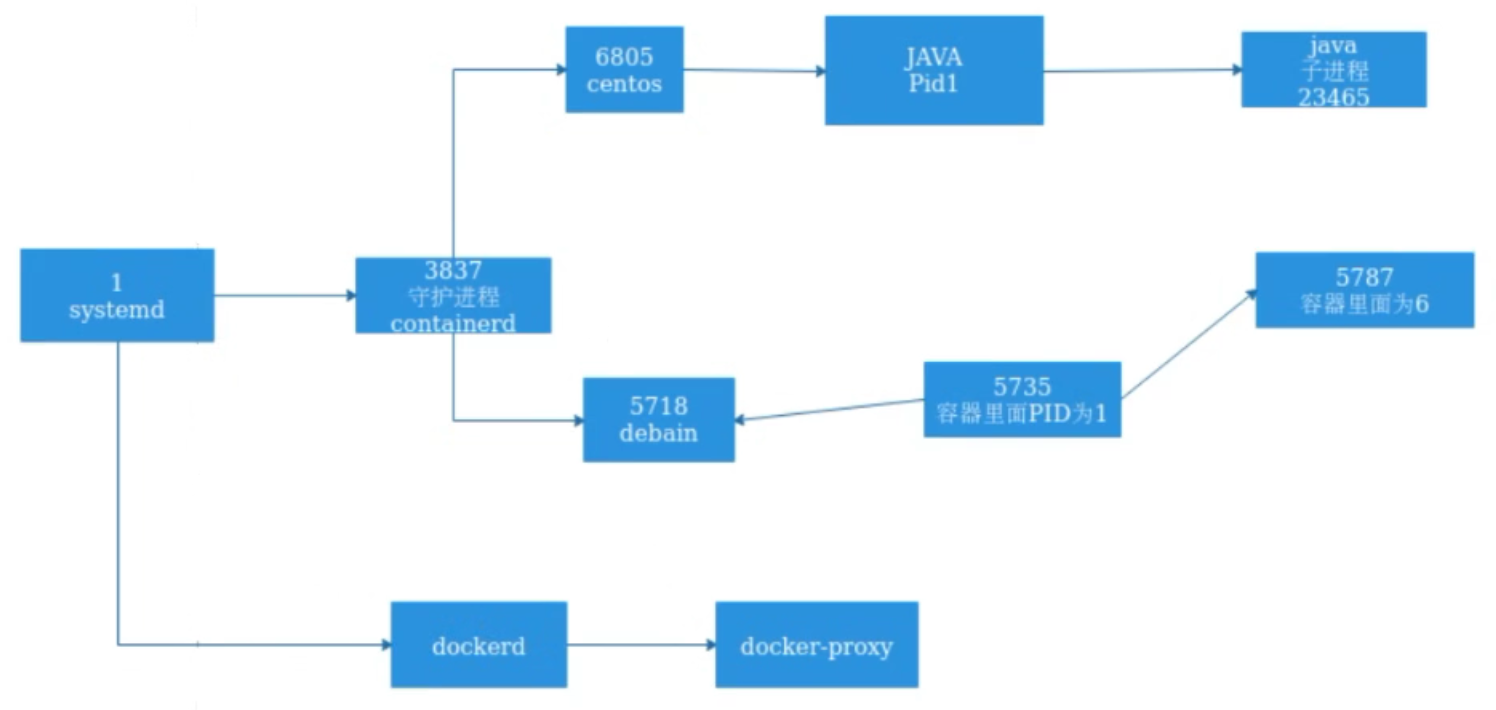
例:
[root@ubuntu2104 ~]# docker exec -it 1a3e0ad6229f sh
sh-4.4# ping 127.0.0.1
PING 127.0.0.1 (127.0.0.1) 56(84) bytes of data.
64 bytes from 127.0.0.1: icmp_seq=1 ttl=64 time=0.014 ms
64 bytes from 127.0.0.1: icmp_seq=2 ttl=64 time=0.042 ms
64 bytes from 127.0.0.1: icmp_seq=3 ttl=64 time=0.037 ms
64 bytes from 127.0.0.1: icmp_seq=4 ttl=64 time=0.039 ms
^Z
[1]+  Stopped(SIGTSTP)        ping 127.0.0.1
sh-4.4# ps aux
USER         PID %CPU %MEM    VSZ   RSS TTY      STAT START   TIME COMMAND
root           1  0.0  0.3  12028  3144 pts/0    Ss+  07:28   0:00 /bin/bash
root          54  0.0  0.3  12028  3232 pts/1    Ss   07:45   0:00 sh
root          60  0.0  0.2  29500  2304 pts/1    T    07:45   0:00 ping 127.0.0.1
root          61  0.0  0.3  44636  3308 pts/1    R+   07:45   0:00 ps aux

[root@ubuntu2104 ~]# pstree -p
systemd(1)─┬─VGAuthService(864)
           ├─accounts-daemon(957)─┬─{accounts-daemon}(964)
           │                      └─{accounts-daemon}(1037)
           ├─agetty(1031)
           ├─containerd-shim(19572)─┬─bash(19592)
           │                        ├─sh(20404)───ping(20413)
           │                        ├─{containerd-shim}(19573)
下图是在一个容器内使用top命令看到的PID为1的进程是ningx:
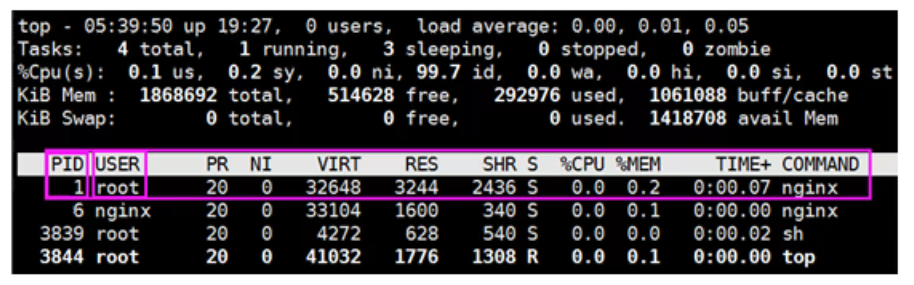
容器内的Nginx主进程与工作进程:

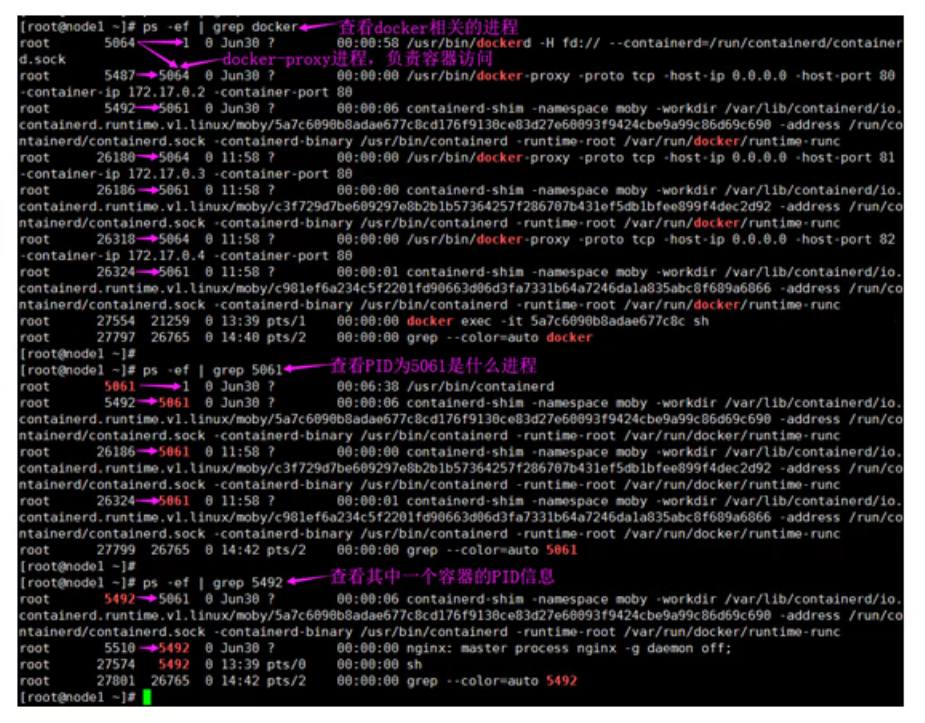
那么宿主机的PID究竟与容器内的PID是什么关系?
查看宿主机上的PID信息
1.1.5.5 NET Namespace
每一个容器都类似于虚拟机一样有自己的网卡、监听端口、TCP/IP协议栈等
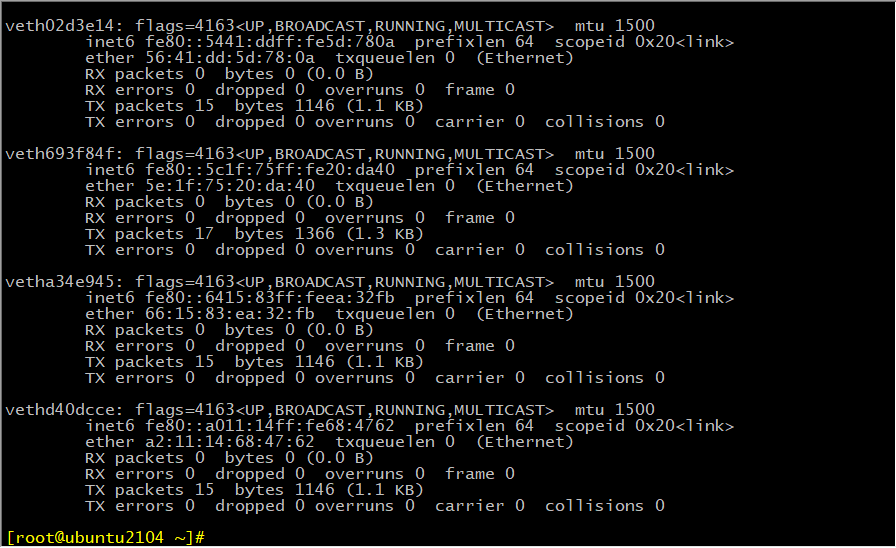
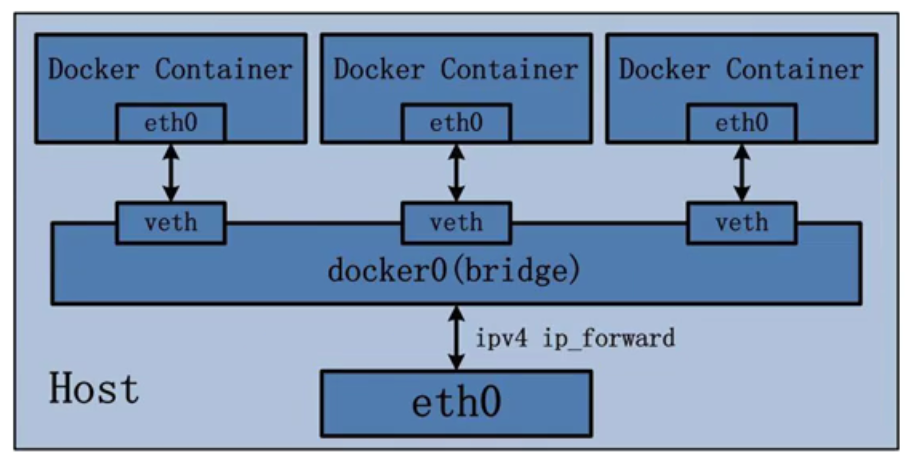
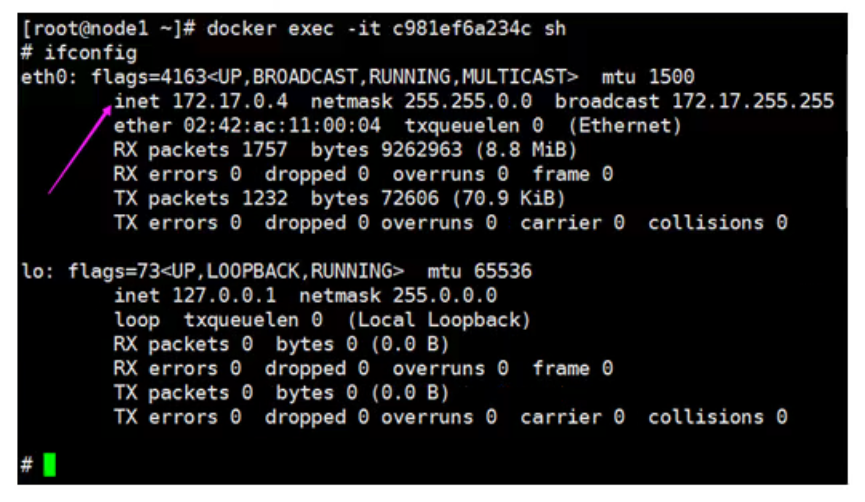
Docker使用network namespace启动一个vethX接口,这样你的容器将拥有它自己的桥接ip地址,通常是docker0,而docker0实质就是Linux的虚拟网桥,网桥是在OSI七层模型的数据链路层的网络设备,通过mac地址对网络进行划分,并且在不同网络直接传递数据。
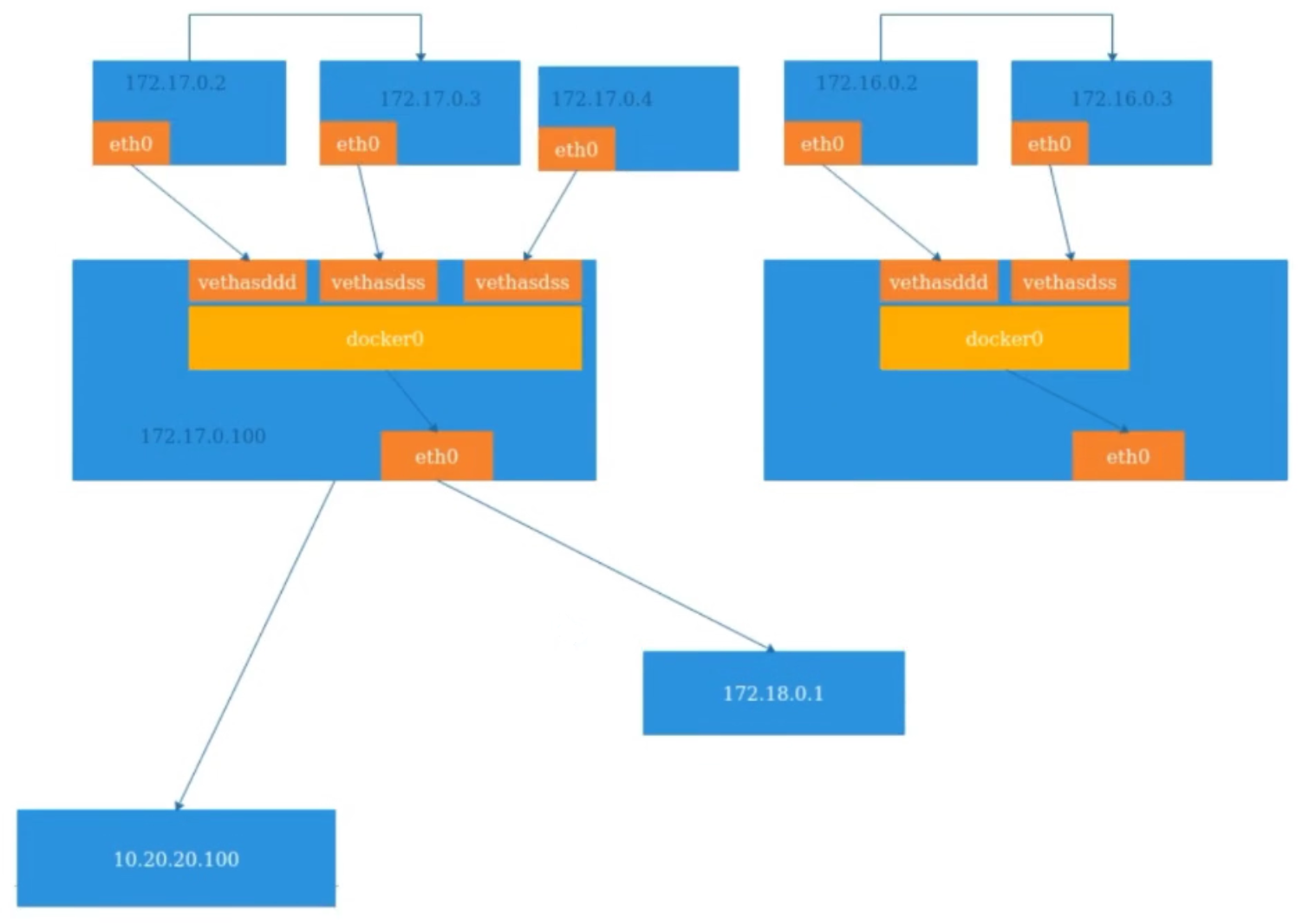
查看宿主机的网卡信息:
[root@ubuntu2104 ~]# ifconfig
docker0: flags=4163<UP,BROADCAST,RUNNING,MULTICAST>  mtu 1500
        inet 172.17.0.1  netmask 255.255.0.0  broadcast 172.17.255.255
        inet6 fe80::42:d5ff:fe34:6216  prefixlen 64  scopeid 0x20<link>
        ether 02:42:d5:34:62:16  txqueuelen 0  (Ethernet)
        RX packets 0  bytes 0 (0.0 B)
        RX errors 0  dropped 0  overruns 0  frame 0
        TX packets 8  bytes 856 (856.0 B)
        TX errors 0  dropped 0 overruns 0  carrier 0  collisions 0

eth0: flags=4163<UP,BROADCAST,RUNNING,MULTICAST>  mtu 1500
        inet 10.0.0.9  netmask 255.255.255.0  broadcast 10.0.0.255
        inet6 fe80::20c:29ff:fe67:87fa  prefixlen 64  scopeid 0x20<link>
        ether 00:0c:29:67:87:fa  txqueuelen 1000  (Ethernet)
        RX packets 390164  bytes 505725245 (505.7 MB)
        RX errors 0  dropped 0  overruns 0  frame 0
        TX packets 122176  bytes 8639691 (8.6 MB)
        TX errors 0  dropped 0 overruns 0  carrier 0  collisions 0

lo: flags=73<UP,LOOPBACK,RUNNING>  mtu 65536
        inet 127.0.0.1  netmask 255.0.0.0
        inet6 ::1  prefixlen 128  scopeid 0x10<host>
        loop  txqueuelen 1000  (Local Loopback)
        RX packets 514  bytes 51928 (51.9 KB)
        RX errors 0  dropped 0  overruns 0  frame 0
        TX packets 514  bytes 51928 (51.9 KB)
        TX errors 0  dropped 0 overruns 0  carrier 0  collisions 0

veth02d3e14: flags=4163<UP,BROADCAST,RUNNING,MULTICAST>  mtu 1500
        inet6 fe80::5441:ddff:fe5d:780a  prefixlen 64  scopeid 0x20<link>
        ether 56:41:dd:5d:78:0a  txqueuelen 0  (Ethernet)
        RX packets 0  bytes 0 (0.0 B)
        RX errors 0  dropped 0  overruns 0  frame 0
        TX packets 15  bytes 1146 (1.1 KB)
        TX errors 0  dropped 0 overruns 0  carrier 0  collisions 0

veth693f84f: flags=4163<UP,BROADCAST,RUNNING,MULTICAST>  mtu 1500
        inet6 fe80::5c1f:75ff:fe20:da40  prefixlen 64  scopeid 0x20<link>
        ether 5e:1f:75:20:da:40  txqueuelen 0  (Ethernet)
        RX packets 0  bytes 0 (0.0 B)
        RX errors 0  dropped 0  overruns 0  frame 0
        TX packets 17  bytes 1366 (1.3 KB)
        TX errors 0  dropped 0 overruns 0  carrier 0  collisions 0

vetha34e945: flags=4163<UP,BROADCAST,RUNNING,MULTICAST>  mtu 1500
        inet6 fe80::6415:83ff:feea:32fb  prefixlen 64  scopeid 0x20<link>
        ether 66:15:83:ea:32:fb  txqueuelen 0  (Ethernet)
        RX packets 0  bytes 0 (0.0 B)
        RX errors 0  dropped 0  overruns 0  frame 0
        TX packets 15  bytes 1146 (1.1 KB)
        TX errors 0  dropped 0 overruns 0  carrier 0  collisions 0

vethd40dcce: flags=4163<UP,BROADCAST,RUNNING,MULTICAST>  mtu 1500
        inet6 fe80::a011:14ff:fe68:4762  prefixlen 64  scopeid 0x20<link>
        ether a2:11:14:68:47:62  txqueuelen 0  (Ethernet)
        RX packets 0  bytes 0 (0.0 B)
        RX errors 0  dropped 0  overruns 0  frame 0
        TX packets 15  bytes 1146 (1.1 KB)
        TX errors 0  dropped 0 overruns 0  carrier 0  collisions 0
查看宿主机桥接设备:
通过brctl show命令查看桥接设备
[root@ubuntu2104 ~]# brctl show
bridge name     bridge id               STP enabled     interfaces
docker0         8000.0242d5346216       no              veth02d3e14
                                                        veth693f84f
                                                        vetha34e945
                                                        vethd40dcce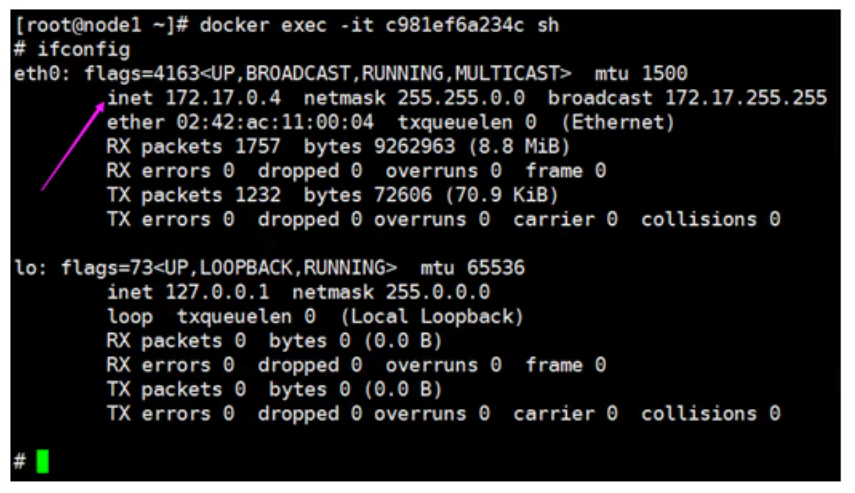
逻辑网络图
宿主机iptables规则
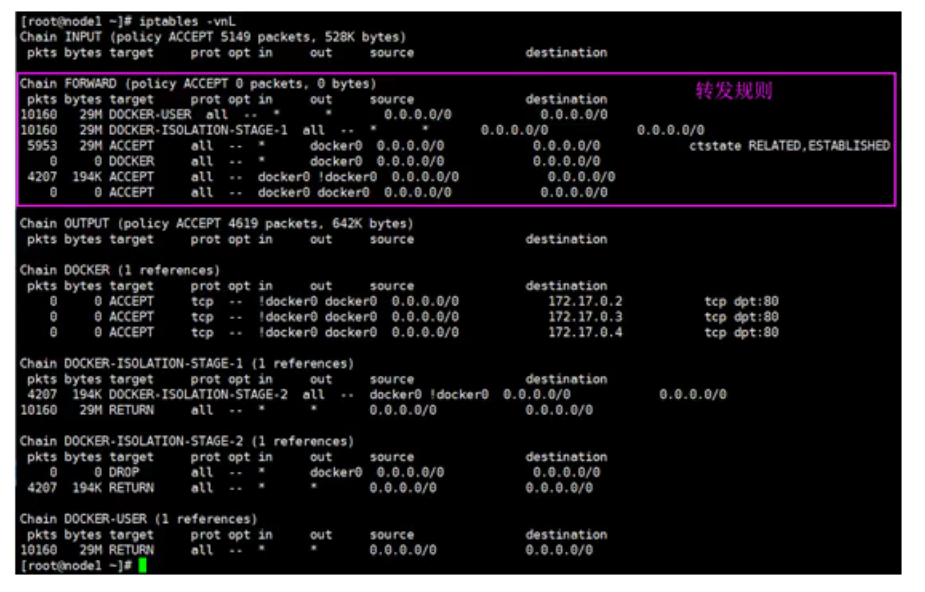
[root@ubuntu2104 ~]# iptables -nvL
Chain INPUT (policy ACCEPT 0 packets, 0 bytes)
 pkts bytes target     prot opt in     out     source               destination

Chain FORWARD (policy DROP 0 packets, 0 bytes)
 pkts bytes target     prot opt in     out     source               destination
    0     0 DOCKER-USER  all  --  *      *       0.0.0.0/0            0.0.0.0/0
    0     0 DOCKER-ISOLATION-STAGE-1  all  --  *      *       0.0.0.0/0            0.0.0.0/0
    0     0 ACCEPT     all  --  *      docker0  0.0.0.0/0            0.0.0.0/0            ctstate RELATED,ESTABLISHED
    0     0 DOCKER     all  --  *      docker0  0.0.0.0/0            0.0.0.0/0
    0     0 ACCEPT     all  --  docker0 !docker0  0.0.0.0/0            0.0.0.0/0
    0     0 ACCEPT     all  --  docker0 docker0  0.0.0.0/0            0.0.0.0/0

Chain OUTPUT (policy ACCEPT 0 packets, 0 bytes)
 pkts bytes target     prot opt in     out     source               destination

Chain DOCKER (1 references)
 pkts bytes target     prot opt in     out     source               destination
    0     0 ACCEPT     tcp  --  !docker0 docker0  0.0.0.0/0            172.17.0.2           tcp dpt:80
    0     0 ACCEPT     tcp  --  !docker0 docker0  0.0.0.0/0            172.17.0.3           tcp dpt:80
    0     0 ACCEPT     tcp  --  !docker0 docker0  0.0.0.0/0            172.17.0.4           tcp dpt:80

Chain DOCKER-ISOLATION-STAGE-1 (1 references)
 pkts bytes target     prot opt in     out     source               destination
    0     0 DOCKER-ISOLATION-STAGE-2  all  --  docker0 !docker0  0.0.0.0/0            0.0.0.0/0
    0     0 RETURN     all  --  *      *       0.0.0.0/0            0.0.0.0/0

Chain DOCKER-ISOLATION-STAGE-2 (1 references)
 pkts bytes target     prot opt in     out     source               destination
    0     0 DROP       all  --  *      docker0  0.0.0.0/0            0.0.0.0/0
    0     0 RETURN     all  --  *      *       0.0.0.0/0            0.0.0.0/0

Chain DOCKER-USER (1 references)
 pkts bytes target     prot opt in     out     source               destination
    0     0 RETURN     all  --  *      *       0.0.0.0/0            0.0.0.0/0
例:
[root@ubuntu2104 ~]# docker ps -a
CONTAINER ID   IMAGE     COMMAND   CREATED   STATUS    PORTS     NAMES
[root@ubuntu2104 ~]# ip a
1: lo: <LOOPBACK,UP,LOWER_UP> mtu 65536 qdisc noqueue state UNKNOWN group default qlen 1000
    link/loopback 00:00:00:00:00:00 brd 00:00:00:00:00:00
    inet 127.0.0.1/8 scope host lo
       valid_lft forever preferred_lft forever
    inet6 ::1/128 scope host
       valid_lft forever preferred_lft forever
2: eth0: <BROADCAST,MULTICAST,UP,LOWER_UP> mtu 1500 qdisc fq_codel state UP group default qlen 1000
    link/ether 00:0c:29:67:87:fa brd ff:ff:ff:ff:ff:ff
    altname enp2s1
    altname ens33
    inet 10.0.0.9/24 brd 10.0.0.255 scope global eth0
       valid_lft forever preferred_lft forever
    inet6 fe80::20c:29ff:fe67:87fa/64 scope link
       valid_lft forever preferred_lft forever
3: docker0: <NO-CARRIER,BROADCAST,MULTICAST,UP> mtu 1500 qdisc noqueue state DOWN group default
    link/ether 02:42:d5:34:62:16 brd ff:ff:ff:ff:ff:ff
    inet 172.17.0.1/16 brd 172.17.255.255 scope global docker0
       valid_lft forever preferred_lft forever
    inet6 fe80::42:d5ff:fe34:6216/64 scope link
       valid_lft forever preferred_lft forever
[root@ubuntu2104 ~]# docker run -itd -p 8888:80 nginx
7bbf2991f09aec07d777944a3b6f7b09062e147751c11ca7726fb2a77d705a4d
[root@ubuntu2104 ~]# ip a
1: lo: <LOOPBACK,UP,LOWER_UP> mtu 65536 qdisc noqueue state UNKNOWN group default qlen 1000
    link/loopback 00:00:00:00:00:00 brd 00:00:00:00:00:00
    inet 127.0.0.1/8 scope host lo
       valid_lft forever preferred_lft forever
    inet6 ::1/128 scope host
       valid_lft forever preferred_lft forever
2: eth0: <BROADCAST,MULTICAST,UP,LOWER_UP> mtu 1500 qdisc fq_codel state UP group default qlen 1000
    link/ether 00:0c:29:67:87:fa brd ff:ff:ff:ff:ff:ff
    altname enp2s1
    altname ens33
    inet 10.0.0.9/24 brd 10.0.0.255 scope global eth0
       valid_lft forever preferred_lft forever
    inet6 fe80::20c:29ff:fe67:87fa/64 scope link
       valid_lft forever preferred_lft forever
3: docker0: <BROADCAST,MULTICAST,UP,LOWER_UP> mtu 1500 qdisc noqueue state UP group default
    link/ether 02:42:d5:34:62:16 brd ff:ff:ff:ff:ff:ff
    inet 172.17.0.1/16 brd 172.17.255.255 scope global docker0
       valid_lft forever preferred_lft forever
    inet6 fe80::42:d5ff:fe34:6216/64 scope link
       valid_lft forever preferred_lft forever
21: vethe7679d8@if20: <BROADCAST,MULTICAST,UP,LOWER_UP> mtu 1500 qdisc noqueue master docker0 state UP group default
    link/ether 9a:1e:f1:37:10:85 brd ff:ff:ff:ff:ff:ff link-netnsid 0
    inet6 fe80::981e:f1ff:fe37:1085/64 scope link
       valid_lft forever preferred_lft forever
[root@ubuntu2104 ~]# docker exec -it 7bbf bash
root@7bbf2991f09a:/# apt update
Get:1 http://deb.debian.org/debian buster InRelease [122 kB]
Get:2 http://deb.debian.org/debian buster-updates InRelease [51.9 kB]
Get:3 http://security.debian.org/debian-security buster/updates InRelease [65.4 kB]
Get:4 http://deb.debian.org/debian buster/main amd64 Packages [7907 kB]
Get:5 http://security.debian.org/debian-security buster/updates/main amd64 Packages [293 kB]
Get:6 http://deb.debian.org/debian buster-updates/main amd64 Packages [15.2 kB]
Fetched 8454 kB in 6s (1410 kB/s)
Reading package lists... Done
Building dependency tree
Reading state information... Done
All packages are up to date.
root@7bbf2991f09a:/# apt install net-tools
Reading package lists... Done
Building dependency tree
Reading state information... Done
The following NEW packages will be installed:
  net-tools
0 upgraded, 1 newly installed, 0 to remove and 0 not upgraded.
Need to get 248 kB of archives.
After this operation, 1002 kB of additional disk space will be used.
Get:1 http://deb.debian.org/debian buster/main amd64 net-tools amd64 1.60+git20180626.aebd88e-1 [248 kB]
Fetched 248 kB in 1s (376 kB/s)
debconf: delaying package configuration, since apt-utils is not installed
Selecting previously unselected package net-tools.
(Reading database ... 7638 files and directories currently installed.)
Preparing to unpack .../net-tools_1.60+git20180626.aebd88e-1_amd64.deb ...
Unpacking net-tools (1.60+git20180626.aebd88e-1) ...
Setting up net-tools (1.60+git20180626.aebd88e-1) ...
root@7bbf2991f09a:/# ifconfig
eth0: flags=4163<UP,BROADCAST,RUNNING,MULTICAST>  mtu 1500
        inet 172.17.0.2  netmask 255.255.0.0  broadcast 172.17.255.255
        ether 02:42:ac:11:00:02  txqueuelen 0  (Ethernet)
        RX packets 725  bytes 8746061 (8.3 MiB)
        RX errors 0  dropped 0  overruns 0  frame 0
        TX packets 625  bytes 35279 (34.4 KiB)
        TX errors 0  dropped 0 overruns 0  carrier 0  collisions 0

lo: flags=73<UP,LOOPBACK,RUNNING>  mtu 65536
        inet 127.0.0.1  netmask 255.0.0.0
        loop  txqueuelen 1000  (Local Loopback)
        RX packets 0  bytes 0 (0.0 B)
        RX errors 0  dropped 0  overruns 0  frame 0
        TX packets 0  bytes 0 (0.0 B)
        TX errors 0  dropped 0 overruns 0  carrier 0  collisions 0

root@7bbf2991f09a:/# exit
exit
[root@ubuntu2104 ~]# iptables -nvL -t nat
Chain PREROUTING (policy ACCEPT 0 packets, 0 bytes)
 pkts bytes target     prot opt in     out     source               destination
    3   240 DOCKER     all  --  *      *       0.0.0.0/0            0.0.0.0/0            ADDRTYPE match dst-type LOCAL

Chain INPUT (policy ACCEPT 0 packets, 0 bytes)
 pkts bytes target     prot opt in     out     source               destination

Chain OUTPUT (policy ACCEPT 0 packets, 0 bytes)
 pkts bytes target     prot opt in     out     source               destination
    0     0 DOCKER     all  --  *      *       0.0.0.0/0           !127.0.0.0/8          ADDRTYPE match dst-type LOCAL

Chain POSTROUTING (policy ACCEPT 0 packets, 0 bytes)
 pkts bytes target     prot opt in     out     source               destination
    7   425 MASQUERADE  all  --  *      !docker0  172.17.0.0/16        0.0.0.0/0
    0     0 MASQUERADE  tcp  --  *      *       172.17.0.2           172.17.0.2           tcp dpt:80

Chain DOCKER (2 references)
 pkts bytes target     prot opt in     out     source               destination
    0     0 RETURN     all  --  docker0 *       0.0.0.0/0            0.0.0.0/0
    0     0 DNAT       tcp  --  !docker0 *       0.0.0.0/0            0.0.0.0/0            tcp dpt:8888 to:172.17.0.2:80
[root@ubuntu2104 ~]# ss -ntlp
State      Recv-Q     Send-Q          Local Address:Port           Peer Address:Port     Process
LISTEN     0          4096            127.0.0.53%lo:53                  0.0.0.0:*         users:(("systemd-resolve",pid=937,fd=13))
LISTEN     0          128                   0.0.0.0:22                  0.0.0.0:*         users:(("sshd",pid=997,fd=3))
LISTEN     0          4096                  0.0.0.0:8888                0.0.0.0:*         users:(("docker-proxy",pid=22345,fd=4))
LISTEN     0          128                      [::]:22                     [::]:*         users:(("sshd",pid=997,fd=4))
LISTEN     0          4096                     [::]:8888                   [::]:*         users:(("docker-proxy",pid=22351,fd=4))
[root@ubuntu2104 ~]# apt install bridge-utils -y
Reading package lists... Done
Building dependency tree... Done
Reading state information... Done
bridge-utils is already the newest version (1.6-5ubuntu1).
0 upgraded, 0 newly installed, 0 to remove and 48 not upgraded.
[root@ubuntu2104 ~]# brctl show
bridge name     bridge id               STP enabled     interfaces
docker0         8000.0242d5346216       no              vethe7679d8
1.1.5.6 User Namespace
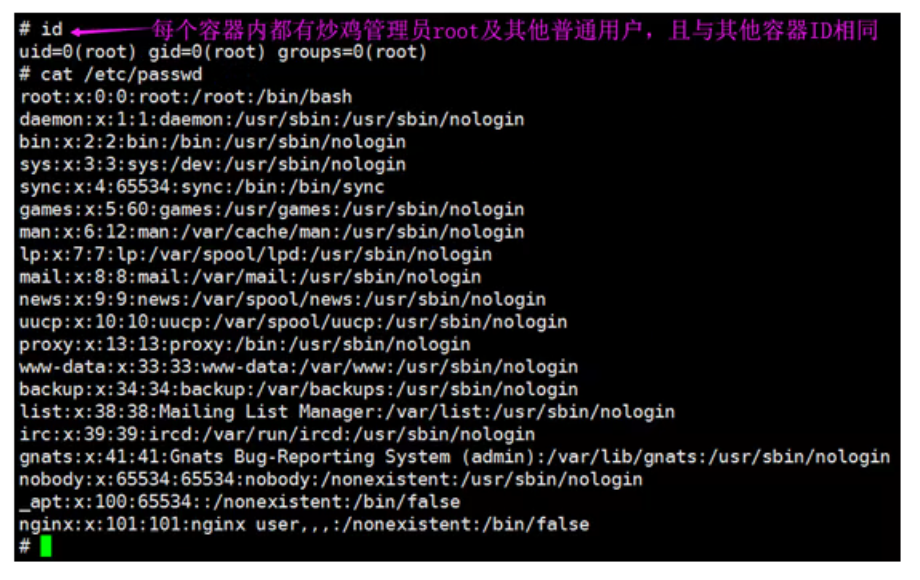
各个容器内可能会出现重名的用户和用户组名称,或重复的用户UID或者GID,那么怎么隔离各个容器内的用户空间呢?
User Namespace允许在各个宿主机的各个容器空间内创建相同的用户名以及相同的用户UID和GID,只是会把用户的作用范围限制在每个容器内,即A容器和B容器可以有相同的用户名称和ID的账户,但是此用户的有效范围仅是当前容器内,不能访问另外一个容器内的文件系统,即相互隔离、互不影响、永不相见。
Comments | NOTHING