









1 导入hellodb.sql生成数据库
(1) 在students表中,查询年龄大于25岁,且为男性的同学的名字和年龄
(2) 以ClassID为分组依据,显示每组的平均年龄
(3) 显示第2题中平均年龄大于30的分组及平均年龄
(4) 显示以L开头的名字的同学的信息
1.1 导入数据库查看数据
[root@centos8 ~]# mysql < hellodb_innodb.sql
[root@centos8 ~]# mysql
mysql> show databases;
+--------------------+
| Database           |
+--------------------+
| hellodb            |
| information_schema |
| mysql              |
| performance_schema |
| sys                |
+--------------------+
5 rows in set (0.01 sec)

mysql> use hellodb;
Database changed
mysql> show tables;
+-------------------+
| Tables_in_hellodb |
+-------------------+
| classes           |
| coc               |
| courses           |
| scores            |
| students          |
| teachers          |
| toc               |
+-------------------+
7 rows in set (0.00 sec)

mysql> select * from students;
+-------+---------------+-----+--------+---------+-----------+
| StuID | Name          | Age | Gender | ClassID | TeacherID |
+-------+---------------+-----+--------+---------+-----------+
|     1 | Shi Zhongyu   |  22 | M      |       2 |         3 |
|     2 | Shi Potian    |  22 | M      |       1 |         7 |
|     3 | Xie Yanke     |  53 | M      |       2 |        16 |
|     4 | Ding Dian     |  32 | M      |       4 |         4 |
|     5 | Yu Yutong     |  26 | M      |       3 |         1 |
|     6 | Shi Qing      |  46 | M      |       5 |      NULL |
|     7 | Xi Ren        |  19 | F      |       3 |      NULL |
|     8 | Lin Daiyu     |  17 | F      |       7 |      NULL |
|     9 | Ren Yingying  |  20 | F      |       6 |      NULL |
|    10 | Yue Lingshan  |  19 | F      |       3 |      NULL |
|    11 | Yuan Chengzhi |  23 | M      |       6 |      NULL |
|    12 | Wen Qingqing  |  19 | F      |       1 |      NULL |
|    13 | Tian Boguang  |  33 | M      |       2 |      NULL |
|    14 | Lu Wushuang   |  17 | F      |       3 |      NULL |
|    15 | Duan Yu       |  19 | M      |       4 |      NULL |
|    16 | Xu Zhu        |  21 | M      |       1 |      NULL |
|    17 | Lin Chong     |  25 | M      |       4 |      NULL |
|    18 | Hua Rong      |  23 | M      |       7 |      NULL |
|    19 | Xue Baochai   |  18 | F      |       6 |      NULL |
|    20 | Diao Chan     |  19 | F      |       7 |      NULL |
|    21 | Huang Yueying |  22 | F      |       6 |      NULL |
|    22 | Xiao Qiao     |  20 | F      |       1 |      NULL |
|    23 | Ma Chao       |  23 | M      |       4 |      NULL |
|    24 | Xu Xian       |  27 | M      |    NULL |      NULL |
|    25 | Sun Dasheng   | 100 | M      |    NULL |      NULL |
+-------+---------------+-----+--------+---------+-----------+
25 rows in set (0.00 sec)
1.2 在students表中,查询年龄大于25岁,且为男性的同学的名字和年龄
# 在students表中,查询年龄大于25岁,且为男性的同学的名字和年龄
mysql> select Name,Age from students where age>25 and Gender='M';
+--------------+-----+
| Name         | Age |
+--------------+-----+
| Xie Yanke    |  53 |
| Ding Dian    |  32 |
| Yu Yutong    |  26 |
| Shi Qing     |  46 |
| Tian Boguang |  33 |
| Xu Xian      |  27 |
| Sun Dasheng  | 100 |
+--------------+-----+
7 rows in set (0.00 sec)
1.3 以ClassID为分组依据,显示每组的平均年龄
# 以ClassID为分组依据,显示每组的平均年龄
mysql> select ClassID,avg(Age) from students group by ClassID;
+---------+----------+
| ClassID | avg(Age) |
+---------+----------+
|       2 |  36.0000 |
|       1 |  20.5000 |
|       4 |  24.7500 |
|       3 |  20.2500 |
|       5 |  46.0000 |
|       7 |  19.6667 |
|       6 |  20.7500 |
|    NULL |  63.5000 |
+---------+----------+
8 rows in set (0.00 sec)
1.4 显示第2题中平均年龄大于30的分组及平均年龄
# 显示第2题中平均年龄大于30的分组及平均年龄
## 方法1
mysql> select ClassID,avg_age from (select ClassID,avg(Age) avg_age from students group by ClassID) t1 where t1.avg_age>30;
+---------+---------+
| ClassID | avg_age |
+---------+---------+
|       2 | 36.0000 |
|       5 | 46.0000 |
|    NULL | 63.5000 |
+---------+---------+
3 rows in set (0.00 sec)
## 方法2
mysql> select classid,avg(age) from students group by classid having avg(age)>30;
+---------+----------+
| classid | avg(age) |
+---------+----------+
|       2 |  36.0000 |
|       5 |  46.0000 |
|    NULL |  63.5000 |
+---------+----------+
3 rows in set (0.00 sec)
1.5 显示以L开头的名字的同学的信息
# 显示以L开头的名字的同学的信息
## 方法1
mysql> select * from students where Name like 'L%';
+-------+-------------+-----+--------+---------+-----------+
| StuID | Name        | Age | Gender | ClassID | TeacherID |
+-------+-------------+-----+--------+---------+-----------+
|     8 | Lin Daiyu   |  17 | F      |       7 |      NULL |
|    14 | Lu Wushuang |  17 | F      |       3 |      NULL |
|    17 | Lin Chong   |  25 | M      |       4 |      NULL |
+-------+-------------+-----+--------+---------+-----------+
3 rows in set (0.00 sec)

## 方法2
mysql> select * from students where Name rlike '^L';
+-------+-------------+-----+--------+---------+-----------+
| StuID | Name        | Age | Gender | ClassID | TeacherID |
+-------+-------------+-----+--------+---------+-----------+
|     8 | Lin Daiyu   |  17 | F      |       7 |      NULL |
|    14 | Lu Wushuang |  17 | F      |       3 |      NULL |
|    17 | Lin Chong   |  25 | M      |       4 |      NULL |
+-------+-------------+-----+--------+---------+-----------+
3 rows in set (0.01 sec)

## 方法3
mysql> select * from students where Name regexp '^L';
+-------+-------------+-----+--------+---------+-----------+
| StuID | Name        | Age | Gender | ClassID | TeacherID |
+-------+-------------+-----+--------+---------+-----------+
|     8 | Lin Daiyu   |  17 | F      |       7 |      NULL |
|    14 | Lu Wushuang |  17 | F      |       3 |      NULL |
|    17 | Lin Chong   |  25 | M      |       4 |      NULL |
+-------+-------------+-----+--------+---------+-----------+
3 rows in set (0.00 sec)
2 数据库授权waluna用户,允许192.168.1.0/24网段可以连接mysql
# 老版本,创建用户加授权一步完成
[root@centos6 ~]# mysql
mysql> grant all privileges on mysql.* to waluna@'192.168.1.%' identified by '123456';
Query OK, 0 rows affected (0.00 sec)

# 新版本,无法授权加创建用户,只能先创建再授权,一步完成会报语法错误
[root@centos8 ~]# mysql
mysql> grant all privileges on mysql.* to waluna@'192.168.1.%' identified by '123456';
ERROR 1064 (42000): You have an error in your SQL syntax; check the manual that corresponds to your MySQL server version for the right syntax to use near 'identified by '123456'' at line 1
mysql>
mysql> create user waluna@'192.168.1.%';
Query OK, 0 rows affected (0.00 sec)

mysql> grant all on mysql.* to waluna@'192.168.1.%';
Query OK, 0 rows affected (0.00 sec)
3 总结mysql常见的存储引擎以及特点
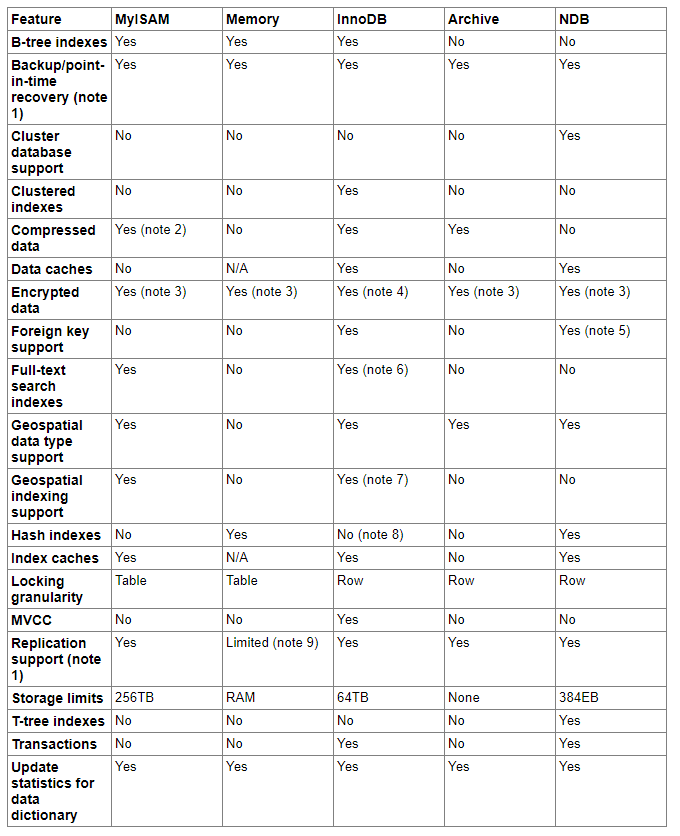
官方参考资料:https://docs.oracle.com/cd/E17952_01/mysql-5.7-en/storage-engines.html
3.1 MyISAM存储引擎
MyISAM引擎特点
- 不支持事务
- 表级锁定
- 读写相互阻塞,写入不能读,读时不能写
- 只缓存索引
- 不支持外键约束
- 不支持聚簇索引
- 读取数据较快,用资源较少
- 不支持MVCC (多版本并发控制机制)高并发
- 崩溃恢复性较差
- MySQL5.5.5前默认的数据库引擎
MyISAM存储引擎适用场景
- 只读(或者写较少)
- 表较小(可以接受长时间进行修复操作)
MyISAM引擎文件
- tbl_name.frm 表格式定义
- tbl_name.MYD 数据文件
- tbl_name.MYI 索引文件
3.2 InnoDB引擎
InnoDB引擎特点
- 行级锁
- 持事务,适合处理大量短期事务
- 读写阻塞与事务隔离级别相关
- 可缓存数据和索引
- 支持持聚簇索引
- 崩溃恢复性更好
- 支持 MVCC 高并发
- 从 MySQL5.5 后支持全文索引
- 从 MySQL5.5.5 开始为默认的数据库引擎
3.3 其他存储引擎
- Performance_Schema:Performance_Schema数据库使用
- Memory:将所有数据存储在RAM中,以便在需要快速查找参考和其他类似数据的环境中进行快速访问。适用存放临时数据。引擎以前被称为HEAP引擎
- MRG_MyISAM:使MySQL DBA或开发人员能够对一系列相同的MyISAM表进行逻辑分组,并将它们作为一个对象引用。适用于VLDB(Very Large Data Base)环境,如数据仓库
- Archive:为存储和检索大量很少参考的存档或安全审核信息,只支持SELECT和INSERT操作;支持行级锁和专用缓存区
- Federated联合:用于访问其它远程MySQL服务器一个代理,它通过创建一个到远程MySQL服务器的客户端连接,并将查询传输到远程服务器执行,而后完成数据存取,提供链接单独MySQL服务器的能力,以便从多个物理服务器创建一个逻辑数据库。 非常适合分布式或数据集市环境
- BDB:可替代InnoDB的事务引擎,支持COMMIT、ROLLBACK和其他事务特性
- Cluster/NDB:MySQL的簇式数据库引擎,尤其适合于具有高性能查找要求的应用程序,这类查找需求还要求具有最高的正常工作时间和可用性
- CSV:CSV存储引擎使用逗号分隔值格式将数据存储在文本文件中。可以使用CSV引擎以CSV格式导入和导出其他软件和应用程序之间的数据交换
- BLACKHOLE:黑洞存储引擎接受但不存储数据,检索总是返回一个空集。该功能可用于分布式数据库设计,数据自动复制,但不是本地存储
- example:"stub"引l擎,它什么都不做。可以使用此引擎创建表,但不能将数据存储在其中或从中检索。目的是作为例子来说明如何开始编写新的存储引擎
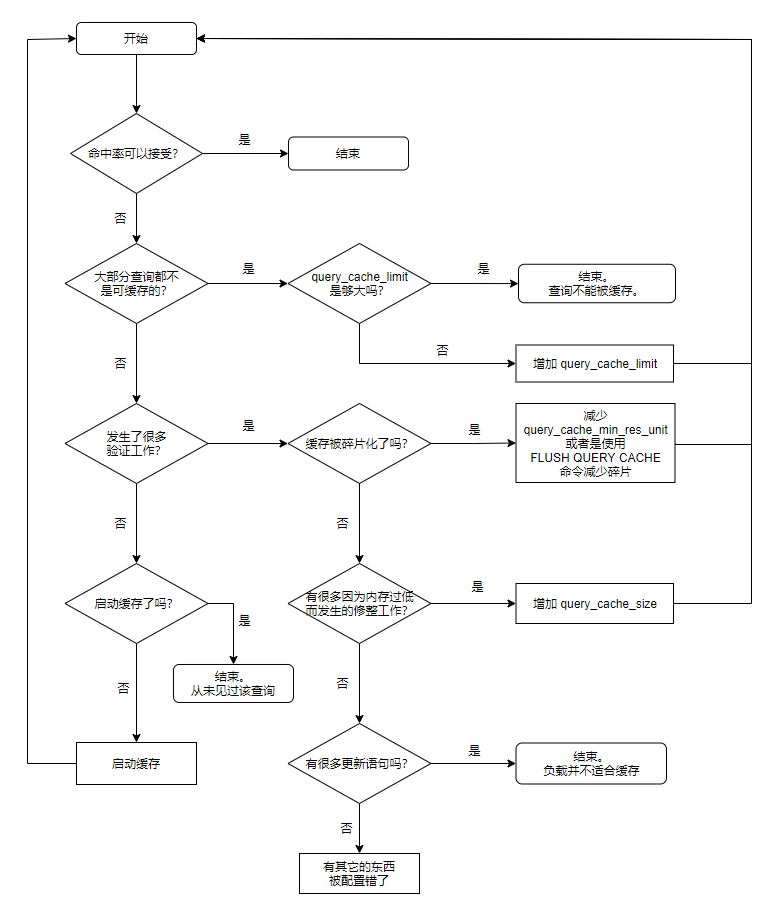
4 MySQL查询缓存优化总结
5 MySQL日志各类总结
MySQL支持丰富的日志类型,如下:
- 事务日志:transaction log
事务日志的写入类型为"追加",因此其操作为"顺序IO";通常也被称为:预写式日志write ahead logging
事务日志文件:ib_logfile0,ib_logfile1 - 错误日志:error log
- 通用日志:general log
- 慢查询日志:slow query log
- 二进制日志:binary log
- 中继日志:reley log,在主从复制架构中,从服务器用于保存从主服务器的二进制日志中读取的事件
5.1 事务日志
事务日志:transaction log
- redo log:实现WAL (Write Ahead Log),数据更新前先记录redo log
- undo log:保存与执行的操作相反的操作,用于实现rollback
事务型存储引擎自行管理和使用,建议和数据文件分开存放
lnnodb事务日志相关配置:
show variables like '%innodb_log%';
innodb_log_file_size    50331648    # 每个日志文件的大小
innodb_log_files_in_group   2       # 日志组成员的个数
innodb_log_group_home_dir   ./      # 事务文件路径
innodb_flush_log_at_trx_commit      # 默认为1
事务日志性能优化
innodb_flush_log_at_trx_commit=0|1|2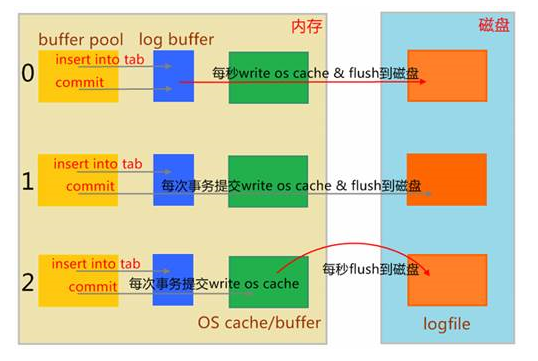
1   此为默认值,日志缓冲区将写入日志文件,并在每次事务后执行刷新到磁盘。这是完全遵守ACID特性
0   提交时没有写磁盘的操作;而是每秒执行一次将日志缓冲区的提交的事务写入刷新到磁盘。这样可提供更好的性能,但服务器崩溃可能丢失最后一秒的事务
2   每次提交后都会写入OS的缓冲区,但每秒才会进行一次刷新到磁盘文件中。性能比0略差一些,但操作系统或停电可能导致最后一秒的交易丢失
高并发业务行业最佳实践,是使用第三种折衷配置(=2):
1.配置为2和配置为0,性能差异并不大,因为将数据从Log Buffer拷贝到os cache,虽然跨越用户态与内核态,但毕竞只是内存的数据拷贝,速度很快
2.配置为2和配置为0,安全性差异巨大,操作系统崩溃的概率相比MySQL应用程序崩溃的概率,小很多,设置为2,只要操作系统不奔溃,也绝对不会丢数据
说明:
- 设置为1,同时sync_binlog=1表示最高级别的容错
- innodb_use_global_flush_log_at_trx_commit=0时,将不能用SET语句重置此变量(MariaDB10.2.6后废弃)
5.2 错误日志
错误日志
-
mysqld启动和关闭过程中输出的事件信息
-
mysqld运行中产生的错误信息
-
event scheduler运行—个event时产生的日志信息
-
在主从复制架构中的从服务器上启动从服务器线程时产生的信息
错误文件路径
SHOW GLOBAL VARIABLES LIKE 'log_error';例:
MariaDB [(none)]> SHOW GLOBAL VARIABLES LIKE 'log_error';
+---------------+------------------------------+
| Variable_name | Value                        |
+---------------+------------------------------+
| log_error     | /var/log/mariadb/mariadb.log |
+---------------+------------------------------+
1 row in set (0.001 sec)
记录哪些警告信息至错误日志信息
# centos7 mariadb 5.5 默认值为1
# centos8 mariadb 10.3 默认值为2
log_warnings=0|1|2|3|...
例:
MariaDB [(none)]> SHOW GLOBAL VARIABLES LIKE 'log_warnings';
+---------------+-------+
| Variable_name | Value |
+---------------+-------+
| log_warnings  | 2     |
+---------------+-------+
1 row in set (0.001 sec)
5.3 通用日志
通用日志:记录对数据库的通用操作,包括:错误的SQL语句
通用日志可以保存在:file(默认值)或table(mysql.general_log表)
通用日志相关设置
general_log=ON|OFF
general_log_file=HOSTNAME.log
log_output=TABLE|FILE|NONE
例:
# 修改通用日志,记录通用日志至mysql.general_log表中
# 查看默认是不开启的
MariaDB [hellodb]> select @@general_log;
+---------------+
| @@general_log |
+---------------+
|             0 |
+---------------+
1 row in set (0.000 sec)

# 开启通用日志功能
MariaDB [hellodb]> set global general_log=1;
Query OK, 0 rows affected (0.000 sec)

# 查看默认保存在文件中
MariaDB [hellodb]> SHOW GLOBAL VARIABLES LIKE 'log_output';
+---------------+-------+
| Variable_name | Value |
+---------------+-------+
| log_output    | FILE  |
+---------------+-------+
1 row in set (0.001 sec)

MariaDB [hellodb]> set global log_output='table';
Query OK, 0 rows affected (0.000 sec)

# 修改保存在表中
MariaDB [hellodb]> SHOW GLOBAL VARIABLES LIKE 'log_output';
+---------------+-------+
| Variable_name | Value |
+---------------+-------+
| log_output    | TABLE |
+---------------+-------+
1 row in set (0.001 sec)

# 操作一番,查看表中数据
MariaDB [hellodb]> select * from mysql.general_log\G
...省略...
*************************** 6. row ***************************
  event_time: 2021-05-19 11:42:25.357773
   user_host: root[root] @ localhost []
   thread_id: 11
   server_id: 1
command_type: Query
    argument: update teachers set age=50 where tid=4
*************************** 7. row ***************************
  event_time: 2021-05-19 11:42:28.079995
   user_host: root[root] @ localhost []
   thread_id: 11
   server_id: 1
command_type: Query
    argument: select * from mysql.general_log
7 rows in set (0.000 sec)
查询执行次数最多的前三条语句
MariaDB [hellodb]> select argument,count(argument) from mysql.general_log group by argument order by count(argument) desc limit 3;
+----------------------------------------+-----------------+
| argument                               | count(argument) |
+----------------------------------------+-----------------+
| select * from mysql.general_log        |               3 |
| select * from students                 |               2 |
| update teachers set age=50 where tid=4 |               2 |
+----------------------------------------+-----------------+
3 rows in set (0.001 sec)
对访问的语句进行排序
[root@centos8 ~]# mysql -e 'select argument from mysql.general_log'|sort|uniq -c|sort -nr

[root@centos8 ~]# mysql -e 'select argument from mysql.general_log'|awk '{sql[$0]++}END{for(i in sql){print sql[i],i}}'|sort -nr
5.4 慢查询日志
慢查询日志:记录执行查询时长超出指定时长的操作
慢查询相关变量
slow_query_log=ON|OFF   # 开启或关闭慢查询,支持全局和会话,只有全局设置才会生成慢查询文件
long_query_time=N       # 慢查询的阀值,单位秒,默认为10s
slow_query_log_file=HOSTNAME-slow.log   # 慢查询日志文件
log_slow_filter = admin,filesort,filesort_on_disk,full_join,full_scan,query_cache,query_cache_miss,tmp_table,tmp_table_on_disk      # 上述查询类型且查询时长超过long_query_time,则记录日志
log_queries_not_using_indexes=ON    # 不使用索引或使用全索引扫描,不论是否达到慢查询阀值的语句是否记录日志,默认OFF,即不记录
log_slow_rate_limit = 1 # 多少次查询才记录,mariadb特有
log_slow_verbosity=Query_plan,explain   # 记录内容
log_slow_queries = OFF  # 同slow_query_log,MariaDB 10.0/MysQL 5.6.1版后己删除
慢查询分析工具mysqldumpslow
[root@centos8 ~]# mysqldumpslow --help
Usage: mysqldumpslow [ OPTS... ] [ LOGS... ]

Parse and summarize the MySQL slow query log. Options are

  --verbose    verbose
  --debug      debug
  --help       write this text to standard output

  -v           verbose
  -d           debug
  -s ORDER     what to sort by (aa, ae, al, ar, at, a, c, e, l, r, t), 'at' is default
                aa: average rows affected
                ae: aggregated rows examined
                al: average lock time
                ar: average rows sent
                at: average query time
                 a: rows affected
                 c: count
                 e: rows examined
                 l: lock time
                 r: rows sent
                 t: query time
  -r           reverse the sort order (largest last instead of first)
  -t NUM       just show the top n queries
  -a           don't abstract all numbers to N and strings to 'S'
  -n NUM       abstract numbers with at least n digits within names
  -g PATTERN   grep: only consider stmts that include this string
  -h HOSTNAME  hostname of db server for *-slow.log filename (can be wildcard),
               default is '*', i.e. match all
  -i NAME      name of server instance (if using mysql.server startup script)
  -l           don't subtract lock time from total time

# 默认是不开启的
MariaDB [hellodb]> select @@slow_query_log;
+------------------+
| @@slow_query_log |
+------------------+
|                1 |
+------------------+
1 row in set (0.000 sec)

# 开启慢查询日志
MariaDB [hellodb]> set global slow_query_log=1;
Query OK, 0 rows affected (0.004 sec)

MariaDB [hellodb]> select @@slow_query_log;
+------------------+
| @@slow_query_log |
+------------------+
|                1 |
+------------------+
1 row in set (0.000 sec)

# 查询文件存放名称
MariaDB [hellodb]> select @@slow_query_log_file;
+-----------------------+
| @@slow_query_log_file |
+-----------------------+
| centos8-slow.log      |
+-----------------------+
1 row in set (0.000 sec)

# 可以看到设置全局后生成了慢查询日志文件
[root@centos8 ~]# ll /var/lib/mysql/centos8-slow.log
-rw-rw---- 1 mysql mysql 163 May 19 13:44 /var/lib/mysql/centos8-slow.log

# 查看时间默认为10s
MariaDB [hellodb]> select @@long_query_time;
+-------------------+
| @@long_query_time |
+-------------------+
|         10.000000 |
+-------------------+
1 row in set (0.010 sec)

# 更改时间为3s
MariaDB [hellodb]> set long_query_time=3;
Query OK, 0 rows affected (0.011 sec)

MariaDB [hellodb]> select @@long_query_time;
+-------------------+
| @@long_query_time |
+-------------------+
|          3.000000 |
+-------------------+
1 row in set (0.000 sec)

# 查看文件内容
[root@centos8 ~]# tail -f /var/lib/mysql/centos8-slow.log
/usr/libexec/mysqld, Version: 10.3.28-MariaDB (MariaDB Server). started with:
Tcp port: 3306  Unix socket: /var/lib/mysql/mysql.sock
Time                Id Command  Argument
# Time: 210519 14:17:47
# User@Host: root[root] @ localhost []
# Thread_id: 9  Schema: hellodb  QC_hit: No
# Query_time: 25.035481  Lock_time: 0.000120  Rows_sent: 25  Rows_examined: 25
# Rows_affected: 0  Bytes_sent: 207
use hellodb;
SET timestamp=1621405067;
select sleep(1) from students;

[root@centos8 ~]# mysqldumpslow -s c -t 2 /var/lib/mysql/centos8-slow.log

Reading mysql slow query log from /var/lib/mysql/centos8-slow.log
Count: 1  Time=25.04s (25s)  Lock=0.00s (0s)  Rows_sent=25.0 (25), Rows_examined=25.0 (25), Rows_affected=0.0 (0), root[root]@localhost
  select sleep(N) from students

Died at /usr/bin/mysqldumpslow line 182, <> chunk 1.
Comments | 1 条评论
2 数据库授权waluna用户,允许192.168.1.0/24网段可以连接mysql
这题,是可以连接mysql,不是连接mysql的mysql库。。。你会错意了。。。
总体上做的很详细,非常棒!