









1 简述DNS服务器原理,并搭建主-辅服务器
1.1 DNS服务器的工作原理
(1) 当用户试图访问Internet上的计算机,例如,在浏览器地址栏中输入 www.waluna.top 时,就将启动一次DNS查询。
(2) DNS查询的首站是本地DNS缓存。在用户访问网络上不同的域名时,这些域名对应的IP地址就将存储在本地缓存中,如果用户之前访问过 www.waluna.top ,则缓存中就会存有该网站的IP地址。
(3) 如果本地DNS缓存中没有该域名的IP,DNS就会用递归DNS服务器进行检查。在互联网上,ISP服务商通常会建设和运维递归DNS服务器。
(4) 递归DNS服务器自身具备缓存,如果在其缓存中存有用户查询的IP地址,则会将其直接返回给用户。如果没有,将向其它DNS服务器发起查询。
(5) 下一站是TLD域名服务器,当用户查询域名 www.waluna.top 时,存储 .top 地址的TLD域名服务器会响应查询请求。该服务器并不存储我们需要的IP地址,但它能够向正确的权限域名服务器转发查询请求。
(6) 权限域名服务器用 www.waluna.top 的IP地址响应此次查询,递归DNS服务器将其存储在本地DNS缓存中,并将地址返回给用户的计算机。
(7) 用户计算机的本地DNS服务获取 www.waluna.top 的IP地址并实施访问。然后,在本地缓存中记录该域名的IP地址,同时记录其生存时间(TTL),即本地DNS记录的有效时间,若用户下次访问该域名的时间超过TTL时间,则下次访问 www.waluna.top 时,DNS将再次执行上述过程。
1.2 实现DNS主从服务器
1.2.1 实验目的
搭建DNS主从服务器架构,实现DNS服务冗余
1.2.2 环境要求
需要四台主机
DNS主服务器:10.0.0.8
DNS从服务器:10.0.0.18
web服务器:10.0.0.7
DNS客户端:10.0.0.6
1.2.3 前提准备
关闭selinux
关闭防火墙
时间同步
1.2.4 实现步骤
1.2.4.1 主DNS服务端配置
[root@centos8 ~]# yum install bind -y
[root@centos8 ~]# vim /etc/named.conf
# 注释掉下面两行
//      listen-on port 53 { 127.0.0.1; };
//      allow-query     { localhost; };
# 只允许从服务器进行区域传输
        allow-transfer    { 10.0.0.18; };

[root@centos8 ~]# vim /etc/named.rfc1912.zones

zone "waluna.top" {
        type master;
        file "waluna.top.zone";
};

[root@centos8 ~]# cp -p /var/named/named.localhost /var/named/waluna.top.zone
[root@centos8 ~]# vim /var/named/waluna.top.zone
$TTL 1D
@       IN SOA  master admin.waluna.top. (
                                        20210506        ; serial
                                        1D      ; refresh
                                        1H      ; retry
                                        1W      ; expire
                                        3H )    ; minimum
        NS      master
        NS      slave
master  A       10.0.0.8
slave   A       10.0.0.18
www     A       10.0.0.7

[root@centos8 ~]# systemctl enable --now named
Created symlink /etc/systemd/system/multi-user.target.wants/named.service → /usr/lib/systemd/system/named.service.
1.2.4.2 从DNS服务器配置
[root@centos8 ~]# yum install bind -y
[root@centos8 ~]# vim /etc/named.conf
//  listen-on port 53 { 127.0.0.1; };
//  allow-query     { localhost; };
# 不允许其他主机进行区域传输
    allow-transfer  { none; };

[root@centos8 ~]# vim /etc/named.rfc1912.zones
zone "waluna.top" {
    type slave;
    masters { 10.0.0.8; };
    file "slaves/waluna.top.slave";
};

[root@centos8 ~]# systemctl enable --now named.service
Created symlink /etc/systemd/system/multi-user.target.wants/named.service → /usr/lib/systemd/system/named.service.

[root@centos8 ~]# ll /var/named/slaves/waluna.top.slave
-rw-r--r-- 1 named named 319 May  6 20:19 /var/named/slaves/waluna.top.slave
1.2.4.3 客户端测试主从DNS服务架构
[root@centos7 ~]# yum install httpd -y;echo www.waluna.top on 10.0.0.7 > /var/www/html/index.html;systemctl enable --now httpd

[root@centos6 ~]# vim /etc/sysconfig/network-scripts/ifcfg-eth0
DNS1=10.0.0.8
DNS2=10.0.0.18
[root@centos6 ~]# service network restart
Shutting down interface eth0:                              [  OK  ]
Shutting down loopback interface:                          [  OK  ]
Bringing up loopback interface:                            [  OK  ]
Bringing up interface eth0:  Determining if ip address 10.0.0.6 is already in use for device eth0...
                                                           [  OK  ]
[root@centos6 ~]# cat /etc/resolv.conf

nameserver 10.0.0.8
nameserver 10.0.0.18

# 验证从服务器DNS是否可以查询
[root@centos6 ~]# dig www.waluna.top

; <<>> DiG 9.8.2rc1-RedHat-9.8.2-0.68.rc1.el6_10.8 <<>> www.waluna.top
;; global options: +cmd
;; Got answer:
;; ->>HEADER<<- opcode: QUERY, status: NOERROR, id: 29164
;; flags: qr aa rd ra; QUERY: 1, ANSWER: 1, AUTHORITY: 2, ADDITIONAL: 2

;; QUESTION SECTION:
;www.waluna.top.                        IN      A

;; ANSWER SECTION:
www.waluna.top.         86400   IN      A       10.0.0.7

;; AUTHORITY SECTION:
waluna.top.             86400   IN      NS      master.waluna.top.
waluna.top.             86400   IN      NS      slave.waluna.top.

;; ADDITIONAL SECTION:
master.waluna.top.      86400   IN      A       10.0.0.8
slave.waluna.top.       86400   IN      A       10.0.0.18

;; Query time: 1 msec
;; SERVER: 10.0.0.8#53(10.0.0.8)
;; WHEN: Wed Mar 31 22:40:54 2021
;; MSG SIZE  rcvd: 121

[root@centos6 ~]# curl www.waluna.top
www.waluna.top on 10.0.0.7

# 在主服务器上停止DNS服务
[root@centos8 ~]# systemctl stop named

# 验证从DNS服务器仍可以查询
[root@centos6 ~]# dig www.waluna.top

; <<>> DiG 9.8.2rc1-RedHat-9.8.2-0.68.rc1.el6_10.8 <<>> www.waluna.top
;; global options: +cmd
;; Got answer:
;; ->>HEADER<<- opcode: QUERY, status: NOERROR, id: 62386
;; flags: qr aa rd ra; QUERY: 1, ANSWER: 1, AUTHORITY: 2, ADDITIONAL: 2

;; QUESTION SECTION:
;www.waluna.top.                        IN      A

;; ANSWER SECTION:
www.waluna.top.         86400   IN      A       10.0.0.7

;; AUTHORITY SECTION:
waluna.top.             86400   IN      NS      slave.waluna.top.
waluna.top.             86400   IN      NS      master.waluna.top.

;; ADDITIONAL SECTION:
master.waluna.top.      86400   IN      A       10.0.0.8
slave.waluna.top.       86400   IN      A       10.0.0.18

;; Query time: 17 msec
;; SERVER: 10.0.0.18#53(10.0.0.18)
;; WHEN: Wed Mar 31 22:42:00 2021
;; MSG SIZE  rcvd: 121

[root@centos6 ~]# curl www.waluna.top
www.waluna.top on 10.0.0.7
2 搭建并实现智能DNS
利用view实现智能DNS
2.1 实验目的
搭建DNS主从服务器架构,实现DNS服务冗余
2.2 环境要求
需要五台主机
DNS主服务器和web服务器1:10.0.0.8/24,172.16.0.8/16
web服务器2:10.0.0.7/24
web服务器3:172.16.0.7/16
DNS客户端1:10.0.0.6/24
DNS客户端2:172.16.0.6/16
2.3 前提准备
关闭selinux
关闭防火墙
时间同步
2.4 实现步骤
2.4.1 DNS服务器的网卡配置
# 配置两个IP
# eth0 10.0.0.8/24
# eth0:1 172.16.0.8/16
[root@centos8 ~]# ip a a 172.16.0.8/16 dev eth0 label eth0:1
[root@centos8 ~]# ip a
1: lo: <LOOPBACK,UP,LOWER_UP> mtu 65536 qdisc noqueue state UNKNOWN group default qlen 1000
    link/loopback 00:00:00:00:00:00 brd 00:00:00:00:00:00
    inet 127.0.0.1/8 scope host lo
       valid_lft forever preferred_lft forever
    inet6 ::1/128 scope host
       valid_lft forever preferred_lft forever
2: eth0: <BROADCAST,MULTICAST,UP,LOWER_UP> mtu 1500 qdisc mq state UP group default qlen 1000
    link/ether 00:0c:29:ef:da:a4 brd ff:ff:ff:ff:ff:ff
    inet 10.0.0.8/24 brd 10.0.0.255 scope global noprefixroute eth0
       valid_lft forever preferred_lft forever
    inet 172.16.0.8/16 scope global eth0:1
       valid_lft forever preferred_lft forever
    inet6 fe80::20e0:4c89:59dc:4d7f/64 scope link noprefixroute
       valid_lft forever preferred_lft forever

[root@centos7 ~]# ip a a 172.16.0.7/16 dev eth0 label eth0:1
[root@centos7 ~]# ip a
1: lo: <LOOPBACK,UP,LOWER_UP> mtu 65536 qdisc noqueue state UNKNOWN group default qlen 1000
    link/loopback 00:00:00:00:00:00 brd 00:00:00:00:00:00
    inet 127.0.0.1/8 scope host lo
       valid_lft forever preferred_lft forever
    inet6 ::1/128 scope host
       valid_lft forever preferred_lft forever
2: eth0: <BROADCAST,MULTICAST,UP,LOWER_UP> mtu 1500 qdisc pfifo_fast state UP group default qlen 1000
    link/ether 00:0c:29:d6:b6:5a brd ff:ff:ff:ff:ff:ff
    inet 10.0.0.17/24 brd 10.0.0.255 scope global noprefixroute eth0
       valid_lft forever preferred_lft forever
    inet 172.16.0.7/16 scope global eth0:1
       valid_lft forever preferred_lft forever
    inet6 fe80::20c:29ff:fed6:b65a/64 scope link
       valid_lft forever preferred_lft forever

[root@centos6 ~]# ip a a 172.16.0.6/16 dev eth0 label eth0:1
[root@centos6 ~]# ip a
1: lo: <LOOPBACK,UP,LOWER_UP> mtu 65536 qdisc noqueue state UNKNOWN
    link/loopback 00:00:00:00:00:00 brd 00:00:00:00:00:00
    inet 127.0.0.1/8 scope host lo
    inet6 ::1/128 scope host
       valid_lft forever preferred_lft forever
2: eth0: <BROADCAST,MULTICAST,UP,LOWER_UP> mtu 1500 qdisc pfifo_fast state UP qlen 1000
    link/ether 00:0c:29:bd:96:28 brd ff:ff:ff:ff:ff:ff
    inet 10.0.0.16/24 brd 10.0.0.255 scope global eth0
    inet 172.16.0.6/16 scope global eth0:1
    inet6 fe80::20c:29ff:febd:9628/64 scope link
       valid_lft forever preferred_lft forever
2.4.2 主DNS服务端配置文件实现view
[root@centos8 ~]# yum install bind -y
[root@centos8 ~]# vim /etc/named.conf
# 在文件最前面加上下面行
acl beijingnet {
    10.0.0.0/24;
};
acl shanghainet {
    172.16.0.0/16;
};
acl othernet {
    any;
};
# 注释掉下面内容
//      listen-on port 53 { 127.0.0.1; };
//      allow-query     { localhost; };

//zone "." IN {
//      type hint;
//      file "named.ca";
//};

//include "/etc/named.rfc1912.zones";
# 创建view
view beijingview {
    match-clients { beijingnet; };
    include "/etc/named.rfc1912.zones.bj";
};
view shanghaiview {
    match-clients { shanghainet; };
    include "/etc/named.rfc1912.zones.sh";
};
view otherview {
    match-clients { othernet; };
    include "/etc/named.rfc1912.zones.other";
};
2.4.3 实现区域配置文件
[root@centos8 ~]# cat /etc/named.rfc1912.zones.bj
zone "." IN {
    type hint;
    file "named.ca";
};
zone "waluna.top" {
    type master;
    file "waluna.top.zone.bj";
};
[root@centos8 ~]# cat /etc/named.rfc1912.zones.sh
zone "." IN {
    type hint;
    file "named.ca";
};
zone "waluna.top" {
    type master;
    file "waluna.top.zone.sh";
};
[root@centos8 ~]# cat /etc/named.rfc1912.zones.other
zone "." IN {
    type hint;
    file "named.ca";
};
zone "waluna.top" {
    type master;
    file "waluna.top.zone.other";
};

[root@centos8 ~]# chgrp named /etc/named.rfc1912.zones.bj
[root@centos8 ~]# chgrp named /etc/named.rfc1912.zones.sh
[root@centos8 ~]# chgrp named /etc/named.rfc1912.zones.other
2.4.4 创建区域数据库文件
[root@centos8 ~]# cat /var/named/waluna.top.zone.bj
$TTL 1D
@       IN SOA  master admin.waluna.top. (
                                        20210506        ; serial
                                        1D      ; refresh
                                        1H      ; retry
                                        1W      ; expire
                                        3H )    ; minimum
                NS      master
master          A       10.0.0.8
websrv          A       10.0.0.7
www             CNAME   websrv
[root@centos8 ~]# cat /var/named/waluna.top.zone.sh
$TTL 1D
@       IN SOA  master admin.waluna.top. (
                                        20210506        ; serial
                                        1D      ; refresh
                                        1H      ; retry
                                        1W      ; expire
                                        3H )    ; minimum
                NS      master
master          A       10.0.0.8
websrv          A       172.16.0.7
www             CNAME   websrv
[root@centos8 ~]# cat /var/named/waluna.top.zone.other
$TTL 1D
@       IN SOA  master admin.waluna.top. (
                                        20210506        ; serial
                                        1D      ; refresh
                                        1H      ; retry
                                        1W      ; expire
                                        3H )    ; minimum
                NS      master
master          A       10.0.0.8
websrv          A       127.0.0.1
www             CNAME   websrv

[root@centos8 ~]# chgrp named /var/named/waluna.top.zone.bj
[root@centos8 ~]# chgrp named /var/named/waluna.top.zone.sh
[root@centos8 ~]# chgrp named /var/named/waluna.top.zone.other

[root@centos8 ~]# rndc reload
server reload successful
2.4.5 实现位于不同区域的三个web服务器
# 分别在三台主机上安装http服务
# 在web服务器1:10.0.0.8/24实现
[root@centos8 ~]# yum install httpd -y;echo www.waluna.top in other > /var/www/html/index.html;systemctl enable --now httpd;curl 10.0.0.8
# 在web服务器2:10.0.0.7/24实现
[root@centos7 ~]# yum install httpd -y;echo www.waluna.top in beijing > /var/www/html/index.html;systemctl enable --now httpd;curl 10.0.0.7
# 在web服务器3:172.16.0.7/16实现
[root@centos7 ~]# yum install httpd -y;echo www.waluna.top in shanghai > /var/www/html/index.html;systemctl enable --now httpd;curl 172.16.0.7
2.4.6 客户端测试
# 分别在三台主机上访问
# DNS客户端1:10.0.0.6/24实现,确保DNS指向10.0.0.8
[root@centos6 ~]# vim /etc/sysconfig/network-scripts/ifcfg-eth0
DNS1=10.0.0.8
[root@centos6 ~]# service network restart
[root@centos6 ~]# cat /etc/resolv.conf

nameserver 10.0.0.8
[root@centos6 ~]# dig www.waluna.top

; <<>> DiG 9.8.2rc1-RedHat-9.8.2-0.68.rc1.el6_10.8 <<>> www.waluna.top
;; global options: +cmd
;; Got answer:
;; ->>HEADER<<- opcode: QUERY, status: NOERROR, id: 41390
;; flags: qr aa rd ra; QUERY: 1, ANSWER: 2, AUTHORITY: 1, ADDITIONAL: 1

;; QUESTION SECTION:
;www.waluna.top.                        IN      A

;; ANSWER SECTION:
www.waluna.top.         86400   IN      CNAME   websrv.waluna.top.
websrv.waluna.top.      86400   IN      A       10.0.0.7

;; AUTHORITY SECTION:
waluna.top.             86400   IN      NS      master.waluna.top.

;; ADDITIONAL SECTION:
master.waluna.top.      86400   IN      A       10.0.0.8

;; Query time: 8 msec
;; SERVER: 10.0.0.8#53(10.0.0.8)
;; WHEN: Thu Apr  1 06:04:59 2021
;; MSG SIZE  rcvd: 106

[root@centos6 ~]# curl www.waluna.top
www.waluna.top in beijing

# DNS客户端2:172.16.0.6/16实现,确保DNS指向172.16.0.8
[root@centos6 ~]# vim /etc/sysconfig/network-scripts/ifcfg-eth0
DNS1=172.16.0.8
[root@centos6 ~]# service network restart
[root@centos6 ~]# cat /etc/resolv.conf
; generated by /sbin/dhclient-script
search localdomain
nameserver 172.16.0.8
nameserver 114.114.114.114
[root@centos6 ~]# dig www.waluna.top

; <<>> DiG 9.8.2rc1-RedHat-9.8.2-0.68.rc1.el6_10.8 <<>> www.waluna.top
;; global options: +cmd
;; Got answer:
;; ->>HEADER<<- opcode: QUERY, status: NOERROR, id: 29031
;; flags: qr aa rd ra; QUERY: 1, ANSWER: 2, AUTHORITY: 1, ADDITIONAL: 1

;; QUESTION SECTION:
;www.waluna.top.                        IN      A

;; ANSWER SECTION:
www.waluna.top.         86400   IN      CNAME   websrv.waluna.top.
websrv.waluna.top.      86400   IN      A       172.16.0.7

;; AUTHORITY SECTION:
waluna.top.             86400   IN      NS      master.waluna.top.

;; ADDITIONAL SECTION:
master.waluna.top.      86400   IN      A       10.0.0.8

;; Query time: 1 msec
;; SERVER: 172.16.0.8#53(172.16.0.8)
;; WHEN: Fri May  7 16:16:56 2021
;; MSG SIZE  rcvd: 106

[root@centos6 ~]# curl www.waluna.top
www.waluna.top in shanghai

# DNS客户端3:10.0.0.8/24实现,确保DNS指向127.0.0.1
[root@centos8 ~]# vim /etc/sysconfig/network-scripts/ifcfg-eth0
DNS=127.0.0.1
[root@centos8 ~]# nmcli con reload
[root@centos8 ~]# nmcli con up eth0
Connection successfully activated (D-Bus active path: /org/freedesktop/NetworkManager/ActiveConnection/7)
[root@centos8 ~]# cat /etc/resolv.conf
# Generated by NetworkManager
nameserver 127.0.0.1
[root@centos8 ~]# dig www.waluna.top

; <<>> DiG 9.11.20-RedHat-9.11.20-5.el8_3.1 <<>> www.waluna.top
;; global options: +cmd
;; Got answer:
;; ->>HEADER<<- opcode: QUERY, status: NOERROR, id: 38719
;; flags: qr aa rd ra; QUERY: 1, ANSWER: 2, AUTHORITY: 1, ADDITIONAL: 2

;; OPT PSEUDOSECTION:
; EDNS: version: 0, flags:; udp: 4096
; COOKIE: 466cc6fed392417ff39bc4696094f8e628546aa01d23fa87 (good)
;; QUESTION SECTION:
;www.waluna.top.                        IN      A

;; ANSWER SECTION:
www.waluna.top.         86400   IN      CNAME   websrv.waluna.top.
websrv.waluna.top.      86400   IN      A       127.0.0.1

;; AUTHORITY SECTION:
waluna.top.             86400   IN      NS      master.waluna.top.

;; ADDITIONAL SECTION:
master.waluna.top.      86400   IN      A       10.0.0.8

;; Query time: 4 msec
;; SERVER: 127.0.0.1#53(127.0.0.1)
;; WHEN: Fri May 07 16:23:02 CST 2021
;; MSG SIZE  rcvd: 145

[root@centos8 ~]# curl www.waluna.top
www.waluna.top in other
3 通过编译、二进制安装MySQL5.7多实例
基于Centos8实现MySQL5.7的多实例
3.1 实验目的
centos8二进制安装mysql-5.7.33并实现三个实例
3.2 环境要求
一台系统centos8.x主机
3.3 前提准备
关闭selinux
关闭防火墙
时间同步
3.4 实现步骤
3.4.1 准备二进制程序并创建用户
# 安装依赖包
[root@centos8 ~]# yum install libaio ncurses-compat-libs -y # ncurses-compat-libs提供libncurses.so.5库

# 解压
[root@centos8 ~]# tar xvf mysql-5.7.33-linux-glibc2.12-x86_64.tar.gz -C /usr/local/src/

# 做软链接
[root@centos8 ~]# ln -sv /usr/local/src/mysql-5.7.33-linux-glibc2.12-x86_64/ /usr/local/mysql
'/usr/local/mysql' -> '/usr/local/src/mysql-5.7.33-linux-glibc2.12-x86_64/'

# 创建mysql用户
[root@centos8 ~]# useradd -r -u 306 -s /bin/flase -d /data/mysql mysql
[root@centos8 ~]# getent passwd mysql
mysql:x:306:306::/data/mysql:/bin/flase

# 设置所有者
[root@centos8 ~]# chown -R mysql.mysql /usr/local/mysql/
3.4.2 准备三个实例的目录
[root@centos8 ~]# mkdir -pv /mysql/{3306..3308}/{data,etc,socket,log,bin,pid}
mkdir: created directory '/mysql'
mkdir: created directory '/mysql/3306'
mkdir: created directory '/mysql/3306/data'
mkdir: created directory '/mysql/3306/etc'
mkdir: created directory '/mysql/3306/socket'
mkdir: created directory '/mysql/3306/log'
mkdir: created directory '/mysql/3306/bin'
mkdir: created directory '/mysql/3306/pid'
mkdir: created directory '/mysql/3307'
mkdir: created directory '/mysql/3307/data'
mkdir: created directory '/mysql/3307/etc'
mkdir: created directory '/mysql/3307/socket'
mkdir: created directory '/mysql/3307/log'
mkdir: created directory '/mysql/3307/bin'
mkdir: created directory '/mysql/3307/pid'
mkdir: created directory '/mysql/3308'
mkdir: created directory '/mysql/3308/data'
mkdir: created directory '/mysql/3308/etc'
mkdir: created directory '/mysql/3308/socket'
mkdir: created directory '/mysql/3308/log'
mkdir: created directory '/mysql/3308/bin'
mkdir: created directory '/mysql/3308/pid'
[root@centos8 ~]# chown -R mysql.mysql /mysql/
[root@centos8 ~]# ll /mysql/
total 0
drwxr-xr-x 8 mysql mysql 76 Aug  7 21:17 3306
drwxr-xr-x 8 mysql mysql 76 Aug  7 21:17 3307
drwxr-xr-x 8 mysql mysql 76 Aug  7 21:17 3308
[root@centos8 ~]# tree /mysql/
/mysql/
├── 3306
│   ├── bin
│   ├── data
│   ├── etc
│   ├── log
│   ├── pid
│   └── socket
├── 3307
│   ├── bin
│   ├── data
│   ├── etc
│   ├── log
│   ├── pid
│   └── socket
└── 3308
    ├── bin
    ├── data
    ├── etc
    ├── log
    ├── pid
    └── socket

21 directories, 0 files
3.4.3 生成数据库文件
# 分别生成数据库文件,注意记录日志生成的最后一行的密码,修改密码使用
[root@centos8 ~]# /usr/local/mysql/bin/mysqld --initialize --user=mysql --datadir=/mysql/3306/data
2021-08-07T14:53:05.632520Z 0 [Warning] TIMESTAMP with implicit DEFAULT value is deprecated. Please use --explicit_defaults_for_timestamp server option (see documentation for more details).
2021-08-07T14:53:05.762351Z 0 [Warning] InnoDB: New log files created, LSN=45790
2021-08-07T14:53:05.781814Z 0 [Warning] InnoDB: Creating foreign key constraint system tables.
2021-08-07T14:53:05.836039Z 0 [Warning] No existing UUID has been found, so we assume that this is the first time that this server has been started. Generating a new UUID: 2c2b6fe1-f78f-11eb-8684-000c293a809d.
2021-08-07T14:53:05.836631Z 0 [Warning] Gtid table is not ready to be used. Table 'mysql.gtid_executed' cannot be opened.
2021-08-07T14:53:06.364289Z 0 [Warning] CA certificate ca.pem is self signed.
2021-08-07T14:53:06.554695Z 1 [Note] A temporary password is generated for root@localhost: aW6pqn&Dhyqd
[root@centos8 ~]# /usr/local/mysql/bin/mysqld --initialize --user=mysql --datadir=/mysql/3307/data
2021-08-07T14:53:11.422281Z 0 [Warning] TIMESTAMP with implicit DEFAULT value is deprecated. Please use --explicit_defaults_for_timestamp server option (see documentation for more details).
2021-08-07T14:53:11.559160Z 0 [Warning] InnoDB: New log files created, LSN=45790
2021-08-07T14:53:11.576048Z 0 [Warning] InnoDB: Creating foreign key constraint system tables.
2021-08-07T14:53:11.580374Z 0 [Warning] No existing UUID has been found, so we assume that this is the first time that this server has been started. Generating a new UUID: 2f97f40f-f78f-11eb-884f-000c293a809d.
2021-08-07T14:53:11.580775Z 0 [Warning] Gtid table is not ready to be used. Table 'mysql.gtid_executed' cannot be opened.
2021-08-07T14:53:12.193824Z 0 [Warning] CA certificate ca.pem is self signed.
2021-08-07T14:53:12.587240Z 1 [Note] A temporary password is generated for root@localhost: JN%+w<%08p!n
[root@centos8 ~]# /usr/local/mysql/bin/mysqld --initialize --user=mysql --datadir=/mysql/3308/data
2021-08-07T14:53:16.441146Z 0 [Warning] TIMESTAMP with implicit DEFAULT value is deprecated. Please use --explicit_defaults_for_timestamp server option (see documentation for more details).
2021-08-07T14:53:16.555971Z 0 [Warning] InnoDB: New log files created, LSN=45790
2021-08-07T14:53:16.573650Z 0 [Warning] InnoDB: Creating foreign key constraint system tables.
2021-08-07T14:53:16.627532Z 0 [Warning] No existing UUID has been found, so we assume that this is the first time that this server has been started. Generating a new UUID: 329a16af-f78f-11eb-889c-000c293a809d.
2021-08-07T14:53:16.628191Z 0 [Warning] Gtid table is not ready to be used. Table 'mysql.gtid_executed' cannot be opened.
2021-08-07T14:53:17.255519Z 0 [Warning] CA certificate ca.pem is self signed.
2021-08-07T14:53:17.315927Z 1 [Note] A temporary password is generated for root@localhost: Y3=+Rq7zi)qf

[root@centos8 ~]# ll /mysql/{3306..3308}/data
/mysql/3306/data:
total 110660
-rw-r----- 1 mysql mysql       56 Aug  7 22:53 auto.cnf
-rw------- 1 mysql mysql     1676 Aug  7 22:53 ca-key.pem
-rw-r--r-- 1 mysql mysql     1112 Aug  7 22:53 ca.pem
-rw-r--r-- 1 mysql mysql     1112 Aug  7 22:53 client-cert.pem
-rw------- 1 mysql mysql     1676 Aug  7 22:53 client-key.pem
-rw-r----- 1 mysql mysql      436 Aug  7 22:53 ib_buffer_pool
-rw-r----- 1 mysql mysql 12582912 Aug  7 22:53 ibdata1
-rw-r----- 1 mysql mysql 50331648 Aug  7 22:53 ib_logfile0
-rw-r----- 1 mysql mysql 50331648 Aug  7 22:53 ib_logfile1
drwxr-x--- 2 mysql mysql     4096 Aug  7 22:53 mysql
drwxr-x--- 2 mysql mysql     8192 Aug  7 22:53 performance_schema
-rw------- 1 mysql mysql     1680 Aug  7 22:53 private_key.pem
-rw-r--r-- 1 mysql mysql      452 Aug  7 22:53 public_key.pem
-rw-r--r-- 1 mysql mysql     1112 Aug  7 22:53 server-cert.pem
-rw------- 1 mysql mysql     1676 Aug  7 22:53 server-key.pem
drwxr-x--- 2 mysql mysql     8192 Aug  7 22:53 sys

/mysql/3307/data:
total 110660
-rw-r----- 1 mysql mysql       56 Aug  7 22:53 auto.cnf
-rw------- 1 mysql mysql     1676 Aug  7 22:53 ca-key.pem
-rw-r--r-- 1 mysql mysql     1112 Aug  7 22:53 ca.pem
-rw-r--r-- 1 mysql mysql     1112 Aug  7 22:53 client-cert.pem
-rw------- 1 mysql mysql     1680 Aug  7 22:53 client-key.pem
-rw-r----- 1 mysql mysql      436 Aug  7 22:53 ib_buffer_pool
-rw-r----- 1 mysql mysql 12582912 Aug  7 22:53 ibdata1
-rw-r----- 1 mysql mysql 50331648 Aug  7 22:53 ib_logfile0
-rw-r----- 1 mysql mysql 50331648 Aug  7 22:53 ib_logfile1
drwxr-x--- 2 mysql mysql     4096 Aug  7 22:53 mysql
drwxr-x--- 2 mysql mysql     8192 Aug  7 22:53 performance_schema
-rw------- 1 mysql mysql     1680 Aug  7 22:53 private_key.pem
-rw-r--r-- 1 mysql mysql      452 Aug  7 22:53 public_key.pem
-rw-r--r-- 1 mysql mysql     1112 Aug  7 22:53 server-cert.pem
-rw------- 1 mysql mysql     1680 Aug  7 22:53 server-key.pem
drwxr-x--- 2 mysql mysql     8192 Aug  7 22:53 sys

/mysql/3308/data:
total 110660
-rw-r----- 1 mysql mysql       56 Aug  7 22:53 auto.cnf
-rw------- 1 mysql mysql     1676 Aug  7 22:53 ca-key.pem
-rw-r--r-- 1 mysql mysql     1112 Aug  7 22:53 ca.pem
-rw-r--r-- 1 mysql mysql     1112 Aug  7 22:53 client-cert.pem
-rw------- 1 mysql mysql     1676 Aug  7 22:53 client-key.pem
-rw-r----- 1 mysql mysql      436 Aug  7 22:53 ib_buffer_pool
-rw-r----- 1 mysql mysql 12582912 Aug  7 22:53 ibdata1
-rw-r----- 1 mysql mysql 50331648 Aug  7 22:53 ib_logfile0
-rw-r----- 1 mysql mysql 50331648 Aug  7 22:53 ib_logfile1
drwxr-x--- 2 mysql mysql     4096 Aug  7 22:53 mysql
drwxr-x--- 2 mysql mysql     8192 Aug  7 22:53 performance_schema
-rw------- 1 mysql mysql     1676 Aug  7 22:53 private_key.pem
-rw-r--r-- 1 mysql mysql      452 Aug  7 22:53 public_key.pem
-rw-r--r-- 1 mysql mysql     1112 Aug  7 22:53 server-cert.pem
-rw------- 1 mysql mysql     1676 Aug  7 22:53 server-key.pem
drwxr-x--- 2 mysql mysql     8192 Aug  7 22:53 sys
3.4.4 准备配置文件
[root@centos8 ~]# vim /mysql/3306/etc/my.cnf
[root@centos8 ~]# cat /mysql/3306/etc/my.cnf
[mysqld]
port=3306
datadir=/mysql/3306/data
skip_name_resolve=1
socket=/mysql/3306/socket/mysql.sock
log-error=/mysql/3306/log/mysql.log
pid-file=/mysql/3306/pid/mysql.pid

[client]
socket=/mysql/3306/socket/mysql.sock

[root@centos8 ~]# sed 's/3306/3307/' /mysql/3306/etc/my.cnf > /mysql/3307/etc/my.cnf
[root@centos8 ~]# sed 's/3306/3308/' /mysql/3306/etc/my.cnf > /mysql/3308/etc/my.cnf
[root@centos8 ~]# cat /mysql/3307/etc/my.cnf
[mysqld]
port=3307
datadir=/mysql/3307/data
skip_name_resolve=1
socket=/mysql/3307/socket/mysql.sock
log-error=/mysql/3307/log/mysql.log
pid-file=/mysql/3307/pid/mysql.pid

[client]
socket=/mysql/3307/socket/mysql.sock
[root@centos8 ~]# cat /mysql/3308/etc/my.cnf
[mysqld]
port=3308
datadir=/mysql/3308/data
skip_name_resolve=1
socket=/mysql/3308/socket/mysql.sock
log-error=/mysql/3308/log/mysql.log
pid-file=/mysql/3308/pid/mysql.pid

[client]
socket=/mysql/3308/socket/mysql.sock
3.4.5 准备service文件
[root@centos8 ~]# vim /lib/systemd/system/mysql3306.service
[root@centos8 ~]# cat /lib/systemd/system/mysql3306.service
[Unit]
Description=MySQL 5.7.33 database server
After=syslog.target
After=network.target

[Service]
#Type=notify
#User=mysql
#Group=mysql

ExecStart=/usr/local/mysql/bin/mysqld_safe --defaults-file=/mysql/3306/etc/my.cnf
Execstop=/usr/local/mysql/bin/mysqladmin -S /mysql/3306/socket/mysql.sock shutdown

TimeoutSec=300

PrivateTmp=true

Restart=on-failure

RestartPreventExitStatus=1

LimitNOFILE = 10000

Environment=MYSQLD_PARENT_PID=1

[Install]
WantedBy=multi-user.target

[root@centos8 ~]# sed 's/3306/3307/' /lib/systemd/system/mysql3306.service > /lib/systemd/system/mysql3307.service
[root@centos8 ~]# sed 's/3306/3308/' /lib/systemd/system/mysql3306.service > /lib/systemd/system/mysql3308.service
[root@centos8 ~]# systemctl daemon-reload
3.4.6 启动服务
[root@centos8 ~]# ss -ntl
State      Recv-Q     Send-Q         Local Address:Port          Peer Address:Port
LISTEN     0          128                  0.0.0.0:22                 0.0.0.0:*
LISTEN     0          128                     [::]:22                    [::]:*

# 注意:不创建日志文件会报错
[root@centos8 ~]# touch /mysql/330{6..8}/log/mysql.log;chown mysql.mysql /mysql/330{6..8}/log/mysql.log

[root@centos8 ~]# systemctl start mysql3306
[root@centos8 ~]# systemctl start mysql3307
[root@centos8 ~]# systemctl start mysql3308
[root@centos8 ~]# ss -ntl
State      Recv-Q     Send-Q         Local Address:Port          Peer Address:Port
LISTEN     0          128                  0.0.0.0:22                 0.0.0.0:*
LISTEN     0          128                     [::]:22                    [::]:*
LISTEN     0          80                         *:3306                     *:*
LISTEN     0          80                         *:3307                     *:*
LISTEN     0          80                         *:3308                     *:*
3.4.7 设置环境变量
[root@centos8 ~]# echo 'PATH=/usr/local/mysql/bin:$PATH' > /etc/profile.d/mysql.sh
[root@centos8 ~]# . /etc/profile.d/mysql.sh

# 或者链接过去
ln -s /usr/local/mysql/bin/* /usr/bin/
3.4.8 修改root密码
[root@centos8 ~]# mysqladmin -S /mysql/3306/socket/mysql.sock -uroot -p'aW6pqn&Dhyqd' password 'waluna' # 密码从3.4.3中的日志信息中获取
mysqladmin: [Warning] Using a password on the command line interface can be insecure.
Warning: Since password will be sent to server in plain text, use ssl connection to ensure password safety.
[root@centos8 ~]# mysqladmin -S /mysql/3307/socket/mysql.sock -uroot -p'JN%+w<%08p!n' password 'waluna'
mysqladmin: [Warning] Using a password on the command line interface can be insecure.
Warning: Since password will be sent to server in plain text, use ssl connection to ensure password safety.
[root@centos8 ~]# mysqladmin -S /mysql/3308/socket/mysql.sock -uroot -p'Y3=+Rq7zi)qf' password 'waluna'
mysqladmin: [Warning] Using a password on the command line interface can be insecure.
Warning: Since password will be sent to server in plain text, use ssl connection to ensure password safety.
3.4.9 登录实例
# 两种连接方法
[root@centos8 ~]# mysql -h127.0.0.1 -P3306   # 基于tcp/ip连接,此方法默认禁止
[root@centos8 ~]# mysql -uroot -pwaluna -S /mysql/3306/socket/mysql.sock    # 基于sock连接
mysql: [Warning] Using a password on the command line interface can be insecure.
Welcome to the MySQL monitor.  Commands end with ; or \g.
Your MySQL connection id is 16
Server version: 5.7.33 MySQL Community Server (GPL)

Copyright (c) 2000, 2021, Oracle and/or its affiliates.

Oracle is a registered trademark of Oracle Corporation and/or its
affiliates. Other names may be trademarks of their respective
owners.

Type 'help;' or '\h' for help. Type '\c' to clear the current input statement.

mysql> show variables like 'port';
+---------------+-------+
| Variable_name | Value |
+---------------+-------+
| port          | 3306  |
+---------------+-------+
1 row in set (0.00 sec)

mysql> \q
Bye
[root@centos8 ~]#

# 关闭数据库
[root@centos8 ~]# systemctl stop mysql3306
[root@centos8 ~]# systemctl stop mysql3307
[root@centos8 ~]# systemctl stop mysql3308
[root@centos8 ~]# ss -ntl
State      Recv-Q     Send-Q         Local Address:Port          Peer Address:Port
LISTEN     0          128                  0.0.0.0:22                 0.0.0.0:*
LISTEN     0          128                     [::]:22                    [::]:*
3.4.10 测试链接
[root@centos8 ~]# mysql -uroot -pwaluna -S /mysql/3306/socket/mysql.sock
mysql: [Warning] Using a password on the command line interface can be insecure.
Welcome to the MySQL monitor.  Commands end with ; or \g.
Your MySQL connection id is 2
Server version: 5.7.33 MySQL Community Server (GPL)

Copyright (c) 2000, 2021, Oracle and/or its affiliates.

Oracle is a registered trademark of Oracle Corporation and/or its
affiliates. Other names may be trademarks of their respective
owners.

Type 'help;' or '\h' for help. Type '\c' to clear the current input statement.

mysql> \q
Bye
[root@centos8 ~]#
4 整理MySQL数据类型
数据类型:
- 数据长什么样
- 数据需要多少空间来存放
数据类型:
- 系统内置数据类型
- 用户定义数据类型
MySQL支持多种内置数据类型
- 数值类型
- 日期/时间类型
- 字符串(字符)类型
数据类型参考链接
https://dev.mysql.com/doc/refman/8.0/en/data-types.html
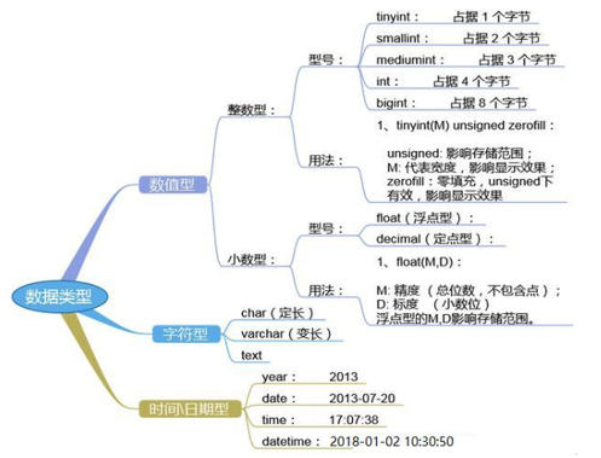
选择正确的数据类型对于获得高性能至关重要,三大原则:
- 更小的通常更好,尽量使用可正确存储数据的最小数据类型
- 简单就好,简单数据类型的操作通常需要更少的CPU周期
- 尽量避免NULL,包含为NULL的列,对MySQL更难优化
4.1 整数型
| 类型 | 占用字节 | 范围 |
|---|---|---|
| tinyint(m) | 1个字节 | -128~127 |
| smallint(m) | 2个字节 | -32768~32767 |
| mediumint(m) | 3个字节 | -8388608~8388607 |
| int(m) | 4个字节 | -2147483648~2147483647 |
| bigint(m) | 8个字节 | ±9.22*10^18 |
上述数据类型,如果加修饰符unsigned后,则最大值翻倍
如:tinyint unsigned的取值范围为(0~255)
int(m)里的m是表示SELECT查询结果集中的显示宽度,并环影响实际的取值范围,规定了MySQL的一些
交互工具(例如MySQL命令行客户端)来显示字符的个数。对于存储和计算来说, Int(1)和Int(20)是相同的
BOOL,BOOLEAN:布尔型,是TINYINT(1)的同义词。 zero值被视为假,非zero值视为真
4.2 浮点型(float和double),近似值
| 类型 | 名称 | 精度 | 说明 |
|---|---|---|---|
| float(m,d) | 单精度浮点型 | 8位精度(4字节) | m总个数,d小数位 |
| double(m,d) | 双精度浮点型 | 16位精度(8字节) | m总个数,d小数位 |
设一个字段定义为float(6,3),如果插入一个数123.45678,实际数据库里存的是123.457,但总个数还以
实际为准,即6位
4.3 定点数
在数据库中存放的是精确值,存为十进制
decimal(m,d),参数m<65是总个数,d<30且d<m是小数位
MySQL 5.0和更高版本将数字打包保存到一个进制字符串中(每4个字节存9个数字)。
例如:
decimal(18,9)小数点两边将各存储9个数字,一共使用9个字节:其中,小数点前的9个数字用4个字
节,小数点后的9个数字用4个字节,小数点本身占1个字节
浮点类型在存储同样范围的值时,通常比decimal使用更少的空间。float使用4个字节存储。 double占
用8个字节
因为需要额外的空间和计算开销,所以应该尽量只在对小数进行精确计算时才使用decimal,例如存储
财务数据。但在数据量比较大的时候,可以考虑使用bigint代替decimal
4.4 字符串(char,varchar,text)
| 类型 | 固定/可变 | 范围 |
|---|---|---|
| char(n) | 固定长度 | 最多255个字符,注意不是字节 |
| varchar(n) | 可变长度 | 最多65535个字符 |
| tinytext | 可变长度 | 最多255个字符 |
| text | 可变长度 | 最多65535个字符 |
| mediumtext | 可变长度 | 最多2的24次方-1个字符 |
| longtext | 可变长度 | 最多2的32次方-1个字符 |
| BINARY(M) | 固定长度 | 可存二进制或字符,长度为0-M字节 |
| VARBINARY(M) | 可变长度 | 可存二进制或字符,允许长度为0-M字节 |
内建类型:ENUM枚举, SET集合
char和varchar:
参考:https://dev.mysql.com/doc/refman/8.0/en/char.html
| Value | CHAR(4) | Storage Required | VARCHAR(4) | Storage Required |
|---|---|---|---|---|
| '' | '' | 4 bytes | '' | 1 byte |
| 'ab' | 'ab ' | 4 bytes | 'ab' | 3 bytes |
| 'abcd' | 'abcd' | 4 bytes | 'abcd' | 5 bytes |
| 'abcdefgh' | 'abcd' | 4 bytes | 'abcd' | 5 bytes |
1.char(n)若存入字符数小于n,则以空格补于其后,查询之时再将空格去掉,所以char类型存储的字符串末尾不能有空格,varchar不限于此
2.char(n)固定长度,char(4)不管是存入几个字符,都将占用4个字节,varchar是存入的实际字符数+1个字节(n\<n>255),所以varchar(4),存入3个字符将占用4个字节
3.char类型的字符串检索速度要比varchar类型的快
varchar和text:
1.varchar可指定n,text不能指定,内部存储varchar是存入的实际字符数+1个字节(n\<n>255),text是实际字符数+2个字节。
2.text类型不能有默认值
3.varchar可直接创建索引,text创建索引要指定前多少个字符。varchar查询速度快于text
数据类型
4.5 二进制数据BLOB
BLOB和text存储方式不同,TEXT以文本方式存储,英文存储区分大小写,而Blob以二进制方式存储,不分大小写
BLOB存储的数据只能整体读出
TEXT可以指定字符集,BLOB不用指定字符集
4.6 日期时间类型
| 类型 | 说明 | 例 |
|---|---|---|
| date | 日期 | '2021-05-11' |
| time | 时间 | '16:25:36' |
| datetime | 日期时间 | '2021-05-11 16:06:55' |
| timestamp | 自动存储记录修改时间 | |
| YEAR(2) | 年份2位 | 21(2021) |
| YEAR(4) | 年份4位 | 2021 |
timestamp字段里的时间数据会随其他字段修改的时候自动刷新,这个数据类型的字段可以存放这条记录最后被修改的时间
4.7 修饰符
适用所有类型的修饰符:
| 类型 | 说明 |
|---|---|
| NULL | 数据列可包含NULL值,默认值 |
| NOT NULL | 数据列不允许包含NULL值,*为必填选项 |
| DEFAULT | 默认值 |
| PRIMARY KEY | 主键,所有记录中此字段的值不能重复,不能为NULL |
| UNIQUE KEY | 唯一键,所有记录中此字段的值不能重复,但可以为NULL |
| CHARACTER SET name | 指定一 个字符集 |
适用数值型的修饰符:
| 类型 | 说明 |
|---|---|
| AUTO_INCREMENT | 自动递增,适用于整数类型 |
| UNSIGNED | 无符号 |
关于AUTO_INCREMENT
MariaDB [(none)]> SHOW VARIABLES LIKE 'auto_inc%';
+--------------------------+-------+
| Variable_name            | Value |
+--------------------------+-------+
| auto_increment_increment | 1     |
| auto_increment_offset    | 1     |
+--------------------------+-------+
2 rows in set (0.010 sec)

-- auto_increment_increment 定义初始值
-- auto_increment_offset    定义步进
例:
mysql> create database test;
Query OK, 1 row affected (0.02 sec)

mysql> use test
Database changed
mysql> create table t1(id int unsigned auto_increment primary key) auto_increment = 4294967294;
Query OK, 0 rows affected (0.07 sec)

mysql> insert into t1 values(null);
Query OK, 1 row affected (0.06 sec)

mysql> select * from t1;
+------------+
| id         |
+------------+
| 4294967294 |
+------------+
1 row in set (0.00 sec)

mysql> insert into t1 values(null);
Query OK, 1 row affected (0.01 sec)

mysql> select * from t1;
+------------+
| id         |
+------------+
| 4294967294 |
| 4294967295 |
+------------+
2 rows in set (0.00 sec)

mysql> insert into t1 values(null);
ERROR 1062 (23000): Duplicate entry '4294967295' for key 't1.PRIMARY'
Comments | NOTHING