









1 文本处理三剑客之sed
1.1 sed工作原理
sed即Stream EDitor,和vi不同,sed是行编辑器
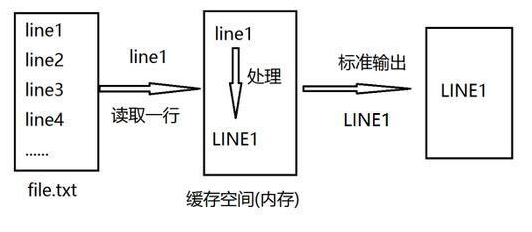
Sed是从文件或管道中读取一行,处理一行,输出一行;再读取一行,再处理一行,再输出一行,直到最后一行。每当处理一行时,把当前处理的行存储在临时缓冲区中,称为模式空间(Pattern Space),接着用sed命令处理缓冲区中的内容,处理完成后,把缓冲区的内容送往屏幕。接着处理下一行,这样不断重复,直到文件末尾。一次处理一行的设计模式使得sed性能很高,sed在读取大文件时不会出现卡顿的现象。如果使用vi命令打开几十M上百M的文件,明显会出现有卡顿的现象,这是因为vi命令打开文件是一次性将文件加载到内存,然后再打开。Sed就避免了这种情况,一行一行的处理,打开速度非常快,执行速度也很快。
参考网站:http://www.gnu.org/software/sed/manual/sed.html
1.2 sed基本用法
格式:
sed [option]... 'script;script;...' inputfile...常用选项:
- -n 不输出模式空间内容到屏幕,即不自动打印
- -e 多点编辑
- -f file 从指定文件中读取编辑脚本
- -r,-E 使用扩展表达式
- -i.bak 备份文件并原处编辑
script格式:
'地址命令'地址格式:
1.不给地址;对全文进行处理
2.单地址:
    #:指定的行,$:最后一行
    /pattern/:被此处模式所能够匹配到的每一行
3.地址范围:
    #,#     从#行到第#行;3,6:表示从第3行到第6行
    #,+#    从#行到+#行;3,+4:表示从第3行到第3+4行
    /pat1/,/pat2/
    #,/pat/
4.步进:~
    1~2 奇数行
    2~2 偶数行
命令:
p           打印当前模式空间内容,追加到默认输出之后
Ip          忽略大小写输出
d           删除模式空间匹配的行,并立即启用下一轮循环
a [\]text   在指定行后面追加文本,支持使用\n实现多行追加
i [\]text   在行前面插入文本
c [\]text   替换行为单行或多行文本
w file      保存模式匹配的行至指定文件
r file      读取指定文件的文本至模式空间中匹配到的行后
=           为模式空间中的行打印行号
!           模式空间中匹配行取反处理

s/partern/string/修饰符    查找替换,支持使用其他分隔符,可以是其他形式:s@@@,s###
替换修饰符:
g   行内全局替换
p   显示替换成功的行
w /PATH/FILE    将替换成功的行保存至文件中
I,i 忽略大小写
例:
# set '' 相当于cat
[root@centos8 ~]# sed ''
welcome
welcome
to
to
laiwu
laiwu

# 等同于cat/etc/issue
[root@centos8 ~]# sed '' /etc/issue
\S
Kernel \r on an \m

# 打印/etc/issue ,因默认打印 所以有两遍
[root@centos8 ~]# sed 'p' /etc/issue
\S
\S
Kernel \r on an \m
Kernel \r on an \m

# 关闭默认打印,并打印/etc/issue
[root@centos8 ~]# sed -n 'p' /etc/issue
\S
Kernel \r on an \m

# 打印/etc/passwd的第一行
[root@centos8 ~]# sed -n '1p' /etc/passwd
root:x:0:0:root:/root:/bin/bash

# 打印ifconfig ens160的第二行
[root@centos8 ~]# ifconfig ens160 |sed -n '2p'
        inet 192.168.11.147  netmask 255.255.255.0  broadcast 192.168.11.255

# 打印/etc/passwd的最后一行
[root@centos8 ~]# sed -n '$p' /etc/passwd
test:x:1000:1000:test:/home/test:/bin/bash

# 打印ifconfig ens160的含netmask的行
[root@centos8 ~]# ifconfig ens160 | sed -n '/netmask/p'
        inet 192.168.11.147  netmask 255.255.255.0  broadcast 192.168.11.255

# 打印df命令以/dev开头的行
[root@centos8 ~]# df |sed -n '/^\/dev/p'
/dev/mapper/cl-root  17811456 1735896  16075560  10% /
/dev/nvme0n1p1         999320  119920    810588  13% /boot

# 打印3到6行
[root@centos8 ~]# seq 10|sed -n '3,6p'
3
4
5
6

# 打印3到3+4行
[root@centos8 ~]# seq 10|sed -n '3,+4p'
3
4
5
6
7

# 打印7到最后一行
[root@centos8 ~]# seq 10|sed -n '7,$p'
7
8
9
10

# 打印奇数行
[root@centos8 ~]# seq 10|sed -n '1~2p'
1
3
5
7
9
[root@centos8 ~]# seq 10|sed '2~2d'
1
3
5
7
9

# 打印偶数行
[root@centos8 ~]# seq 10|sed -n '2~2p'
2
4
6
8
10
[root@centos8 ~]# seq 10|sed '1~2d'
2
4
6
8
10

[root@centos8 ~]# cat seq.txt
1
2
3
4
5
6
7
8
9
10

# 删除seq.txt的第2行和第4行
[root@centos8 ~]# sed -e '2d' -e '4d' seq.txt
1
3
5
6
7
8
9
10
[root@centos8 ~]# sed '2d;4d' seq.txt
1
3
5
6
7
8
9
10

# 删除seq.txt的第2行和第4行并备份
[root@centos8 ~]# sed -i.orig '2d;4d' seq.txt
[root@centos8 ~]# cat seq.txt
1
3
5
6
7
8
9
10
[root@centos8 ~]# cat seq.txt.orig
1
2
3
4
5
6
7
8
9
10

# 将/etc/httpd/conf/httpd.conf文件中的以listen 9527开头行后面添加两行为别分listen 80的行和listen 8080的行
[root@centos8 ~]# sed -i '/^listen 9527/a listen 80 \nlisten 8080/' /etc/httpd/conf/httpd.conf

# 删除以#开头的行
[root@centos8 ~]# sed -i '/^#/d' fstab
[root@centos8 ~]# cat fstab

/dev/mapper/cl-root     /                       xfs     defaults        0 0
UUID=a8ee31ca-2607-4120-8fb0-36fe3949ce3f /boot                   ext4    defaults        1 2
/dev/mapper/cl-swap     swap                    swap    defaults        0 0

# 只显示非#开头的行
[root@centos8 ~]# sed -n '/^#/!p' fstab

/dev/mapper/cl-root     /                       xfs     defaults        0 0
UUID=a8ee31ca-2607-4120-8fb0-36fe3949ce3f /boot                   ext4    defaults        1 2
/dev/mapper/cl-swap     swap                    swap    defaults        0 0
修改网卡配置并备份源文件
[root@centos8 ~]# cat /etc/default/grub
GRUB_TIMEOUT=5
GRUB_DISTRIBUTOR="$(sed 's, release .*$,,g' /etc/system-release)"
GRUB_DEFAULT=saved
GRUB_DISABLE_SUBMENU=true
GRUB_TERMINAL_OUTPUT="console"
GRUB_CMDLINE_LINUX="resume=/dev/mapper/cl-swap rd.lvm.lv=cl/root rd.lvm.lv=cl/swap rhgb quiet"
GRUB_DISABLE_RECOVERY="true"
GRUB_ENABLE_BLSCFG=true
[root@centos8 ~]# sed -Ei.bak '/^GRUB_CMDLINE_LINUX/s/(.*)(")$/\1 net.ifnames=0\2/' /etc/default/grub
[root@centos8 ~]# cat /etc/default/grub
GRUB_TIMEOUT=5
GRUB_DISTRIBUTOR="$(sed 's, release .*$,,g' /etc/system-release)"
GRUB_DEFAULT=saved
GRUB_DISABLE_SUBMENU=true
GRUB_TERMINAL_OUTPUT="console"
GRUB_CMDLINE_LINUX="resume=/dev/mapper/cl-swap rd.lvm.lv=cl/root rd.lvm.lv=cl/swap rhgb quiet net.ifnames=0"
GRUB_DISABLE_RECOVERY="true"
GRUB_ENABLE_BLSCFG=true
[root@centos8 ~]# cat /etc/default/grub.bak
GRUB_TIMEOUT=5
GRUB_DISTRIBUTOR="$(sed 's, release .*$,,g' /etc/system-release)"
GRUB_DEFAULT=saved
GRUB_DISABLE_SUBMENU=true
GRUB_TERMINAL_OUTPUT="console"
GRUB_CMDLINE_LINUX="resume=/dev/mapper/cl-swap rd.lvm.lv=cl/root rd.lvm.lv=cl/swap rhgb quiet"
GRUB_DISABLE_RECOVERY="true"
GRUB_ENABLE_BLSCFG=true
获取分区利用率
[root@centos8 ~]# df|sed -En '/^\/dev/s@.* ([0-9]+)%.*@\1@p'
10
13
取IP地址
[root@centos8 ~]# ifconfig ens160 | sed -nr '2s/[^0-9]+([0-9.]+).*/\1/p'   # 通用 最简洁
192.168.11.147
[root@centos8 ~]# ifconfig ens160 | sed -nr '2s/^[^0-9]+([0-9.]{7,15}).*/\1/p'
192.168.11.147
[root@centos8 ~]# ifconfig ens160 | sed -nr '2s/^[^0-9]+([0-9.]+) .*$/\1/p'   # 通用
192.168.11.147
[root@centos8 ~]# ifconfig ens160 | sed -n '2s/^.*inet //p' | sed -n 's/  netmask.*//p'
192.168.11.147
[root@centos8 ~]# ifconfig ens160 | sed -n '2s/^.*inet //;s/  netmask.*//p'
192.168.11.147
[root@centos8 ~]# ifconfig ens160 | sed -nr '2s/(.*inet )([0-9].*)(  netmask.*)/\2/p'
192.168.11.147
取基名和目录名
[root@centos8 ~]# echo "/etc/sysconfig/network-scripts/"|sed -r 's#(^/.*/)([^/]+/?)#\2#'   # 取基名
network-scripts/
[root@centos8 ~]# echo "/etc/sysconfig/network-scripts/"|sed -r 's#(^/.*/)([^/]+/?)#\1#'   # 取目录
/etc/sysconfig/
#取目录
[root@centos8 ~]# echo /etc/sysconfig/ |sed -nr 's#(.*)/([^/]+)/?#\1#p'
/etc
# 取基名
[root@centos8 ~]# echo /etc/sysconfig/ |sed -nr 's#(.*)/([^/]+)/?#\2#p'
sysconfig
取文件的前后缀
[root@centos8 ~]# echo a.b.c.gz |sed -nr 's/(.*)\.([^.]+)$/\1/p'
a.b.c
[root@centos8 ~]# echo a.b.c.gz |sed -nr 's/(.*)\.([^.]+)$/\2/p'
gz
[root@centos8 ~]# echo a.b.c.gz |grep -Eo '.*\.'
a.b.c.
[root@centos8 ~]# echo a.b.c.gz |grep -Eo '[^.]+$'
gz
将非#开头的行加#
[root@centos8 ~]# sed -nr 's/^[^#]/#&/p' /etc/fstab
#/dev/mapper/cl-root     /                       xfs     defaults        0 0
#UUID=a8ee31ca-2607-4120-8fb0-36fe3949ce3f /boot                   ext4    defaults        1 2
#/dev/mapper/cl-swap     swap                    swap    defaults        0 0
[root@centos8 ~]# sed -nr 's/^[^#](.*)/#\1/p' /etc/fstab
#dev/mapper/cl-root     /                       xfs     defaults        0 0
#UID=a8ee31ca-2607-4120-8fb0-36fe3949ce3f /boot                   ext4    defaults        1 2
#dev/mapper/cl-swap     swap                    swap    defaults        0 0
[root@centos8 ~]# sed -nr '/^#/!s@^@#@p' /etc/fstab
#
#/dev/mapper/cl-root     /                       xfs     defaults        0 0
#UUID=a8ee31ca-2607-4120-8fb0-36fe3949ce3f /boot                   ext4    defaults        1 2
#/dev/mapper/cl-swap     swap                    swap    defaults        0 0
将# 开头的行删除#
[root@centos8 ~]# sed '/^#/s/^#//' /etc/fstab

 /etc/fstab
 Created by anaconda on Wed Mar 17 02:03:22 2021

 Accessible filesystems, by reference, are maintained under '/dev/disk/'.
 See man pages fstab(5), findfs(8), mount(8) and/or blkid(8) for more info.

 After editing this file, run 'systemctl daemon-reload' to update systemd
 units generated from this file.

/dev/mapper/cl-root     /                       xfs     defaults        0 0
UUID=a8ee31ca-2607-4120-8fb0-36fe3949ce3f /boot                   ext4    defaults        1 2
/dev/mapper/cl-swap     swap                    swap    defaults        0 0
取分区利用率
[root@centos8 ~]# df|sed -nr '/^\/dev/s# .* ([0-9]+)%.*# \1#p'
/dev/mapper/cl-root 10
/dev/nvme0n1p1 13
修改内核参数
[root@centos8 ~]# sed -nr '/^GRUB_CMDLINE_LINUX/s/"$/ net.ifnames=0"/p' /etc/default/grub   # 最简单方法
GRUB_CMDLINE_LINUX="resume=/dev/mapper/cl-swap rd.lvm.lv=cl/root rd.lvm.lv=cl/swap rhgb quiet net.ifnames=0"
[root@centos8 ~]# sed -nr '/^GRUB_CMDLINE_LINUX/s@(.*)"$@\1 net.ifnames=0"@p' /etc/default/grub
GRUB_CMDLINE_LINUX="resume=/dev/mapper/cl-swap rd.lvm.lv=cl/root rd.lvm.lv=cl/swap rhgb quiet net.ifnames=0"
修改网卡名称
#centos7/8
[root@centos8 ~]# sed -i.bak '/^GRUB_CMDLINE_LINUX/s/"$/ net.ifnames=0"/' /etc/default/grub
[root@centos8 ~]# grub2-mkconfig -o /boot/grub2/grub.cfg
Generating grub configuration file ...
done
[root@centos8 ~]# reboot
#ubuntu
[root@centos8 ~]# grub-mkconfig -o /boot/grub/grub.cfg
引用变量 要用双引号或者加'''
[root@centos8 ~]# echo|sed "s/^/$RANDOM.rmvb/"
6307.rmvb
[root@centos8 ~]# echo|sed 's/^/$RANDOM.rmvb/'
$RANDOM.rmvb
[root@centos8 ~]# echo|sed 's/^/'''$RANDOM'''.rmvb/'
4278.rmvb
1.3 sed高级用法
sed中除了模式空间,还另外还支持保持空间(Hold Space),利用此空间,可以将模式空间中的数据,临时保存至保持空间,从而后续接着处理,实现更为强大的功能。
常见的高级命令:
- P 打印模式空间开端至\n内容,并追加到默认输出之前
- h 把模式空间中的内容覆盖至保持空间中
- H 把模式空间中的内容追加至保持空间中
- g 从保持空间取出数据覆盖至模式空间
- G 从保持空间取出内容追加至模式空间
- x 把模式空间中的内容与保持空间中的内容进行互换
- n 读取匹配到的行的下一行覆盖至模式空间
- N 读取匹配到的行的下一行追加至模式空间
- d 删除模式空间中的行
- D 如果模式空间包含换行符,则删除直到第一个换行符的模式空间中的文本,并不会读取新的输入行,而使用合成的模式空间重新启动循环。如果模式空间不包含换行符,则会像发出d命令那样启动正常的新循环
例:
sed -n 'n;p' FILE
seq 10 | sed 'N;s/\n//'
sed '1!G;h;$!d' FILE
sed 'N;D' FILE
seq 10 | sed '3h;9G;9!d'
sed '$!N;$!D' FILE
sed '$!d' FILE
sed 'G' FILE
sed 'g' FILE
sed '/^$/d;G' FILE
sed 'n;d' FILE
sed -n '1!G;h;$p' FILE
练习题:
1、删除centos7系统/etc/grub2.cfg文件中所有以空白开头的行行首的空白字符
[root@centos7 ~]# sed -r 's/^[[:blank:]]+//' /etc/grub2.cfg
#
# DO NOT EDIT THIS FILE
#
# It is automatically generated by grub2-mkconfig using templates
# from /etc/grub.d and settings from /etc/default/grub
#

### BEGIN /etc/grub.d/00_header ###
set pager=1

if [ -s $prefix/grubenv ]; then
load_env
fi
if [ "${next_entry}" ] ; then
set default="${next_entry}"
set next_entry=
save_env next_entry
set boot_once=true
else
set default="${saved_entry}"
fi

if [ x"${feature_menuentry_id}" = xy ]; then
menuentry_id_option="--id"
else
menuentry_id_option=""
fi
...省略...
2、删除/etc/fstab文件中所有以#开头,后面至少跟一个空白字符的行的行首的#和空白字符
[root@centos8 ~]# sed -r 's/^#[[:blank:]]+//' /etc/fstab

#
/etc/fstab
Created by anaconda on Wed Mar 17 02:03:22 2021
#
Accessible filesystems, by reference, are maintained under '/dev/disk/'.
See man pages fstab(5), findfs(8), mount(8) and/or blkid(8) for more info.
#
After editing this file, run 'systemctl daemon-reload' to update systemd
units generated from this file.
#
/dev/mapper/cl-root     /                       xfs     defaults        0 0
UUID=a8ee31ca-2607-4120-8fb0-36fe3949ce3f /boot                   ext4    defaults        1 2
/dev/mapper/cl-swap     swap                    swap    defaults        0 0
3、在centos6系统/root/install.log每一行行首增加#号
[root@centos6 ~]# sed -r 's/^/#/' anaconda-ks.cfg
## Kickstart
#exit
# file automatically generated by anaconda.
#
##version=DEVEL
#install
#cdrom
#lang en_US.UTF-8
#keyboard us
#network --onboot no --device eth0 --bootproto dhcp --noipv6
#rootpw  --iscrypted $6$zfMddhGBV1uIWJdg$uJn2gTyEg9CDEWT1WUmViyK2Ocfd7G14ojjKYz0yLXjwbP3JmESc0JKrtxbgPUO7UGncH3b4bsjFk3Yug5zry0
#firewall --service=ssh
#authconfig --enableshadow --passalgo=sha512
#selinux --enforcing
#timezone Asia/Shanghai
#bootloader --location=mbr --driveorder=sda --append="crashkernel=auto rhgb quiet"
## The following is the partition information you requested
## Note that any partitions you deleted are not expressed
## here so unless you clear all partitions first, this is
## not guaranteed to work
##clearpart --linux --drives=sda
#
##part /boot --fstype=ext4 --size=500
##part pv.008002 --grow --size=1
#
##volgroup vg_centos6 --pesize=4096 pv.008002
##logvol / --fstype=ext4 --name=lv_root --vgname=vg_centos6 --grow --size=1024 --maxsize=51200
##logvol swap --name=lv_swap --vgname=vg_centos6 --grow --size=1984 --maxsize=1984
#
#repo --name="CentOS"  --baseurl=cdrom:sr0 --cost=100
#
#%packages
#@core
#@server-policy
#@workstation-policy
#%end
4、在/etc/fstab文件中不以#开头的行的行首增加#号
[root@centos8 ~]# sed -r 's/^[^#]/#/' /etc/fstab

#
# /etc/fstab
# Created by anaconda on Wed Mar 17 02:03:22 2021
#
# Accessible filesystems, by reference, are maintained under '/dev/disk/'.
# See man pages fstab(5), findfs(8), mount(8) and/or blkid(8) for more info.
#
# After editing this file, run 'systemctl daemon-reload' to update systemd
# units generated from this file.
#
#dev/mapper/cl-root     /                       xfs     defaults        0 0
#UID=a8ee31ca-2607-4120-8fb0-36fe3949ce3f /boot                   ext4    defaults        1 2
#dev/mapper/cl-swap     swap                    swap    defaults        0 0
[root@centos8 ~]# sed -r '/^#/!s/^/#/' /etc/fstab
#
#
# /etc/fstab
# Created by anaconda on Wed Mar 17 02:03:22 2021
#
# Accessible filesystems, by reference, are maintained under '/dev/disk/'.
# See man pages fstab(5), findfs(8), mount(8) and/or blkid(8) for more info.
#
# After editing this file, run 'systemctl daemon-reload' to update systemd
# units generated from this file.
#
#/dev/mapper/cl-root     /                       xfs     defaults        0 0
#UUID=a8ee31ca-2607-4120-8fb0-36fe3949ce3f /boot                   ext4    defaults        1 2
#/dev/mapper/cl-swap     swap                    swap    defaults        0 0
5、处理/etc/fstab路径,使用sed命令取出其目录名和基名
# 目录名
[root@centos8 ~]# echo /etc/fstab |sed -r 's#(.*)/([^/]+/?)#\1#'
/etc
# 基名
[root@centos8 ~]# echo /etc/fstab |sed -r 's#(.*)/([^/]+/?)#\2#'
fstab
# 目录名
[root@centos8 ~]# echo /usr/local/share/man/ |sed -r 's#(^/.*/)+(.*)/#\1#'
/usr/local/share/
# 基名
[root@centos8 ~]# echo /usr/local/share/man/ |sed -r 's#(^/.*/)+(.*)/#\2#'
man
6、利用sed 取出ifconfig命令中本机的IPv4地址
[root@centos8 ~]# ifconfig eth0|sed -nr '2s/^[^0-9]+([0-9.]+).*/\1/p'
192.168.11.147
7、统计centos安装光盘中Package目录下的所有rpm文件的以.分隔倒数第二个字段的重复次数
[root@centos6 cd]# ls /misc/cd/Packages | sed -nr 's#(.*\.)+(.*).rpm$#\2#p'|sort -r|uniq -c
   2311 x86_64
    928 noarch
      4 i686
8、统计/etc/init.d/functions文件中每个单词的出现次数,并排序(用grep和sed两种方法分别实现)
[root@centos8 ~]# grep -o '[[:alpha:]]*' /etc/init.d/functions | sort |uniq -c|sort -nr|wc -l
452
[root@centos8 ~]# sed -n 's/[^[:alpha:]]\+/\n/gp;' /etc/init.d/functions|sed -r '/^$/d' |sort |uniq -c|sort -nr|wc -l
452
9、将文本文件的n和n+1行合并为一行,n为奇数行
[root@centos8 ~]# seq 10 |sed 'N;s#\n##'
12
34
56
78
910
Comments | NOTHING