









正则表达式和文件处理三剑客之grep
1 正则表达式
REGEXP:Regular Expressions,类似于增强版的通配符,但是与通配符不同,通配符是用来处理文件名的,而正则表达式是处理文本内容中字符
正则表达式被很多程序和开发语言广泛应用:vim,less,grep,sed,awk,nignx,mysql等
正则表达式分两类:
- 基本正则表达式:BRE
- 扩展正则表达式:ERE
1.1 基本正则表达式元字符
1.1.1 字符匹配
.   匹配任意单个字符,可以是一个汉字
[]  匹配指定范围内的任意单个字符,示例:[wang]    [0-9]       [a-z]       [a-zA-z]
[^] 匹配指定范围外的任意单个字符,示例:[^wang]

[:alnum:]   字母和数字
[:alpha:]   字母即a-z,A-Z
[:lower:]   小写字母
[:upper:]   大写字母
[:blank:]   空白字符(空格和制表符)
[:space:]   水平和垂直的空白字符(比[:blank:]包含的范围广)
[:cntrl:]   不可打印的控制字符(退格、删除、警铃...)
[:digit:]   十进制数字
[:xdigit:]  十六进制数字
[:graph:]   可打印的非空白字符
[:print:]   可打印字符
[:punct:]   标点符号
例:
[root@centos8 ~]# ls /etc/|grep 'rc[.0-6]'   # 匹配rc加后边.或0-6
rc0.d
rc1.d
rc2.d
rc3.d
rc4.d
rc5.d
rc6.d
rc.d
rc.local
[root@centos8 ~]# ls /etc/|grep 'rc[.0-6].'   # 匹配rc后边加.或0-6后再加任意一个任意字符
rc0.d
rc1.d
rc2.d
rc3.d
rc4.d
rc5.d
rc6.d
rc.d
rc.local
[root@centos8 ~]# ls /etc/|grep 'rc[.0-6]\.'   # 匹配rc加.或0-6后再加.
rc0.d
rc1.d
rc2.d
rc3.d
rc4.d
rc5.d
rc6.d
1.1.2 匹配次数
用在要指定次数的字符后面,用于指定前面的字符集要出现的次数
*       匹配前面的字符任意次,包括0次,贪婪模式:尽可能长的匹配
.*      匹配任意长度的任意字符
\?      匹配其前面的字符0或1次,即:可有可无
\+      匹配其前面的字符至少一次,即:肯定有,>=1
\{n\}   匹配前面的字符n次
\{m,n\} 匹配前面的至少有m次,最多n次
\{n,\}  匹配前面的字符至少n次,即>=n
\{,n\}  匹配前面的字符最多n次,即<=n
1、\?演示 匹配/etc后边的\可有可无
[root@centos8 ~]# echo /etc/|grep '/etc/\?'
/etc/
[root@centos8 ~]# echo /etc|grep '/etc/\?'
/etc
2、各种功能演示
[root@centos8 ~]# cat google.txt
google
gooooooogle
ggle
gogle
gooooo00000gle
gooole
# 匹配g后边o的次数0或1次o的结果,即:可有可无
[root@centos8 ~]# grep 'go\?gle' google.txt
ggle
gogle
# 匹配g后边o的次数至少一次为o的结果,即:肯定有,>=1
[root@centos8 ~]# grep 'go\+gle' google.txt
google
gooooooogle
gogle
# 匹配g后边o的次数为2次o的结果
[root@centos8 ~]# grep 'go\{2\}gle' google.txt
google
# 匹配g后边o的次数至少有2次,最多7次o的结果
[root@centos8 ~]# grep 'go\{2,7\}gle' google.txt
google
gooooooogle
# 匹配g后边o的次数至少2次o的结果,即>=2
[root@centos8 ~]# grep 'go\{2,\}gle' google.txt
google
gooooooogle
# 匹配g后边o的次数最多7次o的结果,即<=7
[root@centos8 ~]# grep 'go\{,7\}gle' google.txt
google
gooooooogle
ggle
gogle
# 匹配g后边o的次数有1次o的结果
[root@centos8 ~]# grep 'go.gle' google.txt
google
# 匹配g后边o的次数有任意次的o的结果
[root@centos8 ~]# grep 'go*gle' google.txt
google
gooooooogle
ggle
gogle
# 匹配g后边o的任意长度的任意字符的结果
[root@centos8 ~]# grep 'go.*gle' google.txt
google
gooooooogle
gogle
gooooo00000gle
1.1.3 位置锚定
位置锚定可以用于定位出现的位置
^               用于模式的最左侧
$               行尾锚定,用于模式的最右侧
^PATTERN$       用于模式匹配整行
^$              空行
^[[:space:]]*$  空白行
\<或\b            词首锁定,用于单词模式的左侧
\>或\b            词尾锁定,用于单词模式的右侧
\<PATTERN\>       匹配整个单词

# 注意:单词是由字母,数字,下划线组成
去除#开头和空白行
[root@centos8 ~]# grep '^[^#]' /etc/fstab
/dev/mapper/cl-root     /                       xfs     defaults        0 0
UUID=a8ee31ca-2607-4120-8fb0-36fe3949ce3f /boot                   ext4    defaults        1 2
/dev/mapper/cl-swap     swap                    swap    defaults        0 0
去除空行和#开头的行
[root@centos8 ~]# grep -v '^#' /etc/profile|grep -v '^$'
[root@centos8 ~]# grep ^[^#] /etc/profile
1.1.4 分组
分组:()将多个字符捆绑在一起,当作一个整体处理,如:\(root\)+
后向引用:分组括号中的模式匹配到的内容会被正则表达式引擎记录于内部的变量中,这些变量的命名方式为:\1.\2,\3...
\1表示从左侧起的第一个括号以及与之匹配右括号之间的模式所匹配到的字符
\(string1\(string2\)\)
\1:string\(string2\)
\2:string2注意:反向引用引用前面的分组括号中的模式所匹配字符,而非模式本身
1.1.4. 2或者 \|
a\|b    a或b
C\|cat  C或cat
\(C\|c\)at  Cat或cat
去除空行和#开头的行
[root@centos8 ~]# grep -v '^#' /etc/profile|grep -v '^$'
[root@centos8 ~]# grep -v '^#\|^$' /etc/profile
[root@centos8 ~]# grep -v '^\(#\|$\)' /etc/profile
[root@centos8 ~]# grep ^[^#] /etc/profile
练习题:
1、显示/proc/meminfo文件中以大小s开头的行(要求: 使用两种方法)
# 方法一:
[root@centos8 ~]# grep -i ^s /proc/meminfo
SwapCached:            0 kB
SwapTotal:       2097148 kB
SwapFree:        2097148 kB
Shmem:              6848 kB
Slab:             148452 kB
SReclaimable:      48484 kB
SUnreclaim:        99968 kB
ShmemHugePages:        0 kB
ShmemPmdMapped:        0 kB
# 方法二:
[root@centos8 ~]# grep ^[s\|S] /proc/meminfo
SwapCached:            0 kB
SwapTotal:       2097148 kB
SwapFree:        2097148 kB
Shmem:              6848 kB
Slab:             148452 kB
SReclaimable:      48484 kB
SUnreclaim:        99968 kB
ShmemHugePages:        0 kB
ShmemPmdMapped:        0 kB
2、显示/etc/passwd文件中不以bin/bash结尾的行
[root@centos8 ~]# grep -v '/bin/bash$' /etc/passwd
bin:x:1:1:bin:/bin:/sbin/nologin
daemon:x:2:2:daemon:/sbin:/sbin/nologin
adm:x:3:4:adm:/var/adm:/sbin/nologin
lp:x:4:7:lp:/var/spool/lpd:/sbin/nologin
sync:x:5:0:sync:/sbin:/bin/sync
shutdown:x:6:0:shutdown:/sbin:/sbin/shutdown
halt:x:7:0:halt:/sbin:/sbin/halt
mail:x:8:12:mail:/var/spool/mail:/sbin/nologin
operator:x:11:0:operator:/root:/sbin/nologin
games:x:12:100:games:/usr/games:/sbin/nologin
ftp:x:14:50:FTP User:/var/ftp:/sbin/nologin
nobody:x:65534:65534:Kernel Overflow User:/:/sbin/nologin
dbus:x:81:81:System message bus:/:/sbin/nologin
systemd-coredump:x:999:997:systemd Core Dumper:/:/sbin/nologin
systemd-resolve:x:193:193:systemd Resolver:/:/sbin/nologin
tss:x:59:59:Account used by the trousers package to sandbox the tcsd daemon:/dev/null:/sbin/nologin
polkitd:x:998:996:User for polkitd:/:/sbin/nologin
unbound:x:997:995:Unbound DNS resolver:/etc/unbound:/sbin/nologin
sssd:x:996:993:User for sssd:/:/sbin/nologin
sshd:x:74:74:Privilege-separated SSH:/var/empty/sshd:/sbin/nologin
3、显示用户mail默认的shel程序
[root@centos8 ~]# grep mail /etc/passwd|cut -d: -f7
/sbin/nologin
4、找出/etc/passwd中的两位或三位数
[root@centos8 ~]# grep -o "\<[0-9]\{2,3\}\>" /etc/passwd
12
11
12
100
14
50
81
81
999
997
193
193
59
59
998
996
997
995
996
993
74
74
5、显示CentOS7的/etc/grub2.cfg文件中, 至少以一个空白字符开头的且后面有非空白字符的行
[root@centos7 ~]# grep '^[[:space:]]\+[^[:space:]]\+' /etc/grub2.cfg6、找出"netstat -tan"命令结果中以LISTEN后跟任意多个空白字符结尾的行
[root@centos8 ~]# netstat -ant |grep 'LISTEN[[:space:]]\+$'
tcp        0      0 0.0.0.0:22              0.0.0.0:*               LISTEN
tcp6       0      0 :::22                   :::*                    LISTEN
7、显示CentOS7上所有UID小于1000以内的用户名和UID
[root@centos7 ~]# cat /etc/passwd |cut -d: -f1,3 |grep '\<[0-9]\{1,3\}\>'|sort -t: -k2
root:0
bin:1
operator:11
games:12
ftp:14
systemd-network:192
daemon:2
adm:3
lp:4
sync:5
shutdown:6
halt:7
sshd:74
mail:8
dbus:81
postfix:89
nobody:99
polkitd:999
8、添加用户bash、testbash、 basher.、sh、 nologin(其shell为/sbin/nologin),找出/etc/passwd用户名和shell同名的行
[root@centos7 ~]# grep '^\(.*\)\>.*\<\1$' /etc/passwd
sync:x:5:0:sync:/sbin:/bin/sync
shutdown:x:6:0:shutdown:/sbin:/sbin/shutdown
halt:x:7:0:halt:/sbin:/sbin/halt
nologin:x:1005:1005::/home/nologin:/sbin/nologin
[root@centos7 ~]# egrep '^(.*)\>.*\<\1$' /etc/passwd
sync:x:5:0:sync:/sbin:/bin/sync
shutdown:x:6:0:shutdown:/sbin:/sbin/shutdown
halt:x:7:0:halt:/sbin:/sbin/halt
nologin:x:1005:1005::/home/nologin:/sbin/nologin
9、利用df和grep, 取出磁盘各分区利用率,并从大到小排序
[root@centos8 ~]# df |grep '1\?[0-9]\?[0-9]%'|tr -s ' '|sort -t' ' -k5 -nr | cut -d' ' -f5
13%
9%
2%
0%
0%
0%
0%
1.2 扩展正则表达式
1.2.1 字符匹配元字符
.           任意单个字符
[wang]      匹配指定范围的字符
[^wang]     不匹配指定范围的字符
[:alnum:]   字母和数字
[:alpha:]   字母即a-z,A-Z
[:lower:]   小写字母
[:upper:]   大写字母
[:blank:]   空白字符(空格和制表符)
[:space:]   水平和垂直的空白字符(比[:blank:]包含的范围广)
[:cntrl:]   不可打印的控制字符(退格、删除、警铃...)
[:digit:]   十进制数字
[:xdigit:]  十六进制数字
[:graph:]   可打印的非空白字符
[:print:]   可打印字符
[:punct:]   标点符号
1.2.2 次数匹配
*       匹配前面字符任意次
?       0或1次
+       1次或多次
{n}     匹配n次
{m,n}   至少m次,最多n次
1.2.3 位置锚定
^       行首
$       行尾
\<,\b    语首
\>,\b    语尾
1.2.4 分组其他
()      分组
反向引用:\1,\2,...
|       或者
a|b     a或b
C|cat   C或cat
(C|c)at Cat或cat
练习题:
1、显示三个用户root、test、games的UID和默认shell
[root@centos8 ~]# grep -E ^root\|^test\|^games /etc/passwd|cut -d: -f3,7
0:/bin/bash
12:/sbin/nologin
1000:/bin/bash
2、找出/etc/rc.d/init.d/functions文件中行首为某单词(包括下划线)后面跟一个小括号的行
[root@centos8 ~]# grep -E "^\<[^[:digit:]]*\>\(\)" /etc/rc.d/init.d/functions
checkpid() {
__kill_pids_term_kill_checkpids() {
__kill_pids_term_kill() {
__pids_var_run() {
__pids_pidof() {
daemon() {
killproc() {
pidfileofproc() {
pidofproc() {
status() {
echo_success() {
echo_failure() {
echo_passed() {
echo_warning() {
update_boot_stage() {
success() {
failure() {
passed() {
warning() {
action() {
strstr() {
is_ignored_file() {
is_true() {
is_false() {
apply_sysctl() {
3、使用egrep取出/etc/rc.d/init.d/functions中其基名
[root@centos8 ~]# echo "/etc/rc.d/init.d/function" |egrep -o "[^/]+$"
function
4、使用egrep取出上面路径的目录名
[root@centos8 ~]# echo "/etc/rc.d/init.d/function" |egrep -o "/.*/"
/etc/rc.d/init.d/
5、统计last命令 中以root登录的每个主机IP地址登录次数
[root@centos8 ~]# last | grep ^root | tr -s ' '|cut -d' ' -f3|sort|grep ^[0-9]|uniq -c
      5 192.168.11.30
6、利用扩展正则表达式分别表示0-9、10-99、 100-199、 200-249、 250-255
[0-9]
[1-9][0-9]
1[0-9][0-9]
2[0-4][0-9]
25[0-5]
7、显示ifconfig命令结果 中所有IPv4地址
[root@centos8 ~]# ifconfig|grep -Eo '([0-9]{1,3}.){3}[0-9]{1,3}'|grep [.]
192.168.11.147
255.255.255.0
192.168.11.255
127.0.0.1
255.0.0.0
8、将此字符串: welcome to magedu linux中的每个字符去重并排序,重复次数多的排到前面
[root@centos8 ~]# echo welcome to test linux|grep -o [a-z]|sort|uniq -c|sort -nr
      3 t
      3 e
      2 o
      2 l
      1 x
      1 w
      1 u
      1 s
      1 n
      1 m
      1 i
      1 c
2 文本处理三剑客之grep
grep:Global search REgular expression and Print out the line
作用:文本搜索工具,根据用户指定的”模式“对目标文本逐行进行匹配检查;打印匹配到的行
模式:由正则表达式字符及文本字符所编写的过滤条件
格式:
grep [OPTIONS] PATTERN [FILE...]常用选项:
-coloe=auto 对匹配的文本着色显示
-m #        匹配#次后停下
-v  显示不被pattern匹配到的行
-i  忽略字符的大小写
-n  显示匹配的行号
-c  统计匹配的行数
-o  仅显示匹配到的字符串
-q  静默模式,不输出任何信息
-A #    after,后#行
-B #    before,前#行
-C #    context,前后各#行
-e  实现多个选项间的逻辑or关系,如:grep -e 'cat' -e 'dog' file
-w  匹配整个单词
-E  使用ERE,相当于egrep
-F  不支持正则表达式,相当于fgrep
-f file 根据模式文件处理
-r  递归目录,但不处理软连接
-R  递归目录,但处理软连接
取两个文件相同的行
[root@centos8 ~]# cat f1.txt
a
b
1
c
2
[root@centos8 ~]# cat f2.txt
b
e
f
c
1
3
[root@centos8 ~]# grep -f f1.txt f2.txt
b
c
1
分区利用率的最大值
[root@centos8 ~]# df|grep '^/dev/'|tr -s ' '|cut -d' ' -f5|sort -n|tail -1
13%
[root@centos8 ~]# df|grep '^/dev/'|grep -Eo '\<[0-9]{,3}%'|tr -d ’%‘|sort -n|tail -1
13
[root@centos8 ~]# df|grep '^/dev/'|grep -Eo '\<[0-9]{,3}%'|grep -Eo '[0-9]+'|sort -nr|head -1
13
哪个IP和当前主机连接数最多的前三位
ss -nt|grep '^ESTAB'|tr -s ' ' :|cut -d: -f6|sort|uniq -c|sort -nr|head -3连接状态的统计
ss -nat|grep -v '^State'|cut -d ' ' -f1|sort|uniq -c
ss -nta|tail -n+2|cut -d ' ' -f1|sort|uniq -c
去除#和空行五种方法
[root@centos8 ~]# grep -v '^#' /etc/profile | grep -v '^$'
[root@centos8 ~]# grep -v '^#\|^$' /etc/profile
[root@centos8 ~]# grep -v '^\(#\|$\)' /etc/profile
[root@centos8 ~]# grep -Ev '^(#|$)' /etc/profile
[root@centos8 ~]# egrep -v '^(#|$)' /etc/profile
取出/etc/passwd下rxxt格式的字符串
[root@centos8 ~]# grep r..t /etc/passwd
root:x:0:0:root:/root:/bin/bash
operator:x:11:0:operator:/root:/sbin/nologin
ftp:x:14:50:FTP User:/var/ftp:/sbin/nologin
[root@centos8 ~]# grep -o r..t /etc/passwd   # 只显示字符串
root
root
root
root
r/ft
取出ip地址
[root@centos8 ~]# ifconfig |grep -E '[0-9]{1,3}.[0-9]{1,3}.[0-9]{1,3}.[0-9]{1,3}'
        inet 192.168.11.147  netmask 255.255.255.0  broadcast 192.168.11.255
        RX packets 17434  bytes 1678819 (1.6 MiB)
        TX packets 11721  bytes 1581106 (1.5 MiB)
        inet 127.0.0.1  netmask 255.0.0.0
[root@centos8 ~]# ifconfig |grep -E '([0-9]{1,3}.){3}[0-9]{1,3}'                     inet 192.168.11.147  netmask 255.255.255.0  broadcast 192.168.11.255
        RX packets 17548  bytes 1689519 (1.6 MiB)
        TX packets 11799  bytes 1591566 (1.5 MiB)
        inet 127.0.0.1  netmask 255.0.0.0
[root@centos8 ~]# ifconfig eth0|grep -Eo '([0-9]{1,3}.){3}[0-9]{1,3}'|head -1
192.168.11.147
[root@centos8 ~]# echo "([0-9]{1,3}.){3}[0-9]{1,3}" > regex.txt   # 为了方便可以放在一个文件中
[root@centos8 ~]# cat regex.txt
([0-9]{1,3}.){3}[0-9]{1,3}
[root@centos8 ~]# ifconfig |grep -oEf regex.txt
192.168.11.147
255.255.255.0
192.168.11.255
1725679
1621446
127.0.0.1
255.0.0.0
取出/etc/passwd中包含root和bash字符串的行
[root@centos8 ~]# grep -E 'root|bash' /etc/passwd
root:x:0:0:root:/root:/bin/bash
operator:x:11:0:operator:/root:/sbin/nologin
test:x:1000:1000:test:/home/test:/bin/bash
[root@centos8 ~]# grep -e root -e bash /etc/passwd
root:x:0:0:root:/root:/bin/bash
operator:x:11:0:operator:/root:/sbin/nologin
test:x:1000:1000:test:/home/test:/bin/bash
取出含有单词root的行
[root@centos8 ~]# grep -w root /etc/passwd
root:x:0:0:root:/root:/bin/bash
operator:x:11:0:operator:/root:/sbin/nologin
[root@centos8 ~]# grep '\<root\>' /etc/passwd
root:x:0:0:root:/root:/bin/bash
operator:x:11:0:operator:/root:/sbin/nologin
取出用户名和shell类型一样的行
[root@centos8 ~]# grep '^\(.*\)\>.*\<\1$' /etc/passwd
sync:x:5:0:sync:/sbin:/bin/sync
shutdown:x:6:0:shutdown:/sbin:/sbin/shutdown
halt:x:7:0:halt:/sbin:/sbin/halt
[root@centos8 ~]# grep -E '^(.*)\>.*\<\1$' /etc/passwd
sync:x:5:0:sync:/sbin:/bin/sync
shutdown:x:6:0:shutdown:/sbin:/sbin/shutdown
halt:x:7:0:halt:/sbin:/sbin/halt
[root@centos8 ~]# egrep '^(.*)\>.*\<\1$' /etc/passwd
sync:x:5:0:sync:/sbin:/bin/sync
shutdown:x:6:0:shutdown:/sbin:/sbin/shutdown
halt:x:7:0:halt:/sbin:/sbin/halt
面试题:计算所有人年龄总合
[root@centos8 ~]# cat age.txt
xiaoming=20
xiaohong=18
xiaoqiang=22
[root@centos8 ~]# cat age.txt |cut -d= -f2|tr '\n' '+'|grep -Eo '.*[0-9]'|bc
60
[root@centos8 ~]# grep -Eo '[0-9]+' age.txt |tr '\n' +|grep -Eo '.*[0-9]'|bc
60
[root@centos8 ~]# grep -oE '[0-9]+' age.txt |paste -s -d+ |bc
60
练习
1、编写脚本 createuser.sh,实现如下功能:使用一个用户名做为参数,如果指定参数的用户存在,就显示其存在,否则添加之;显示添加的用户的id号等信息
[root@centos8 ~]# vim createuser.sh
#!/bin/bash
id $1 &> /dev/null && echo $1 is exist || (useradd $1;id $1)

# 测试
[root@centos8 ~]# cat createuser.sh
#!/bin/bash
id $1 &> /dev/null && echo $1 is exist || (useradd $1;id $1)
[root@centos8 ~]# bash createuser.sh test
test is exist
[root@centos8 ~]# bash createuser.sh test1
uid=1001(test1) gid=1001(test1) groups=1001(test1)
2、编写脚本 systeminfo.sh,显示当前主机系统信息,包括:主机名,IPv4地址,操作系统版本,内核版本,CPU型号,内存大小,硬盘大小
[root@centos8 ~]# cat systeminfo.sh
#!/bin/bash
echo -e "\e[1;32m=====================host systeminfo=====================\e[0m"
echo -e "\e[1;31mhostname:       `hostname`
Ipv4:           `ifconfig eth0|grep -Eo '([0-9]{1,3}.){3}[0-9]{1,3}'|head -1`
OS:             `cat /etc/redhat-release`
kernel:         `uname -r`
CPU:           `lscpu|grep 'Model name:'|tr -s ' '|cut -d: -f2`
Memory:         `free -h|grep Mem|tr -s ' '|cut -d' ' -f2`
Disk:           `lsblk|grep disk|tr -s ' '|cut -d' ' -f4`\e[0m"
echo -e "\e[1;32m=========================================================\e[0m"
[root@centos8 ~]# bash systeminfo.sh
=====================host systeminfo=====================
hostname:       centos8
Ipv4:           10.0.0.8
OS:             CentOS Linux release 8.1.1911 (Core)
kernel:         5.11.14-luna-6.6.6
CPU:            Intel(R) Core(TM) i5-6300HQ CPU @ 2.30GHz
Memory:         948Mi
Disk:           30G
=========================================================
效果图
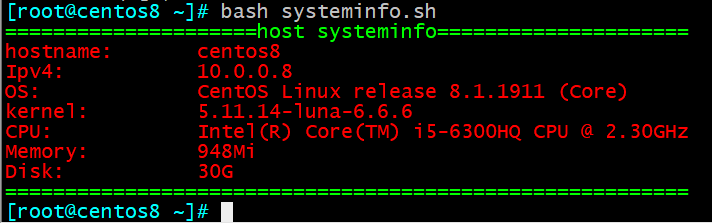
3、编写脚本disk.sh,显示当前硬盘分区中空间利用率最大的值
[root@centos8 ~]# cat disk.sh
#!/bin/bash
df -h|grep ^/dev/|tr -s ' '|cut -d' ' -f5|sort -nr|head -1
[root@centos8 ~]# bash disk.sh
27%
Comments | NOTHING