









用户和组管理命令
用户管理命令
- useradd
- usermod
- userdel
组账号维护命令
- groupadd
- groupmod
- groupdel
一、用户管理命令
1 用户创建
useradd命令可以创建新的Linux用户
格式:
useradd [opyions] LOGIN常见选项:
-u  UID
-o  配合-u选项,不检查UID的唯一性
-g GID  指明用户所属基本组,可为组名,也可以GID
-c "COMMENT"  用户的注释信息
-d HOME_DIR 以指定的路径(不存在)为家目录
-s SHELL    指明用户的默认shell程序,可用列表在/etc/shells文件中
-G GROUP1[,GROUP2,...]  为用户指明附加组,组须事先存在
-N  不创建私用组做主组,使用users组做主组
-r  创建系统用户centos6之前:ID<500,centos7以后:ID<1000
-m  创建家目录,用于系统用户
-M  不创建家目录,用于非系统用户
-p  指定加密的密码
例:
useradd -r -u 48 -g apache -s /sbin/nologin -d /var/www -c "Apache" apacheuseradd命令默认值由/etc/default/useradd定义
[root@centos8 ~]# cat /etc/default/useradd
# useradd defaults file
GROUP=100
HOME=/home
INACTIVE=-1   # 对应/etc/shadow文件第7列,即用户密码过期的宽限期
EXPIRE=       # 对应/etc/shadow文件第8列.即用户账号的有效期
SHELL=/bin/bash
SKEL=/etc/skel
CREATE_MAIL_SPOOL=yes

[root@centos8 ~]#
显示或更改默认设置
useradd -D
useradd -D -s shell
useradd -D -b BASE_DIR
useradd -D -g GROUP
新建用户的相关文件
- /etc/default/useradd
- /etc/skel/*
- /etc/login.defs
批量创建用户
newusers passwd 格式文件批量修改用户口令
echo username:passwd|chpasswd2 用户属性修改
usermod命令可以修改用户属性
格式:
usermod [OPTION] login常见选项:
-u UID  新UID
-g GID  新主组
-G GROUP1[,GROUP2,...[,GROuPN]]]    新附加组,原来的附加组将会被覆盖;若保留原有,则要同时使用-a选项
-s SHELL    新的默认SHELL
-c "COMMENT"  新的注释信息
-d HOME 新家目录不会自动创建;若要创建新家目录并移动原家数据,同时使用-m选项
-l login_name   新的名字
-L  lock指定用户,在/etc/shadow密码栏的增加!
-U  unlock指定用户,将/etc/shadow密码栏的!拿掉
-e YYYY-MM-DD   指明用户账号过期日期
-f INACTIVE 设定非活动期限,即宽限期
3 删除用户
userdel可删除Linux用户
格式:
userdel [OPTION]... Login常见选项:
-f,--force  强制
-r,--remove 删除用户家目录和邮箱
4 查看用户相关的ID信息
id 命令可以查看用户的UID,GID等信息
id [OPTION]... [USER]常见选项:
-u  显示UID
-g  显示GID
-G  显示用户所属组的ID
-n  显示名称,需配合ugG使用
5 切换用户或以其他用户身份执行命令
su:即switch user,命令可以切换用户身份,并且以指定用户的身份执行命令
格式:
su [options...] [-] [user [args...]]常见选项:
-l,--login  su -l username  相当于su - username
-c,--command <command>    pass a single command to the shell with -c
切换用户的方式:
- su UserName:非登录式切换,即不会读取目标用户的配置文件,不改变当前工作目录,即不完全切换
- su -UserName:登录式切换,会读取目标用户的配置文件,切换至自已的家目录,即完全切换
说明:root用户su至其他用户无须密码;非root用户切换时需要密码
注意:su切换新用户后,使用exit退回至旧的用户,而不要再用su切换至旧用户,否则会生成很多的bash子进程,环境可能会混乱。
换个身份执行命令:
su [-] username -c 'command'例:
[root@centos8 ~]# getent passwd test
test:x:1000:1000:test:/home/test:/bin/bash
[root@centos8 ~]# usermod -s /bin/false test
[root@centos8 ~]# getent passwd test
test:x:1000:1000:test:/home/test:/bin/false
[root@centos8 ~]# su - test
Last login: Sun May  2 15:54:42 CST 2021 on pts/1
[root@centos8 ~]# whoami
root
例:
[root@centos8 ~]# su -s /sbin/nologin test
This account is currently not available.
[root@centos8 ~]# whoami
root

[root@centos8 ~]# su -s /bin/false test
[root@centos8 ~]# whoami
root
例:
[test@centos8 ~]$ su - root -c "getent shadow root"
Password:
root:$6$dUZD7LLeZOSNdFMQ$8KXNsDJN3AsO66rpkPRPcT1ndpwnSyZEu68LKG.Zty68Ue8NxZ9mXpFC7v4N.xEeF2MKG5prR0BPJ84biql4t.:18746:0:99999:7:::
例:
[root@centos8 ~]# su - test -c "touch test.txt"
[root@centos8 ~]# ll ~test/
total 0
-rw-rw-r-- 1 test test 0 May  2 18:38 test.txt
例:
[root@centos8 ~]# su bin
This account is currently not available.
[root@centos8 ~]# su - bin
Last login: Sun May  2 18:39:09 CST 2021 on pts/1
This account is currently not available.
[root@centos8 ~]# su -s /bin/bash bin
bash-4.4$ whoami
bin
bash-4.4$ exit
exit

[root@centos8 ~]# getent passwd tss
tss:x:59:59:Account used by the trousers package to sandbox the tcsd daemon:/dev/null:/sbin/nologin
[root@centos8 ~]# su - -s /bin/bash tss
su: warning: cannot change directory to /dev/null: Not a directory
-bash: /dev/null/.bash_profile: Not a directory
[tss@centos8 root]$ pwd
/root
[tss@centos8 root]$ whoami
tss
[tss@centos8 root]$ exit
logout
-bash: /dev/null/.bash_logout: Not a directory
[root@centos8 ~]#
6 设置密码
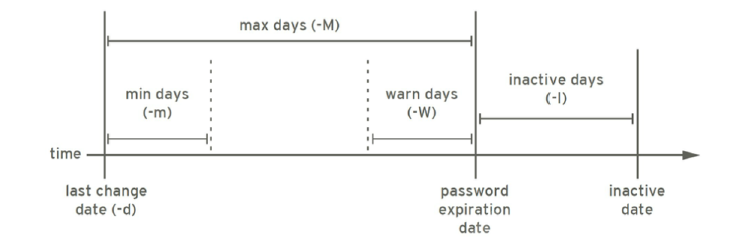
passwd可以修改用户密码
格式:
passwd [OPTIONS] username常用选项:
-d  删除指定用户密码
-l  锁定指定用户
-u  解锁指定用户
-e  强制用户下次登录修改密码
-f  强制操作
-n mindays  指定最短使用期限
-x maxdays  最大使用期限
-w warndays 提前多少天开始警告
-i inactivedays 非活动期限
--stdin 从标准输入接收用户密码,ubuntu无此选项
非交互式修改用户密码
# 此方式更通用,适用于各种linux版本,如:
[root@centos8 ~]# echo -e '123456\n123456'|passwd test
Changing password for user test.
New password: BAD PASSWORD: The password is shorter than 8 characters
Retype new password: passwd: all authentication tokens updated successfully.

# 适用于红帽系列的linux版本
[root@centos8 ~]# echo 123456|passwd --stdin test
Changing password for user test.
passwd: all authentication tokens updated successfully.
Ubuntu非交互式修改用户密码
[root@ubuntu ~]# echo ubuntu:123456|chpasswd
[root@ubuntu ~]# passwd ubuntu <<EOF
> 123456
> 123456
> EOF
Enter new UNIX password: Retype new UNIX password: passwd: password updated successfully
[root@ubuntu ~]# echo -e '123456\n123456'|passwd ubuntu
Enter new UNIX password: Retype new UNIX password: passwd: password updated successfully
设置用户下次必须更改密码
[root@centos8 ~]# useradd zhang
[root@centos8 ~]# echo 123456|passwd --stdin zhang
Changing password for user zhang.
passwd: all authentication tokens updated successfully.
[root@centos8 ~]# getent shadow zhang
zhang:$6$.DlEvs1O33U/8HD4$alBSVw0AsugZGwLTmUihl.hX/LeCPyTSiI/PSLHxATRpyTeC2tIMbnpUAX/Bsv0v9teE42mIWKJBxYuB7frhX.:18749:0:99999:7:::
[root@centos8 ~]# passwd -e zhang
Expiring password for user zhang.
passwd: Success
[root@centos8 ~]# getent shadow zhang
zhang:$6$.DlEvs1O33U/8HD4$alBSVw0AsugZGwLTmUihl.hX/LeCPyTSiI/PSLHxATRpyTeC2tIMbnpUAX/Bsv0v9teE42mIWKJBxYuB7frhX.:0:0:99999:7:::
[root@centos8 ~]# su - test
Last login: Sun May  2 18:38:01 CST 2021 on pts/1
[test@centos8 ~]$ su - zhang
Password:
You are required to change your password immediately (administrator enforced)
Current password:
New password:
BAD PASSWORD: The password is shorter than 8 characters
New password:
BAD PASSWORD: The password fails the dictionary check - it is too simplistic/systematic
su: Have exhausted maximum number of retries for service
[test@centos8 ~]$ su - zhang
Password:
You are required to change your password immediately (administrator enforced)
Current password:
New password:
Retype new password:
Last login: Sun May  2 20:18:02 CST 2021 on pts/1
Last failed login: Sun May  2 20:19:45 CST 2021 on pts/1
There were 3 failed login attempts since the last successful login.
[zhang@centos8 ~]$ su - zhang
Password:
Last login: Sun May  2 20:20:18 CST 2021 on pts/1
[zhang@centos8 ~]$ exit
logout
[test@centos8 ~]$ exit
logout
[root@centos8 ~]# getent shadow zhang
zhang:$6$j0.P0orT0Im/htuo$V4IqxnzpUNtDZrEU4fGllIlFR9PvnPB5uBqErs5WSsR7VkjGUblVfRgAG6aYP2SKO5NLHAv/O9Xy/ngQ.6bCR/:18749:0:99999:7:::
7 修改用户密码策略
chage 可以修改用户密码策略
格式:
chage [OPTION]... LOGIN常见选项:
-d LAST_DAY 更改密码的时间
-m --mindays MIN_DAYS
-M --maxdays MAX_DAYS
-W --warndays WARN_DAYS
-I --inactive INACTIVE  密码过期后的宽限期
-E --expriedate EXPRIE_DATE
-l  显示密码策略
例:
[root@centos8 ~]# chage -m 3 -M 42 -W 14 -I 7 -E 2021-7-7 zhang
[root@centos8 ~]# chage -l zhang
Last password change                                    : May 02, 2021
Password expires                                        : Jun 13, 2021
Password inactive                                       : Jun 20, 2021
Account expires                                         : Jul 07, 2021
Minimum number of days between password change          : 3
Maximum number of days between password change          : 42
Number of days of warning before password expires       : 14
[root@centos8 ~]# getent shadow zhang
zhang:$6$j0.P0orT0Im/htuo$V4IqxnzpUNtDZrEU4fGllIlFR9PvnPB5uBqErs5WSsR7VkjGUblVfRgAG6aYP2SKO5NLHAv/O9Xy/ngQ.6bCR/:18749:3:42:14:7:18815:

# 下一次登录强制重设密码
[root@centos8 ~]# chage -d 0 zhang
[root@centos8 ~]# getent shadow zhang
zhang:$6$j0.P0orT0Im/htuo$V4IqxnzpUNtDZrEU4fGllIlFR9PvnPB5uBqErs5WSsR7VkjGUblVfRgAG6aYP2SKO5NLHAv/O9Xy/ngQ.6bCR/:0:3:42:14:7:18815:
[root@centos8 ~]# chage -l zhang
Last password change                                    : password must be changed
Password expires                                        : password must be changed
Password inactive                                       : password must be changed
Account expires                                         : Jul 07, 2021
Minimum number of days between password change          : 3
Maximum number of days between password change          : 42
Number of days of warning before password expires       : 14
8 用户相关的其他命令
- chfn 指定个人信息
- chsh指定shell,相当于usermod -s
- finger可以查看用户个人信息
例:
[root@centos8 ~]# chfn zhang
Changing finger information for zhang.
Name []: zhangsan
Office []: it
Office Phone []: 10000
Home Phone []: 11111

Finger information changed.
[root@centos7 ~]# yum install finger -y 最小化安装需要安装此包(centos8中无此包)
[root@centos7 ~]# finger zhang
Login: zhang                            Name: zhangsan
Directory: /home/zhang                  Shell: /bin/bash
Office: it, x1-0000                     Home Phone: x1-1111
Never logged in.
No mail.
No Plan.
[root@centos8 ~]# getent passwd zhang
zhang:x:1002:1002:zhangsan,it,10000,11111:/home/zhang:/bin/bash

[root@centos8 ~]# chsh -s /bin/sh zhang
Changing shell for zhang.
Shell changed.
[root@centos8 ~]# getent passwd zhang
zhang:x:1002:1002:zhangsan,it,10000,11111:/home/zhang:/bin/sh
[root@centos8 ~]# usermod -s /bin/bash zhang
[root@centos8 ~]# getent passwd zhang
zhang:x:1002:1002:zhangsan,it,10000,11111:/home/zhang:/bin/bash
修改用户使用不可登录的shell类型
[root@centos8 ~]# getent passwd zhang
zhang:x:1002:1002:zhangsan,it,10000,11111:/home/zhang:/bin/bash
[root@centos8 ~]# chsh -s /sbin/nologin zhang
Changing shell for zhang.
chsh: Warning: "/sbin/nologin" is not listed in /etc/shells.
Shell changed.
[root@centos8 ~]# su - zhang
Last login: Sun May  2 20:21:09 CST 2021 on pts/1
This account is currently not available.
[root@centos8 ~]# id
uid=0(root) gid=0(root) groups=0(root)
[root@centos8 ~]# chsh -s /bin/bash zhang
Changing shell for zhang.
Shell changed.
[root@centos8 ~]# su - zhang
Last login: Sun May  2 20:47:17 CST 2021 on pts/1
[zhang@centos8 ~]$ id
uid=1002(zhang) gid=1002(zhang) groups=1002(zhang)
二、组管理相关命令
1 创建组
groupadd实现创建组
格式:
groupadd [OPTION]... group_name常见选项:
-g GID 指明GID号;[GID_MIN,GID_MAX]
-r 创建系统组,centos6之前:GID<500,centos7以后:GID<1000
例:
groupadd -g48 -r apache2 修改组
groupmod 组属性修改
格式:
groupmod [OPTION]... group常见选项:
-n group_name 新名字
-g GID 新的GID
3 组删除
groupdel可以删除组
格式:
groupdel [OPTION] group常见选项:
-f,--force 强制删除,即使时用户的主组也强制删除组
4 更改组密码
gpasswd命令,可以更改组密码,也可以修改附加组的成员关系
格式:
gpasswd [OPTION] group常见选项:
-a user 将user添加至指定组中
-d user 从指定附加组中移除用户user
-A user,user2,...   设置有管理权限的用户列表
例:
# 增加组成员
[root@centos8 ~]# groupadd admins
[root@centos8 ~]# id zhang
uid=1002(zhang) gid=1002(zhang) groups=1002(zhang)
[root@centos8 ~]# gpasswd -a zhang admins
Adding user zhang to group admins
[root@centos8 ~]# id zhang
uid=1002(zhang) gid=1002(zhang) groups=1002(zhang),1003(admins)
[root@centos8 ~]# groups zhang
zhang : zhang admins

# 删除组成员
[root@centos8 ~]# gpasswd -d zhang admins
Removing user zhang from group admins
[root@centos8 ~]# groups zhang
zhang : zhang
[root@centos8 ~]# id zhang
uid=1002(zhang) gid=1002(zhang) groups=1002(zhang)
[root@centos8 ~]# getent group admins
admins:x:1003:
5 临时切换主组
newgrp命令可以临时切换主组,如果用户本不属于此组,则需要组密码
格式:
newgrp [-] [group]如果使用-选项,可以初始化用户环境
[root@centos8 ~]# gpasswd root
Changing the password for group root
New Password:
Re-enter new password:
[root@centos8 ~]# getent gshadow root
root:$6$v5hnx/CeZYn/IutC$QdxxKCDP4eSfyRHRRTSztiNW2Wz7Gf/Xqr9eZwdE5BVIAcAswmGD4mknMkrxvdb1rSadxkvl3LwZu9vYmIQjE1::

[root@centos8 ~]# su - zhang
Last login: Sun May  2 20:47:36 CST 2021 on pts/1
[zhang@centos8 ~]$ newgrp root
Password:
[zhang@centos8 ~]$ id
uid=1002(zhang) gid=0(root) groups=0(root),1002(zhang)
[zhang@centos8 ~]$ getent passwd zhang
zhang:x:1002:1002:zhangsan,it,10000,11111:/home/zhang:/bin/bash
[zhang@centos8 ~]$ touch zhang1.txt
[zhang@centos8 ~]$ ll
total 0
-rw-r--r-- 1 zhang root 0 May  2 21:05 zhang1.txt
[zhang@centos8 ~]$ exit
exit
[zhang@centos8 ~]$ id
uid=1002(zhang) gid=1002(zhang) groups=1002(zhang)
[zhang@centos8 ~]$ touch zhang2.txt
[zhang@centos8 ~]$ ll
total 0
-rw-r--r-- 1 zhang root  0 May  2 21:05 zhang1.txt
-rw-rw-r-- 1 zhang zhang 0 May  2 21:05 zhang2.txt
6 更改和查看组成员
groupmems可以管理附加组的成员关系
格式:
groupmems [options] [action]常见选项:
-g,--group groupname    更改为指定组(只有root)
-a,--add username       指定用户加入组
-d,--delete username    从组中删除用户
-p,--purge              从组中清楚所有成员
-l,--list               显示组成员列表
groups可以查看用户组关系
格式:
# 查看用防护所属组列表
groups [OPTION] [USERNAME]...
例:
[root@centos8 ~]# groupmems -l -g admins
[root@centos8 ~]# groupmems -a zhang -g admins
[root@centos8 ~]# id zhang
uid=1002(zhang) gid=1002(zhang) groups=1002(zhang),1003(admins)
[root@centos8 ~]# groupmems -l -g admins
zhang
[root@centos8 ~]# groupmems -a test -g admins
[root@centos8 ~]# groupmems -l -g admins
zhang  test
[root@centos8 ~]# groupmems -d test -g admins
[root@centos8 ~]# groupmems -l -g admins
zhang
[root@centos8 ~]# groupmems -p -g admins
[root@centos8 ~]# groupmems -l -g admins
三、练习
1、创建组distro,其GID为2019;
[root@centos8 ~]# groupadd -g 2019 distro
[root@centos8 ~]# getent group distro
distro:x:2019:
2、创建用户mandriva, 其ID号为1005;基本组为distro;
[root@centos8 ~]# useradd -u 1005 -g distro mandriva
[root@centos8 ~]# id mandriva
uid=1005(mandriva) gid=2019(distro) groups=2019(distro)
3、创建用户mageia,其ID号为1100,家目录为/home/linux;
[root@centos8 ~]# useradd -u 1100 -d /home/linux mageia
[root@centos8 ~]# getent passwd mageia
mageia:x:1100:1100::/home/linux:/bin/bash
4、给用户mageia添加密码,密码为mageedu,并设置用户密码7天后过期
[root@centos8 ~]# echo mageedu|passwd --stdin mageia
Changing password for user mageia.
passwd: all authentication tokens updated successfully.
[root@centos8 ~]# chage -M 7 mageia
[root@centos8 ~]# chage -l mageia
Last password change                                    : May 02, 2021
Password expires                                        : May 09, 2021
Password inactive                                       : never
Account expires                                         : Jan 08, 1970
Minimum number of days between password change          : 0
Maximum number of days between password change          : 7
Number of days of warning before password expires       : 7
5、删除mandriva,但保留其家目录;
[root@centos8 ~]# userdel mandriva
[root@centos8 ~]# getent passwd mandriva
[root@centos8 ~]# ll -d /home/mandriva
drwx------ 2 1005 distro 62 May  2 21:20 /home/mandriva
6、创建用户slackware,其ID号为2002,基本组为distro,附加组peguin;
[root@centos8 ~]# groupadd peguin
[root@centos8 ~]# useradd -u 2002 -g distro -G peguin slackware
[root@centos8 ~]# id slackware
uid=2002(slackware) gid=2019(distro) groups=2019(distro),2020(peguin)
7、修改slackware的默认shell为/bin/tcsh;
[root@centos8 ~]# yum install tcsh -y
[root@centos8 ~]# usermod -s /bin/tcsh slackware
[root@centos8 ~]# getent passwd slackware
slackware:x:2002:2019::/home/slackware:/bin/tcs
8、为用户slackware新增附加组admins,并设置不可登陆。
[root@centos8 ~]# usermod -G admins -s /sbin/nologin slackware
[root@centos8 ~]# getent passwd slackware
slackware:x:2002:2019::/home/slackware:/sbin/nologin
[root@centos8 ~]# id slackware
uid=2002(slackware) gid=2019(distro) groups=2019(distro),1003(admins)
[root@centos8 ~]# su - slackware
This account is currently not available.
创建用户user1、user2、user3。在/data/下创建目录test
[root@centos8 ~]# useradd user1
[root@centos8 ~]# useradd user2
[root@centos8 ~]# useradd user3
[root@centos8 ~]# mkdir -p /data/test
1、设置目录/data/test属主、属组为user1
[root@centos8 ~]# chown user1:user1 /data/test/
[root@centos8 ~]# ll -d /data/test/
drwxrwxr-x 2 user1 user1 6 May  2 21:33 /data/test/
2、在目录属主、属组不变的情况下,user2对test及其子目录有读写权限
[root@centos8 ~]# setfacl -m u:user2:rw- /data/test/
[root@centos8 ~]# ll -d /data/test/
drwxrwxr-x+ 2 user1 user1 6 May  2 21:33 /data/test/
[root@centos8 ~]# getfacl /data/test/
getfacl: Removing leading '/' from absolute path names
# file: data/test/
# owner: user1
# group: user1
user::rwx
user:user2:rw-
group::r-x
mask::rwx
other::r-x

[root@centos8 ~]#
3、user1在/data/test目录下创建文件a1.sh, a2.sh, a3.sh, a4.sh,设置所有用户都不可删除a1.sh,a2.sh文件。
root@centos8 ~]# su - user1
Last login: Sun May  2 21:45:37 CST 2021 on pts/1
[user1@centos8 ~]$ touch /data/test/a{1..4}.sh
[user1@centos8 ~]$ ls /data/test/
a1.sh  a2.sh  a3.sh  a4.sh
[user1@centos8 ~]$ exit
logout
[root@centos8 ~]# chattr +i /data/test/a{1,2}.sh
[root@centos8 ~]# lsattr /data/test/a{1,2}.sh
----i--------------- /data/test/a1.sh
----i--------------- /data/test/a2.sh
4、清理/data/test目录及其下所有文件的acl权限
[root@centos8 ~]# getfacl /data/test/
getfacl: Removing leading '/' from absolute path names
# file: data/test/
# owner: user1
# group: user1
user::rwx
user:user2:rw-
group::r-x
mask::rwx
other::r-x

[root@centos8 ~]# setfacl -b /data/test/
[root@centos8 ~]# getfacl /data/test/
getfacl: Removing leading '/' from absolute path names
# file: data/test/
# owner: user1
# group: user1
user::rwx
group::r-x
other::r-x
Comments | NOTHING