









文件系统及文件管理
1 文件系统目录结构
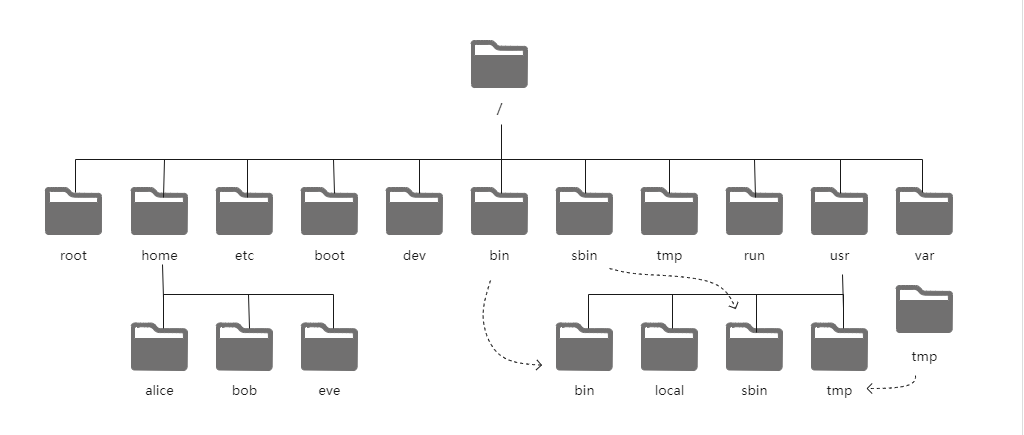
1.1 文件系统的目录结构
- 文件和目录被组织成—个单根倒置树结构
- 文件系统从根目录下开始,用”/“表示
- 根文件系统(rootfs):root filesystem
- 标准Linux文件系统(如:ext4),文件名称大小写敏感,例如:MAIL,Mail,mail,mAiL
- 以 . 开头的文件为隐藏文件
- 路径分隔的/
- 文件名最长255个字节
- 包括路径在内文件名称最长4095个字节
- 默认:蓝色-->目录 绿色-->可执行文件 红色-->压缩文件 浅蓝色-->链接文件 灰色-->其他文件
- 除了斜杠和NUL,所有字符都有效。但使用特殊字符的目录名和文件不推荐使用,有些字符需要用引号来引用
- 每个文件都有两类相关数据:元数据:metadata,即属性,数据::data,即文件内容
Linux的文件系统分层结构:FHS Filesystem Hierarchy Standard
参考文档:https://www.pathname.com/fhs/
1.2 常见的文件系统目录结构
/boot:引导文件存放目录,内核文件(vmlinuz)、引导加载器(bootloader,grub)都存放于此目录
/bin:所有用户使用的基本命令;不能关联至独立分区,os启动即会用到的程序
/sbin:管理类的基本命令;不能关联至独立分区,os启动即会用到的程序
/lib:启动时程序依赖的基本共享库文件以及内核模块文件(/lib/modules)
/lib64:专用于x86_64系统上的辅助共享库文件存放位置
/etc:配置文件目录
/home/USERNAME:普通用户家目录
/root:管理员的家目录
/media:便携式移动设备挂载点
/mnt:临时文件系统挂载点
/dev:设备文件及特殊文件存储位置
    b:block device,随机访问
    c:character device,线性访问
/opt:第三方应用程序的安装位置
/srv:系统上运行的服务用到的数据
/tmp:临时文件存储位置
/usr:universal shared,read-only data
    bin:保证系统拥有完整功能而提供的应用程序
    sbin:
    lib:32位使用
    lib64:只存在64位系统
    include:c程序的头文件(header files)
    share:结构化独立的数据,例如doc,man等
        local:第三方应用程序的安装位置
            bin,sbin,lib,lib64,etc,share
/var:variab1e data files
    cache:应用程序缓存数据目录
    lib:应用程序状态信息数据
    local:专用于为/usr/local下的应用程序存储可变数据
    lock:锁文件
    log:日志目录及文件
    opt:专用于为/opt下的应用程序存储可变数据
    run:运行中的进程相关数据,通常用于存储进程pid文件
    spool:应用程序数据池
    tmp:保存系统两次重启之间产生的临时数据
/proc:用于输出内核与进程信息相关的虚拟文件系统
/sys:用于输出当前系统上硬件设备相关信息虚拟文件系统
/selinux:security enhanced Linux,selinux相关的安全策略等信息的存储位置
1.3 应用程序的组成部分
二进制程序:/bin,/sbin,/usr/bin,/usr/sbin,/usr/local/bin,/usr/local/sbin
库文件/lib,/lib64,/usr/lib,/usr/lib64,/usr/local/lib,/usr/local/lib64
配置文件:/etc,/etc/DIRECTORY,/usr/local/etc
帮助文件:/usr/share/man,/usr/share/doc,/usr/local/share/man,/usr/local/share/doc
1.4 Centos7以后版本目录结构变化
- /bin和/usr/bin
- /sbin和/usr/sbin
- /lib和/usr/lib
- /lib64和/usr/lib64
[root@centos8 ~]# ll -d /bin /sbin /lib /lib64
lrwxrwxrwx. 1 root root 7 May 11  2019 /bin -> usr/bin
lrwxrwxrwx. 1 root root 7 May 11  2019 /lib -> usr/lib
lrwxrwxrwx. 1 root root 9 May 11  2019 /lib64 -> usr/lib64
lrwxrwxrwx. 1 root root 8 May 11  2019 /sbin -> usr/sbin
[root@centos6 ~]# ll -d /bin /sbin /lib /lib64
dr-xr-xr-x. 2 root root  4096 Apr  2 02:08 /bin
dr-xr-xr-x. 8 root root  4096 Mar 17 14:12 /lib
dr-xr-xr-x. 9 root root 12288 Apr  2 02:08 /lib64
dr-xr-xr-x. 2 root root 12288 Apr  3 01:52 /sbin
Last login: Sun Apr 18 06:17:26 2021 from 10.0.0.1
root@ubuntu:~# ll -d /bin /sbin /lib /lib64
drwxr-xr-x  2 root root  4096 Mar 17 03:11 /bin/
drwxr-xr-x 22 root root  4096 Mar 17 03:11 /lib/
drwxr-xr-x  2 root root  4096 Mar 17 02:37 /lib64/
drwxr-xr-x  2 root root 12288 Mar 17 03:17 /sbin/
2 文件元数据和节点表结构
2.1 inode表结构
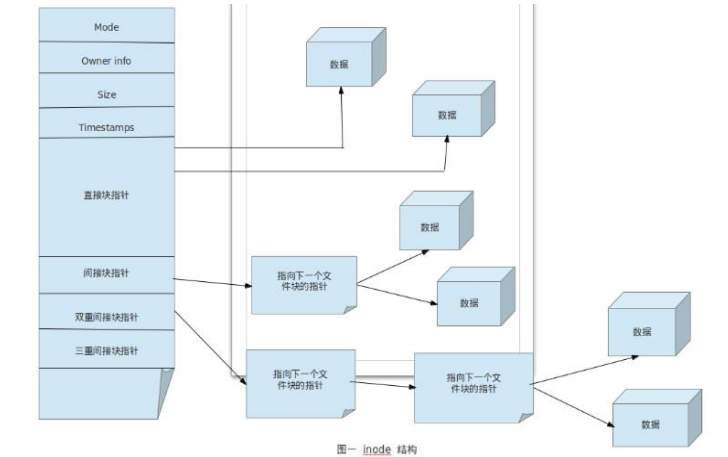
每个文件的属性信息,比如:文件的大小,时间,类型等,称为文件的元数据(meta data)。这些原数是存放哎node(index node)表中。node表中有很多记录组成,第一条记录对应的存放了一个文件的元数据信息
第一个node表记录对应的保存了以下信息:
- inode number 节点号
- 文件类型
- 权限
- UID
- GID
- 链接数(指向这个文件名路径名称的个数)
- 该文件的大小和不同的时间戳
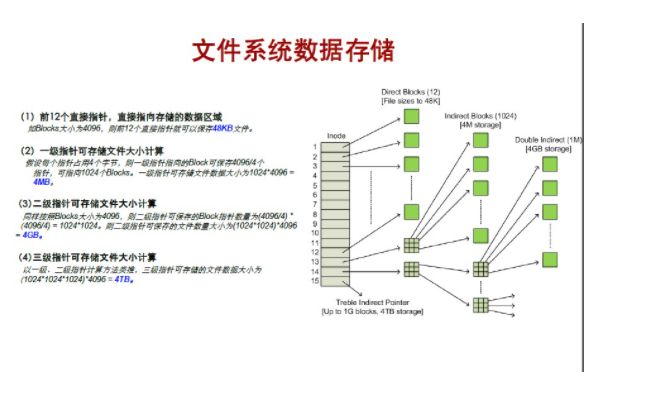
- 指向磁盘上文件的数据块指针
- 有关文件的其他数据

目录
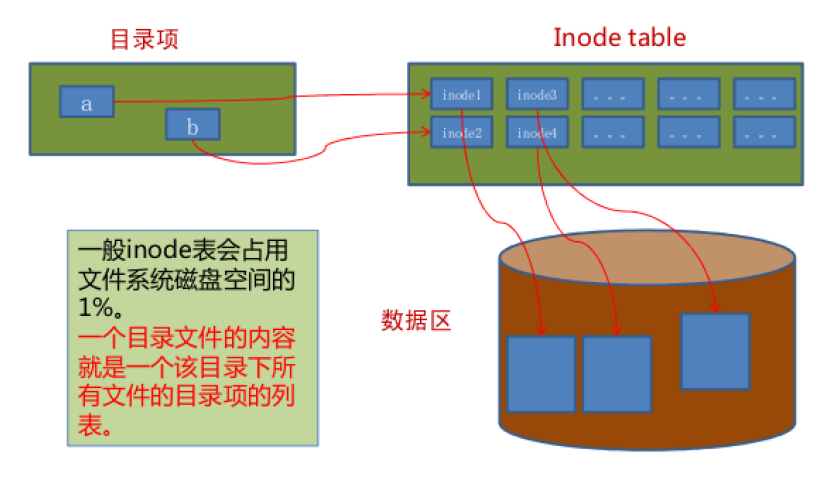
目录是个特殊文件,目录文件的内容保存了此目录中文件的列表及inode number对应关系
- 文件引用一个是inode号
- 人是通过文件名来引用—个文件
- 一个目录是目录下的文件名和文件inode号之间的映射
inode表和目录
2.2 查看文件状态stat
文件相关信息:metadata,data
每个文件有三个时间戳;
- access time 访问时间,atime,读取文件内容
- modify time 修改时间,mtime,改变文件内容(数据)
- change time 改变事件,ctime,元数据发生变化
[root@centos8 ~]# stat /etc/passwd
  File: /etc/passwd
  Size: 1299            Blocks: 8          IO Block: 4096   regular file
Device: fd00h/64768d    Inode: 17665753    Links: 1
Access: (0644/-rw-r--r--)  Uid: (    0/    root)   Gid: (    0/    root)
Context: system_u:object_r:passwd_file_t:s0
Access: 2021-04-21 22:14:37.687014993 +0800
Modify: 2021-04-20 21:48:39.471145073 +0800
Change: 2021-04-20 21:48:39.478145072 +0800
 Birth: -
2.2.1 创建空文件和修改文件时间戳
touch命令可以用来创建空文件或修改文件的时间戳
选项说明:
- -a 仅改变atime和ctime
- -m 仅改变mtime和ctime
- -t [[CC]YY]MMDDhhmm[.ss]指定atime和mtime的时间戳
- -c 如果文件不存在,则不予创建
[root@centos8 etc]# ll /etc/issue
-rw-r--r--. 1 root root 23 Jan  2  2020 /etc/issue
[root@centos8 etc]# touch /etc/issue
[root@centos8 etc]# ll /etc/issue
-rw-r--r--. 1 root root 23 Mar 14 14:04 /etc/issue
[root@centos8 etc]# stat /etc/issue
  File: /etc/issue
  Size: 23              Blocks: 8          IO Block: 4096   regular file
Device: fd00h/64768d    Inode: 16798794    Links: 1
Access: (0644/-rw-r--r--)  Uid: (    0/    root)   Gid: (    0/    root)
Context: system_u:object_r:etc_t:s0
Access: 2021-03-14 14:04:12.454558631 +0800
Modify: 2021-03-14 14:04:12.454558631 +0800
Change: 2021-03-14 14:04:12.454558631 +0800
 Birth: -
修改文件的时间戳
# 查看1.txt的时间戳
[root@centos8 ~]# stat 1.txt
  File: 1.txt
  Size: 205             Blocks: 8          IO Block: 4096   regular file
Device: fd00h/64768d    Inode: 34673170    Links: 1
Access: (0644/-rw-r--r--)  Uid: (    0/    root)   Gid: (    0/    root)
Context: unconfined_u:object_r:admin_home_t:s0
Access: 2021-04-20 22:43:38.680010822 +0800
Modify: 2021-04-20 22:43:37.124010885 +0800
Change: 2021-04-20 22:43:37.125010885 +0800
 Birth: -
# 更新1.txt的时间戳
[root@centos8 ~]# touch 1.txt
[root@centos8 ~]# stat 1.txt
  File: 1.txt
  Size: 205             Blocks: 8          IO Block: 4096   regular file
Device: fd00h/64768d    Inode: 34673170    Links: 1
Access: (0644/-rw-r--r--)  Uid: (    0/    root)   Gid: (    0/    root)
Context: unconfined_u:object_r:admin_home_t:s0
Access: 2021-04-22 14:41:09.040467442 +0800
Modify: 2021-04-22 14:41:09.040467442 +0800
Change: 2021-04-22 14:41:09.040467442 +0800
 Birth: -
# 更新atime和ctime
[root@centos8 ~]# touch -a 1.txt
[root@centos8 ~]# stat 1.txt
  File: 1.txt
  Size: 205             Blocks: 8          IO Block: 4096   regular file
Device: fd00h/64768d    Inode: 34673170    Links: 1
Access: (0644/-rw-r--r--)  Uid: (    0/    root)   Gid: (    0/    root)
Context: unconfined_u:object_r:admin_home_t:s0
Access: 2021-04-22 14:43:40.256461289 +0800
Modify: 2021-04-22 14:43:03.259462794 +0800
Change: 2021-04-22 14:43:40.256461289 +0800
 Birth: -
# 更新mtime和ctime
[root@centos8 ~]# touch -m 1.txt
[root@centos8 ~]# stat 1.txt
  File: 1.txt
  Size: 205             Blocks: 8          IO Block: 4096   regular file
Device: fd00h/64768d    Inode: 34673170    Links: 1
Access: (0644/-rw-r--r--)  Uid: (    0/    root)   Gid: (    0/    root)
Context: unconfined_u:object_r:admin_home_t:s0
Access: 2021-04-22 14:43:40.256461289 +0800
Modify: 2021-04-22 14:43:49.805460900 +0800
Change: 2021-04-22 14:43:49.805460900 +0800
 Birth: -
# 更新文件时间戳,等同于touch
[root@centos8 ~]# touch -c 1.txt
[root@centos8 ~]# stat 1.txt
  File: 1.txt
  Size: 205             Blocks: 8          IO Block: 4096   regular file
Device: fd00h/64768d    Inode: 34673170    Links: 1
Access: (0644/-rw-r--r--)  Uid: (    0/    root)   Gid: (    0/    root)
Context: unconfined_u:object_r:admin_home_t:s0
Access: 2021-04-22 14:44:01.252460434 +0800
Modify: 2021-04-22 14:44:01.252460434 +0800
Change: 2021-04-22 14:44:01.252460434 +0800
 Birth: -
# 修改1.txt的时间戳为202103140520.21
[root@centos8 ~]# touch -t 202103140520.21 1.txt
[root@centos8 ~]# stat 1.txt
  File: 1.txt
  Size: 205             Blocks: 8          IO Block: 4096   regular file
Device: fd00h/64768d    Inode: 34673170    Links: 1
Access: (0644/-rw-r--r--)  Uid: (    0/    root)   Gid: (    0/    root)
Context: unconfined_u:object_r:admin_home_t:s0
Access: 2021-03-14 05:20:21.000000000 +0800
Modify: 2021-03-14 05:20:21.000000000 +0800
Change: 2021-04-22 14:47:08.675452808 +0800
 Birth: -
# 查看1.txt的时间戳
[root@centos8 ~]# stat 1.txt
  File: 1.txt
  Size: 205             Blocks: 8          IO Block: 4096   regular file
Device: fd00h/64768d    Inode: 34673170    Links: 1
Access: (0644/-rw-r--r--)  Uid: (    0/    root)   Gid: (    0/    root)
Context: unconfined_u:object_r:admin_home_t:s0
Access: 2021-03-14 05:20:21.000000000 +0800
Modify: 2021-03-14 05:20:21.000000000 +0800
Change: 2021-04-22 14:47:08.675452808 +0800
 Birth: -
# 查看2.txt的时间戳
[root@centos8 ~]# stat 2.txt
  File: 2.txt
  Size: 213             Blocks: 8          IO Block: 4096   regular file
Device: fd00h/64768d    Inode: 34673171    Links: 1
Access: (0644/-rw-r--r--)  Uid: (    0/    root)   Gid: (    0/    root)
Context: unconfined_u:object_r:admin_home_t:s0
Access: 2021-04-20 23:19:40.900922837 +0800
Modify: 2021-04-20 23:19:39.641922888 +0800
Change: 2021-04-20 23:19:39.642922888 +0800
 Birth: -
# 更新2.txt的时间戳为1.txt的时间戳
[root@centos8 ~]# touch -r 1.txt 2.txt
[root@centos8 ~]# stat 2.txt
  File: 2.txt
  Size: 213             Blocks: 8          IO Block: 4096   regular file
Device: fd00h/64768d    Inode: 34673171    Links: 1
Access: (0644/-rw-r--r--)  Uid: (    0/    root)   Gid: (    0/    root)
Context: unconfined_u:object_r:admin_home_t:s0
Access: 2021-03-14 05:20:21.000000000 +0800
Modify: 2021-03-14 05:20:21.000000000 +0800
Change: 2021-04-22 14:47:50.744451096 +0800
 Birth: -
[root@centos8 ~]#
2.3 硬(hard)链接
硬链接本质上就给一个文件起—个新的名称,实质是同一个文件
硬链接特性
- 创建硬链接会在对应的目录中增加额外的记录项以引用文件
- 对应于同—文件系统上—个物理文件
- 每个目录引用相同的inode号
- 创建时链接数递增
- 删除文件时:rm命令递减计数的链接,文件要存在,至少有一个链接数,当链接数为零时,该文件被删除
- 不能跨越驱动器或分区
- 不支持对目录创建硬链接
数据库删除时,可以防止IO占用增大,导致机器崩溃。
格式:
ln filename [linkname]2.4 符号symbolic(或软soft)链接
一个符号链接指向另一个文件,就像windows中快捷方式,软链接文件和原文件本质上不是同一个文件
软链接特点
- 一个符号链接的内容是它引用文件的名称
- 可以对目录创建软链接
- 可以跨分区的文件实现
- 指向的是另一个文件的路径;其大小为指向的路径字符串的长度;不增加或减少目标文件inode的引用计数
- 软链接如果使用相对路径,是相对于原文件的路径,而非相对于当前目录
可以用于软件升级使用
格式:
ln -s filename [linkname]例
# 绝对路径
ln -s /data/dir /data/dirlink
# 相对路径
cd /data
ln -s ../data/dir /root/dirlink
rm -rf /data/dirlink   # 删除软连接本身,不会删除源目录内容
rm -rf /data/dirlink/  # 删除源目录的文件,不会删除链接文件
# 查看链接文件指向的源文件
readlink /data/dirlink
[root@centos8 ~]# readlink /proc/$$/exe
/usr/bin/bash
例
[root@centos8 local]# mkdir mysql5.6.10
[root@centos8 local]# mkdir mysql5.6.11
[root@centos8 local]# ls
bin  games    lib    libexec      mysql5.6.11  share
etc  include  lib64  mysql5.6.10  sbin         src
[root@centos8 local]# ln -s mysql5.6.10 mysql
[root@centos8 local]# ls
bin  games    lib    libexec  mysql5.6.10  sbin   src
etc  include  lib64  mysql    mysql5.6.11  share
[root@centos8 local]# ll
total 0
drwxr-xr-x. 2 root root  6 May 11  2019 bin
drwxr-xr-x. 2 root root  6 May 11  2019 etc
drwxr-xr-x. 2 root root  6 May 11  2019 games
drwxr-xr-x. 2 root root  6 May 11  2019 include
drwxr-xr-x. 2 root root  6 May 11  2019 lib
drwxr-xr-x. 2 root root  6 May 11  2019 lib64
drwxr-xr-x. 2 root root  6 May 11  2019 libexec
lrwxrwxrwx. 1 root root 11 Mar 14 19:05 mysql -> mysql5.6.10
drwxr-xr-x. 2 root root  6 Mar 14 19:04 mysql5.6.10
drwxr-xr-x. 2 root root  6 Mar 14 19:04 mysql5.6.11
drwxr-xr-x. 2 root root  6 Mar 12 04:32 sbin
drwxr-xr-x. 5 root root 49 Jun  7  2020 share
drwxr-xr-x. 2 root root  6 May 11  2019 src
[root@centos8 local]# rm -f mysql
[root@centos8 local]# ln -s mysql5.6.11 mysql
[root@centos8 local]# ll
total 0
drwxr-xr-x. 2 root root  6 May 11  2019 bin
drwxr-xr-x. 2 root root  6 May 11  2019 etc
drwxr-xr-x. 2 root root  6 May 11  2019 games
drwxr-xr-x. 2 root root  6 May 11  2019 include
drwxr-xr-x. 2 root root  6 May 11  2019 lib
drwxr-xr-x. 2 root root  6 May 11  2019 lib64
drwxr-xr-x. 2 root root  6 May 11  2019 libexec
lrwxrwxrwx. 1 root root 11 Mar 14 19:05 mysql -> mysql5.6.11
drwxr-xr-x. 2 root root  6 Mar 14 19:04 mysql5.6.10
drwxr-xr-x. 2 root root  6 Mar 14 19:04 mysql5.6.11
drwxr-xr-x. 2 root root  6 Mar 12 04:32 sbin
drwxr-xr-x. 5 root root 49 Jun  7  2020 share
drwxr-xr-x. 2 root root  6 May 11  2019 src
若用相对路径写软连接:软链接是相对当前目录的路径,而源文件是相对于软连接的相对路径
[root@centos8 tmp]# ln -s ../111.txt /root/Templates/111.link
[root@centos8 tmp]# ll /root/Templates/
total 0
lrwxrwxrwx. 1 root root 10 Mar 14 18:57 111.link -> ../111.txt
删除目录的软链接时千万不能加/
[root@centos8 local]# cd mysql5.6.10
[root@centos8 mysql5.6.10]# ls
[root@centos8 mysql5.6.10]# touch 1.txt
[root@centos8 mysql5.6.10]# ls
1.txt
[root@centos8 mysql5.6.10]# cd ..
[root@centos8 local]# ln -s mysql5.6.10 mysql
[root@centos8 local]# rm -rf mysql
[root@centos8 local]# ls
bin  games    lib    libexec      mysql5.6.11  share
etc  include  lib64  mysql5.6.10  sbin         src
[root@centos8 local]# ll mysql5.6.10
total 0
-rw-r--r--. 1 root root 0 Mar 14 19:09 1.txt
[root@centos8 local]# ln -s mysql5.6.10 mysql
[root@centos8 local]# rm -rf mysql/
[root@centos8 local]# ll mysql5.6.10
total 0
目录的链接数有可能是2也有可能是3
[root@centos8 dir]# ll -i
total 0
51750440 drwxr-xr-x. 3 root root 18 Mar 14 19:24 dir1
[root@centos8 dir]# ll -ia dir1/
total 0
51750440 drwxr-xr-x. 3 root root 18 Mar 14 19:24 .
34769416 drwxr-xr-x. 3 root root 18 Mar 14 19:23 ..
 2847967 drwxr-xr-x. 2 root root  6 Mar 14 19:24 dir2
[root@centos8 dir]# ll -ia dir1/dir2/
total 0
 2847967 drwxr-xr-x. 2 root root  6 Mar 14 19:24 .
51750440 drwxr-xr-x. 3 root root 18 Mar 14 19:24 ..
2.5 硬链接和软链接的区别:
1、本质:
硬链接:本质是同一个文件
软链接:本质不是同一个文件
2、跨设备:
硬链接:不支持
软链接:支持
3、inode
硬链接:相同
软链接:不同
4、链接数:
硬链接:创建新的硬链接,链接数会增加,删除硬链接,链接数减少
软链接:创建或删除,链接数不会变化
5、文件夹:
硬链接:不支持
软链接:支持
6、相对路径:
硬链接:原始文件相对路径是对于当前工作目录
软链接:原始文件的相对路径是相对于链接文件的相对路径
7、删除源文件:
硬链接:只是链接数减一,但链接文件的访问不受影响
软链接:链接文件将无法访问
8、文件类型:
硬链接:和源文件相同
软链接:链接文件,和源文件无关
Comments | 1 条评论
很好,整理的很详细。排版也很漂亮。